
A modern case with six or eight intake and exhaust fans can overwhelm even a mid-range motherboard, which often ships with fewer headers than most enthusiasts need. A fan hub solves that bottleneck by consolidating multiple fan connectors into a single motherboard header, letting you control an entire bank of fans through one PWM signal. But not all hubs are built the same, and the differences between them can decide whether your system runs cool and quiet or whether you end up fighting thermal throttling.
What separates a good fan hub from a mediocre one comes down to power delivery capacity, build quality of the connector pins, and whether the unit supports both PWM and ARGB signals simultaneously. Cheap hubs may share a single voltage regulator across all ports, causing fans to starve at higher loads. Better units include individual regulation or at least a clearly rated amperage ceiling per port. For this 2026 roundup, we compared published specifications, current market prices, and aggregated owner feedback across all eight candidates to identify where each product excels and where it falls short.
As an Amazon Associate we earn from qualifying purchases at no extra cost to you.



Our Top Picks
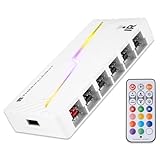
 Thermalright ARGB Fan HUB Controller Support 8 Groups5.51 x 0.63 x 2.52 inches0.2 poundsCheck on Amazon




Top 3 picks at a glance
Quick Picks
| Product | Best for | Price |
|---|---|---|
| Thermalright ARGB 8-Port Hub | RGB-heavy builds needing addressable lighting sync | Check on Amazon |
| VWEICYY 1-to-5 Hub | Budget 3-pin or 4-pin fan splitting | Check on Amazon |
| Noctua NA-FH1 | Premium quiet builds with safety features | Check on Amazon |
| ThreeBulls PWM 1-to-5 Hub | Sleeved cable aesthetics on a tight budget | Check on Amazon |
| Thermalright X12 IR Black | Maximum fan and RGB groups in one unit | Check on Amazon |
| AVERZELLA 2-Pack 1-to-5 Hub | Large cases needing two separate fan banks | Check on Amazon |
| ARCTIC Fan Controller | Per-port software control without RGB features | Check on Amazon |
| Thermalright X12 IR White | White-themed builds with high fan count | Check on Amazon |
How We Compared
We evaluated each hub on four criteria: rated amperage capacity per port and in total, which determines how many fans a single hub can reliably power; connector type compatibility, since not all hubs handle 3-pin and 4-pin fans together; additional feature support such as addressable RGB passthrough or software control; and physical mounting method, because a hub rattling against a drive cage can negate the quiet operation you invested in premium fans. Owner-reported reliability failures carried more weight than marketing claims, since connector quality is impossible to judge from a spec sheet alone.
The 8 Best PC Fan Hub in 2026
Thermalright ARGB Fan HUB Controller (8-Port)
This hub targets builders who want a single controller for both fan speed and addressable RGB lighting without juggling separate modules. Its eight ports handle PWM fans up to four-pin, while the 5V three-pin ARGB header syncs lighting effects across all connected fans from one source.
- Pro: Combines fan control and ARGB in one unit, reducing cable clutter significantly.
- Pro: Magnetic plus adhesive mounting options keep the hub secure in any orientation.
- Con: Explicitly does not support 12V four-pin RGB, limiting compatibility with older lit fans.
Skip this if your case uses legacy 12V RGB fans or if you only need fan splitting without lighting management.
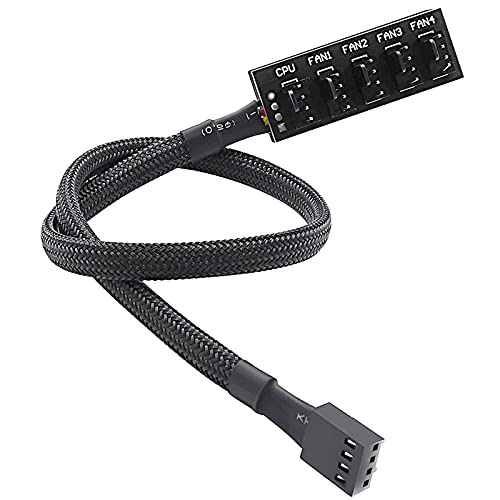
VWEICYY Fan Hub (1-to-5)
At under five dollars, this is the simplest solution for anyone who just needs to split one motherboard header across up to five fans without any extras. It accepts both 3-pin and 4-pin connectors, so mixed fan sets are not a problem.
- Pro: Lowest price in this roundup, making it nearly disposable in budget builds.
- Pro: Universal compatibility with both DC and PWM fan connectors.
- Con: No individual port control, no amperage rating published, and no mounting hardware included.
Avoid this hub if you plan to connect more than four fans on a single header or if you need guaranteed per-port current limits.
Noctua NA-FH1 (8-Port)
Noctua’s entry carries the brand’s reputation for engineering discipline and material quality. Eight PWM ports, magnetic mounting, and a short-circuit protection circuit distinguish it from budget splitters. The protection circuit alone justifies its premium for users who have experienced fan stalls that risk motherboard damage.
- Pro: Short-circuit protection prevents electrical faults from propagating to the motherboard header.
- Pro: Strong magnetic mounting keeps the hub firmly in place without adhesives aging out.
- Con: At nearly four times the price of comparable capacity hubs, value-conscious buyers will hesitate.
Pass on this if your fan setup totals under four units or if budget constraints outweigh reliability concerns.
ThreeBulls PWM Fan Hub (1-to-5)
Similar in function to the VWEICYY but with sleeved cable construction that improves aesthetics and slightly protects against abrasion inside tight cable-management spaces. The 15.7-inch length gives reasonable routing flexibility without excessive slack.
- Pro: Braided sleeve construction looks clean in windowed cases with visible internals.
- Pro: Same 3-pin and 4-pin compatibility as other budget hubs at an identical price.
- Con: No published per-port amperage ceiling leaves users guessing about safe fan counts.
Consider alternatives if you need software control or individual port regulation rather than a simple passive splitter.
Thermalright ARGB and Fan HUB X12 IR Black
Twelve fan groups and twelve ARGB groups make this the highest-capacity combo hub in the list. It targets builders running extreme air-cooling setups with multiple tower fans plus RGB strips, all managed through a single SATA power input. The IR remote adds convenience for lighting mode switching without software.
- Pro: Double the fan groups of the standard eight-port model at the same price point.
- Pro: Included IR remote for lighting control without requiring software or motherboard headers.
- Con: Does not support 12V four-pin RGB, a recurring Thermalright limitation across the line.
Skip if your total fan count is six or fewer, since the added cable mass and complexity offer no benefit.
AVERZELLA 2-Pack Cooling Fan Hub (1-to-5)
Selling two individual one-to-five hubs in a package, this suits large cases where the front and rear fan banks benefit from separate motherboard headers, allowing different speed curves per zone. The sixteen-inch cable length accommodates full-tower routing.
- Pro: Two hubs in one purchase covers dual-zone fan layouts without buying separately.
- Pro: Sleeved braided cable maintains a tidy appearance in visible build areas.
- Con: No PWM-to-DC fallback documentation, so 3-pin fan behavior may vary by motherboard.
Not ideal if your case has only one header available or if you want a single centralized control point.
ARCTIC Fan Controller (10-Port)
This is the only entry offering per-port individual PWM control through software on both Windows and Linux. With a rated two amperes per port and 4.5 total, it handles demanding fan arrays while letting you set distinct curves for intake versus exhaust. The magnetic or adhesive mounting is standard fare.
- Pro: Independent per-port control means you can set different speeds for different fans from one unit.
- Pro: Linux kernel support at 7.2 and above broadens compatibility for workstation users.
- Con: No RGB or ARGB passthrough, so lighting must be managed separately.
Look elsewhere if your primary need is lighting synchronization or if you have fewer than six fans total.
Thermalright ARGB and Fan HUB X12 IR White
Functionally identical to the black variant, this version serves builders coordinating white-themed cases with visible internal components. Twelve fan groups, twelve ARGB groups, SATA direct input, and the same IR remote control for lighting patterns.
- Pro: White housing blends into light-themed builds without needing paint or adhesive covers.
- Pro: Maximum group capacity at the same price as smaller Thermalright hubs.
- Con: Same 12V four-pin RGB exclusion as the black model, regardless of color preference.
Choose this only over the black variant for aesthetic matching; there is no functional advantage to the color choice.
Buying Guide
Amperage Rating and Fan Count Limits
A typical 120mm PWM fan draws between 0.1 and 0.3 amperes at full speed. Multiply that by your fan count and compare against the hub’s total rated output, not just per-port figures. The Noctua NA-FH1 and ARCTIC controller publish clear amperage ceilings; most budget hubs do not. If a hub leaves this specification unpublished, assume a practical limit of four fans until proven otherwise by owner reports.
PWM, DC, and ARGB Compatibility
Determine whether your fans are 3-pin DC or 4-pin PWM before selecting a hub. Some budget splitters physically accept both connectors but do not translate signals properly, causing DC fans to run at full speed regardless of motherboard commands. ARGB support adds a separate 5V three-pin header path; if your fans are not addressable, paying for ARGB passthrough is wasted money.
Mounting and Cable Management
Adhesive-only mounts degrade with thermal cycling and dust accumulation inside a case. Magnetic mounting, as found on the Noctua and Thermalright hubs, maintains grip over years without residue. For non-metallic cases, check whether the hub ships with a backup adhesive option. Cable length matters more than most buyers realize: too short creates strain on motherboard headers; too long adds clutter that restricts airflow.
Our Verdict
The ARCTIC Fan Controller earns our top pick because per-port individual control eliminates the primary limitation of every other hub in this list, and its published amperage ratings give buyers confidence they are not overloading the unit. For those who simply need to split a single header without spending meaningfully, the VWEICYY at around $4 is the lowest-risk entry given universal connector compatibility. If you run an extreme build with more than eight fans plus addressable lighting, the Thermalright X12 doubles your group capacity at the same price as smaller units, making it the strongest value at scale.
FAQ
Will a fan hub reduce individual fan RPM control?
Yes, in most cases. Standard passive splitters like the VWEICYY or ThreeBulls share one PWM signal across all connected fans, so every fan on that hub runs at the same speed. Only hubs with per-port control circuitry, such as the ARCTIC model, allow different speeds on different ports.
Can I chain multiple fan hubs together?
Physically you can plug one hub’s input into another’s output, but this creates a single PWM signal across all fans and concentrates current draw on one motherboard header. Total amperage becomes the concern, not connector compatibility. Most motherboard headers are rated around one ampere, so chaining beyond eight or ten fans is inadvisable.
Do I need a fan hub if my motherboard has enough headers?
Not strictly, though hubs still help with cable organization and can offload power draw from the motherboard to a SATA connection. If your board already has the exact number of fan headers you need and you do not require per-port software control, a hub adds cost without functional benefit.
What happens if I exceed a hub’s rated amperage?
Fans will likely stall or run at reduced speed because the hub cannot supply sufficient current. In worst-case scenarios without protection circuitry, the regulator inside the hub may overheat or fail. The Noctua NA-FH1’s short-circuit protection is the primary reason it costs three to four times more than comparable hubs.
Related guides
- Best Gaming PC for Fortnite: Eight Prebuilt Desktops Sorted by Refresh Rate Goal (2026)
- Best RX 9070 XT Prebuilt Gaming PCs: Seven Desktops and Three Cards Compared: 10 Compared (2026)
- CyberPowerPC vs iBUYPOWER Gaming PC: How the Two Brands Compare
- Best RX 9070 XT Prebuilt Gaming PC (2026): 5 Picks Compared









