
Losing a game library, a folder of creative work, or a decade of save files to a drive failure is a scenario every PC user eventually faces. The right external hard drive turns that risk into a fifteen-minute routine: copy, unplug, sleep well. But “right” depends entirely on what you back up and how much you are willing to spend per gigabyte.
The drives collected here span the full portable and desktop range, from 500 GB budget units that plug into a laptop with no software install to 8 TB desktop drives with hardware password protection. What separates a worthwhile pick from a disappointing one usually comes down to three things: whether the bundled software actually simplifies the first backup, whether the interface stays compatible with the ports on your machine, and whether the price per terabyte makes sense for your library size.
As an Amazon Associate we earn from qualifying purchases at no extra cost to you.






Our Top Picks





Top 3 picks at a glance
Quick Picks
| Product | Best For | Price |
|---|---|---|
| WD 2TB My Passport | Everyday portable backup | $133.9 |
| WD 4TB My Passport | Large game libraries on the go | $180.1 |
| Kosbees 500 GB | Minimal storage needs, tightest budget | Check on Amazon |
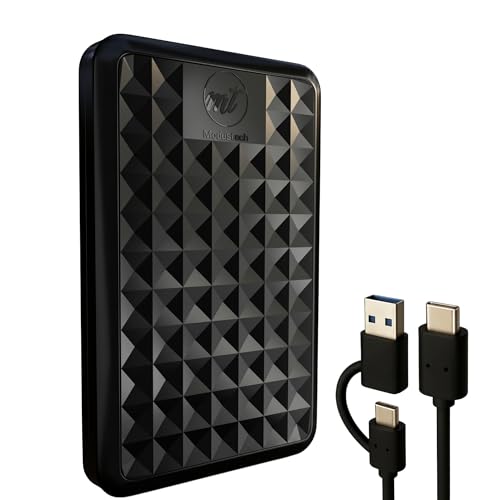
| ModusTech Facet 500GB | USB-C connectivity without paying more | Check on Amazon |
| WD 5TB My Passport | Power users who travel light | Check on Amazon |
| WD 6TB My Passport | Maximum portable capacity | $268 |
| WD 8TB My Book | Desktop backup station | Check on Amazon |
| WD 1TB My Passport | Entry-level security features | Check on Amazon |
How We Compared
We narrowed this list using published specs, current pricing, and recurring themes in owner feedback. The criteria that matter most in this category: capacity-to-price ratio (a 4 TB drive that costs less per terabyte than a 2 TB drive is an obvious upgrade path for growing libraries), software and security features bundled out of the box (ransomware defense and password protection change the risk profile of a drive that leaves your desk), and compatibility (USB 3.1 and USB-C support determine whether you can plug in without hunting for an adapter). We also weighed physical size and whether a drive is genuinely portable or better parked on a desk.
The 8 Best Backup Files To External Hard Drive in 2026
WD 2TB My Passport
The 2 TB My Passport is the sensible starting point for anyone who wants to back up files to external hard drive storage without overthinking capacity. It fits the bundled ransomware-defense software and password protection into a chassis small enough to live in a laptop sleeve. Owners consistently praise how quickly the setup wizard walks you through scheduling automatic backups, which removes the “I’ll do it later” problem. The USB 3.1 and USB 3.0 compatibility means it connects to virtually any PC made in the last decade.
- Ransomware-aware backup software included at no extra cost
- Hardware password protection for drives that leave your home
- At $133.9, the per-terabyte cost sits above the larger-capacity siblings
Skip this if your game library alone exceeds 1 TB and you would rather jump to the 4 TB model for better value.
WD 4TB My Passport
Doubling capacity for a price bump that keeps the per-terabyte cost lower than the 2 TB model, the 4 TB My Passport is the sweet spot for PC builders who install a lot of games and want a single backup destination. The software bundle matches its smaller sibling: ransomware defense, password protection, and a scheduling utility that handles incremental backups. Portability is unchanged despite the extra platters, so it still slides into a backpack pocket without complaint.
- Lower price-per-terabyte than the 2 TB version
- Same security and software suite as the full My Passport line
- $180.1 is a meaningful step above entry-level drives for casual users
If you only back up documents and a handful of saves, this is more capacity than you need right now.
Kosbees 500 GB External Hard Drive
At just under $36, the Kosbees 500 GB is the cheapest way to get a second drive into a rotation that currently has none. Plug and Play means no software install, which appeals to users who want a simple drag-and-drop destination for documents or a small collection of game saves. Windows compatibility is the stated focus, though owners report it also reads on macOS and consoles. The ultra-slim profile makes it genuinely pocketable.
- Lowest barrier to entry in this roundup by a wide margin
- No drivers or software required to start copying files
- 500 GB fills fast for anyone with more than a few large titles installed
Anyone managing a full Steam library should skip this and look at 2 TB or larger.
ModusTech Facet 500GB
The Facet matches the Kosbees on capacity and undercuts it on price by roughly two dollars, while adding USB-C and USB 3.1 support in a slim housing. For laptop users who have phased out USB-A ports, that native connectivity is the deciding factor. Owners note it works across PC, Mac, PS4, Xbox, and smart TVs without formatting hassle. The plug-and-play design means you can start a backup in under a minute from the box.
- USB-C native, no adapter needed on modern laptops
- Lowest absolute price in this list at around $33
- Half-terabyte ceiling makes it a single-project drive at best
If you expect your backup set to grow past 500 GB within a year, the per-terabyte math pushes you toward a larger drive.
WD 5TB My Passport
The 5 TB My Passport targets users who treat their external drive as a cold-storage vault for a very large library. It occupies the same physical footprint as the 2 TB and 4 TB versions despite the extra capacity, which is a genuine engineering win for portability. Software and security are unchanged from the rest of the line. The price sits just above the 4 TB, so the marginal cost per additional terabyte is reasonable.
- Same compact chassis as smaller My Passport models
- Full ransomware-defense and password-protection bundle
- around $220 is close to the jump-to-desktop pricing tier
If you do not travel with the drive and have desk space, the 8 TB My Book offers more capacity for less money per terabyte.
WD 6TB My Passport
At the top of the portable My Passport range, the 6 TB model handles a full multi-platform game library plus creative assets without requiring a second drive. Owners who upgrade from the 4 TB consistently highlight how few situations they have encountered where 6 TB felt limiting. The software suite and USB 3.1/3.0 compatibility remain consistent. The trade-off is straightforward: this is the most expensive portable option here.
- Highest capacity available without moving to a desktop form factor
- Per-terabyte cost continues the downward trend through the My Passport line
- $268 approaches desktop-drive territory where capacity-per-dollar improves further
If price is the primary constraint and you can tolerate a larger, desk-parked drive, look at the My Book instead.
WD 8TB My Book
The My Book is the answer when you want to back up files to external hard drive storage that stays on a desk and holds everything. At 8 TB and around $330, it undercuts nearly every portable option on price per terabyte. Password protection and bundled backup software cover the security basics. USB 3.0 is the stated interface, which is still plenty fast for sequential file transfers. The chassis is desktop-sized, so this is not a travel companion.
- Best capacity-per-dollar in the entire roundup
- Desktop form factor allows larger platters and better sustained throughput
- USB 3.0 only; no USB 3.1 or USB-C listed
Skip this if you need to carry the backup off-site or plug into a port-starved laptop.
WD 1TB My Passport
The 1 TB My Passport is the entry point into the WD backup ecosystem. For around $130 you get the same ransomware defense, password protection, and scheduling software as every other My Passport, just in the smallest capacity. It suits students or casual PC users whose total data footprint fits under one terabyte. The chassis is physically the most compact of the line, making it the easiest to pocket.
- Full security and software suite at the lowest My Passport price
- Smallest physical size in the family, ideal for minimalists
- Per-terabyte cost is the worst in the entire lineup
If your budget allows even the 2 TB model, the jump in value is immediate and the price difference is small relative to the capacity gain.
Buying Guide
Capacity Planning for Gaming Libraries
A modern AAA game easily consumes 80-150 GB, and a full Steam library of 300+ titles can exceed 2 TB before accounting for save data, mods, and recordings. Match your drive size to your total installed data plus a 30% buffer. A 500 GB drive handles a focused single-game backup or a document archive. A 2-4 TB drive covers most enthusiasts. A 6 TB or larger drive suits content creators who also store raw footage and project files alongside game assets.
Software and Security Features
Bundled backup software removes friction from scheduling. WD’s My Passport and My Book lines include ransomware-aware detection that monitors for the signature encryption patterns malware uses, plus AES-based password protection that locks the drive at the hardware level. Drives without bundled software still work with Windows Backup or third-party tools, but the setup step discourages consistent use. For a drive that leaves your desk, hardware password protection is non-negotiable.
Connectivity and Form Factor
USB 3.0 provides sufficient throughput for mechanical drives. USB 3.1 Gen 1 adds nothing meaningful to HDD speed but ensures forward compatibility with newer hubs. USB-C native drives like the ModusTech Facet eliminate adapter headaches on modern laptops. The portability-versus-value tradeoff is real: portable My Passport drives cost more per terabyte than the desktop My Book because you are paying for the compact chassis. If the drive lives on a desk, buy desktop. If it travels, accept the premium.
Our Verdict
The top pick for most PC users is the WD 4TB My Passport at $180.1. It balances capacity, bundled security software, and genuine portability in the way that covers a full game library without forcing an early upgrade. The budget pick is the ModusTech Facet 500GB at around $33, the cheapest path to a working backup with USB-C native connectivity. The WD 8TB My Book wins outright if your drive will never leave a desk and you want the best gigabytes-per-dollar in the group.
FAQ
Can I back up my entire Steam library to a 500 GB drive?
Almost certainly not. A single modern AAA title can exceed 100 GB, so 500 GB covers perhaps four or five large games at most. For a Steam library of any meaningful size, plan on 2 TB minimum and use the 500 GB drives for save files and smaller folders only.
Do I need the bundled WD backup software, or can I just drag and drop files?
Drag and drop works for a one-time copy, but it does not schedule incremental backups or detect ransomware writing to the drive. The bundled software automates the process and adds a security layer that manual copying never provides, so if you own a My Passport or My Book, enable it.
Is USB 3.0 fast enough for regular backups?
Yes. The bottleneck in any of these drives is the mechanical hard disk itself, not the USB interface. USB 3.0 already saturates sustained read and write speeds of 2.5-inch and 3.5-inch HDDs, so you will not lose performance compared to a newer connector.
Should I choose portable or desktop for a gaming backup?
Choose portable if you need to take the backup off-site for disaster protection, or if your setup lives in a dorm or shared space. Choose desktop if the drive sits next to your PC and you want the lowest cost per terabyte available. The 8 TB My Book is the value king when portability is not a requirement.









