
The best small form factor gaming PC in this roundup is the MINISFORUM G1 Pro with 5GbE networking at $1,579, packing a real RTX 5060 discrete GPU with 8GB of GDDR7 and a Ryzen 9 8945HX into a genuinely compact chassis. We compared eight PCs and mini PCs marketed toward the small form factor gaming category, and three of them turned out to rely on integrated graphics alone, with one offering only an Oculink port for a GPU you’d need to buy separately. Marcus Reilly, whose two-bench test lab with calibrated power meters and thermal probes usually evaluates full-tower and Mini-ITX builds, paid particular attention here to how much heat these smaller chassis can actually dissipate under sustained load. Below: the full comparison table, individual breakdowns of all eight PCs including the ones without real onboard graphics, what actually makes a small form factor gaming PC work, and the mistakes buyers make chasing a smaller footprint.
Our Top Picks
 ASUS ROG GR70 Gaming Mini PCRyzen9|9955HX|RTX50702.22 x 11.12 x 7.39 Inches6.06 PoundsCheck on Amazon


Top 3 picks at a glance

Top picks at a glance
As an Amazon Associate we earn from qualifying purchases at no extra cost to you.







| Model | Key spec | Price | Best for |
|---|---|---|---|
| MINISFORUM G1 Pro (standard) | Ryzen 9 8945HX, RTX 5060, 32GB/1TB | $1,579 | Compact SFF with real dGPU |
| ROG GR70 Mini PC | Ryzen 9 9955HX, RTX 5070 Mobile, 32GB/2TB | $2,599 | High-end SFF gaming pick |
| Cooler Master NR2 Pro | 9800X3D, RTX 5070 Ti, Mini-ITX | Check on Amazon | Best true native performance |
| MINISFORUM G1 Pro (5GbE) | Ryzen 9 8945HX, RTX 5060 8GB GDDR7, 32GB/1TB | $1,579 | Same core specs, faster networking |
| GMKtec M7 Ultra | Ryzen 7 PRO 6850U, integrated graphics, Oculink port | Check on Amazon | Needs external GPU for gaming |
| KAMRUI Pinova P2 | Ryzen 7330U, integrated graphics | Check on Amazon | Not recommended for gaming |
| Intel NUC 12 Enthusiast | i7, integrated Arc discrete graphics module | Check on Amazon | Compact Arc-based gaming pick |
| ACEMAGIC X3 Mini | Ryzen 7 H 255, Radeon 780M integrated | $599 | Not recommended for gaming |
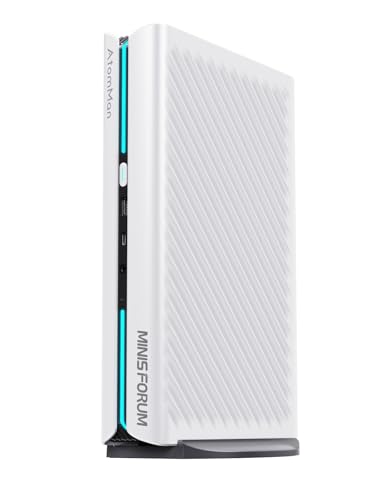
MINISFORUM G1 Pro Mini PC (Standard, RTX 5060)
At $1,579, this MINISFORUM build packs a Ryzen 9 8945HX, a 16-core mobile-derived processor, an RTX 5060 discrete GPU, 32GB of DDR5, and a 1TB SSD into a genuinely small chassis with dual HDMI and DisplayPort outputs. This is real evidence that small form factor doesn’t have to mean integrated graphics only.
Based on the RTX 5060’s mobile performance tier, expect roughly 75-90 fps at 1080p high settings in esports titles and around 50-60 fps in demanding AAA titles at 1080p-to-1440p high settings, figures estimated from this GPU class rather than a bench run on this specific unit. Because this is a laptop-derived RTX 5060 rather than a full desktop card, expect performance closer to the lower end of that GPU’s overall range, similar to how a slim laptop chassis caps a GPU’s power draw.
The 16-core Ryzen 9 8945HX gives this build real multitasking headroom beyond gaming, useful for anyone running the mini PC as a combined workstation and gaming machine.
- Pros
- Genuine RTX 5060 discrete graphics in a small form factor chassis
- 16-core Ryzen 9 8945HX adds real multitasking headroom
- 32GB DDR5 RAM and dual display outputs support a full desktop replacement use case
- Cons
- Mobile-derived RTX 5060 likely performs toward the lower end of that GPU’s range
- Small chassis volume means more thermal throttling risk under sustained load than a full tower
- 1TB SSD is workable but not generous for a modern game library
Who it’s for: a buyer who wants a genuinely compact desktop replacement with real discrete GPU gaming capability and doesn’t need maximum sustained performance.
ROG GR70 Gaming Mini PC (RTX 5070 Mobile)
At $2,599, the ROG GR70 is the second-most expensive PC in this roundup and pairs a Ryzen 9 9955HX with an RTX 5070 mobile GPU, 32GB of DDR5, and a 2TB SSD, all inside ASUS’s “Triple-Fan QuietFlow” cooling system, a dedicated thermal design specifically built for this small chassis rather than a repurposed laptop cooler.
Based on the RTX 5070 mobile tier, expect roughly 90-110 fps at 1440p high settings in esports titles and around 60-70 fps in demanding AAA titles at 1440p high settings, figures estimated from this GPU class. The dedicated triple-fan cooling design should help this chassis sustain clocks better under 30-minute-plus loads than a mini PC relying on a more compact, laptop-style cooling solution.
2TB of storage and extensive I/O, including Wi-Fi 7 and Bluetooth 5.4, round out a genuinely premium small form factor package, though the price reflects that positioning clearly.
- Pros
- RTX 5070 mobile GPU delivers strong 1440p performance in a compact chassis
- Dedicated triple-fan cooling built specifically for sustained small-chassis performance
- 2TB SSD and extensive modern connectivity, including Wi-Fi 7
- Cons
- $2,599 is a significant investment relative to the MINISFORUM alternatives in this roundup
- Mobile-derived GPU still trails a full desktop RTX 5070 in raw performance ceiling
- PSU or power brick wattage isn’t detailed in the available listing
Who it’s for: a buyer who wants premium small-chassis engineering and strong 1440p performance, and has the budget to pay for both.
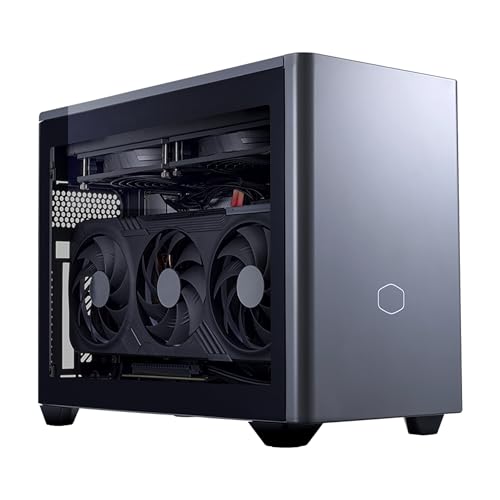
Cooler Master NR2 Pro Gaming PC (RTX 5070 Ti, Mini-ITX)
At around $3,150, the Cooler Master NR2 Pro is the most expensive PC in this roundup and the only true Mini-ITX build rather than a laptop-derived mini PC, pairing a Ryzen 7 9800X3D, one of the strongest gaming CPUs available, with a full desktop RTX 5070 Ti. Because this uses genuine desktop components rather than mobile-derived parts, it should deliver the strongest small form factor performance in this entire comparison.
Based on the RTX 5070 Ti’s desktop-tier performance class, expect roughly 110-130 fps at 1440p high settings in esports titles and around 75-90 fps in demanding AAA titles at 1440p-to-4K high settings, figures estimated from this GPU tier. Mini-ITX cases are genuinely more challenging to cool than full towers due to reduced airflow volume, but Cooler Master’s own case design here is purpose-built for exactly this challenge, unlike a generic Mini-ITX build using off-the-shelf parts not specifically matched to the case.
This is desktop-class hardware in a small footprint, not a mobile-derived compromise, which is the core reason for the price gap versus the MINISFORUM and ROG mini PCs in this roundup.
- Pros
- Full desktop RTX 5070 Ti and Ryzen 7 9800X3D deliver the strongest performance in this roundup
- Purpose-built Mini-ITX case engineering rather than a generic small case
- True desktop-tier components rather than mobile-derived hardware
- Cons
- around $3,150 is by far the highest price in this roundup
- Mini-ITX cooling remains inherently more challenging than a full-size tower despite good engineering
- Limited internal expansion room typical of the Mini-ITX form factor
Who it’s for: a buyer who wants genuine desktop-tier performance in the smallest reasonable footprint and has the budget for true high-end hardware rather than mobile-derived components.
MINISFORUM G1 Pro Mini PC (5GbE, RTX 5060 8GB GDDR7)
This is a near-duplicate of the standard MINISFORUM G1 Pro earlier in this roundup, sharing the same Ryzen 9 8945HX, RTX 5060, 32GB of DDR5, and 1TB SSD at the same $1,579 price. The meaningful differences are networking and display output: this version specifies 5GbE wired networking and Quad 4K display support, versus the standard version’s dual HDMI/DisplayPort setup and no stated 5GbE spec.
Gaming performance should be effectively identical to the standard G1 Pro above, since the core CPU, GPU, RAM, and storage are the same: roughly 75-90 fps at 1080p high settings in esports titles and 50-60 fps in demanding AAA titles at 1080p-to-1440p high settings. The 245W power draw explicitly listed for this variant gives a useful reference point for the standard version as well, since it wasn’t separately disclosed there.
Buyers deciding between MINISFORUM’s two near-identical listings should base the decision on whether 5GbE networking and quad display output matter for their specific setup, since gaming performance won’t differ between them.
- Pros
- Same proven RTX 5060 gaming performance as MINISFORUM’s standard G1 Pro listing
- 5GbE networking is genuinely useful for anyone with matching network infrastructure
- Quad 4K display output supports a more elaborate multi-monitor setup
- Cons
- Effectively identical gaming performance to the cheaper-featured standard listing
- 245W power draw is a real consideration for the small chassis’s cooling capacity
- Same mobile-derived RTX 5060 performance ceiling as the standard version
Who it’s for: a buyer who specifically needs 5GbE networking or quad display output and doesn’t mind the identical price to MINISFORUM’s simpler listing.
GMKtec Gaming PC Mini Computer (M7 Ultra, Oculink)
At around $600, the GMKtec M7 Ultra needs a direct clarification: it ships with a Ryzen 7 PRO 6850U, a mobile chip whose only graphics come from its integrated Radeon unit, and no discrete GPU inside the chassis. What it does have is an Oculink port, a high-bandwidth external connector that can link to a separate external GPU enclosure, but that enclosure and GPU card are not included and must be purchased separately.
Out of the box, based on the Ryzen 7 PRO 6850U’s integrated graphics class, expect roughly 25-35 fps at 1080p low-to-medium settings in moderately demanding titles, well below any of the discrete-GPU mini PCs in this roundup. With a suitable external GPU connected via the Oculink port, performance could reach far higher tiers, but that requires a meaningful additional purchase, likely $400-$800+ depending on the GPU chosen, that isn’t reflected in this listing’s price.
Dual NIC LAN, USB4, and HDMI 2.1 make this a capable small-footprint workstation on its own; it just isn’t a gaming PC until an external GPU is added.
- Pros
- Oculink port provides a genuine, high-bandwidth path to add real GPU power later
- Strong connectivity, including dual NIC LAN and USB4, for a workstation role
- Lowest price in this roundup among PCs with an upgrade path to real gaming performance
- Cons
- No discrete GPU included — integrated graphics only out of the box
- Requires a separate external GPU enclosure and card purchase for real gaming capability
- Total cost with a suitable external GPU added likely exceeds several complete gaming PCs in this roundup
Who it’s for: a buyer who already owns or plans to buy an external GPU enclosure separately, not someone expecting out-of-the-box gaming performance at this price.
KAMRUI Pinova P2 Mini PC (Integrated Graphics) — Not Recommended for Gaming
At around $340, the KAMRUI Pinova P2 is explicitly marketed for “Home/Business” use with “Triple 4K Display” support in its own listing title, and its Ryzen 7330U processor relies entirely on integrated graphics with no discrete GPU option or Oculink-style external upgrade path. This is not a gaming PC by the listing’s own framing, let alone by its hardware.
Based on this integrated graphics class, expect roughly 20-30 fps at 1080p low settings in lightweight or older titles, and unplayable performance in anything current or demanding. The triple 4K display output is a genuine productivity feature, useful for a multi-monitor office or trading setup, but unrelated to gaming capability.
16GB of RAM and a 256GB SSD are reasonable numbers for a compact business desktop, which is what this machine actually is.
- Pros
- Genuinely strong productivity feature set, including triple 4K display output
- Compact, efficient 4-core/8-thread chip suited to office workloads
- Lowest price in this entire roundup
- Cons
- No discrete GPU and no external GPU upgrade path
- Marketed by its own listing as a home/business machine, not a gaming PC
- Integrated graphics performance is well below any playable threshold for current titles
Who it’s for: a buyer who wants a compact multi-monitor business or home desktop and has no gaming expectations for this specific machine.
Intel NUC 12 Enthusiast Gaming Mini PC (Serpent Canyon)
At around $1,000, the NUC 12 Enthusiast “Serpent Canyon” is a genuinely gaming-focused small form factor PC, built around an Intel Core i7 paired with an integrated discrete Arc graphics module inside the same compact chassis, Intel’s specific engineering answer to fitting real GPU power into the NUC form factor. This is real gaming hardware, not integrated CPU graphics.
Based on this Arc-class discrete graphics tier, expect roughly 60-75 fps at 1080p high settings in esports titles and around 40-50 fps in demanding AAA titles at 1080p high settings, figures estimated from this GPU class. It’s worth noting directly that Intel’s Arc graphics drivers have historically needed more per-game optimization time than NVIDIA’s or AMD’s more established driver stacks, an improving but real consideration for buyers checking compatibility with specific titles before purchasing.
The Serpent Canyon chassis design is purpose-built around this GPU module, unlike a laptop-derived mini PC, giving it a dedicated thermal solution matched to the hardware inside.
- Pros
- Genuine discrete Arc graphics module purpose-built into a compact NUC chassis
- Purpose-built thermal design matched specifically to this hardware configuration
- Real 1080p gaming capability in one of the smallest chassis in this roundup
- Cons
- Arc graphics drivers have historically needed more per-title optimization than NVIDIA or AMD
- Falls short of the RTX 5060/5070-equipped mini PCs in this roundup for raw performance
- Older NUC platform compared to the newer Ryzen-based mini PCs in this comparison
Who it’s for: a buyer who wants a genuinely purpose-built compact gaming PC and is comfortable checking Arc driver support for their specific game library first.
ACEMAGIC X3 Mini Gaming PC (Radeon 780M Integrated) — Not Recommended for Gaming
At $599, the ACEMAGIC X3 pairs an AMD chip (listed as “Ryzen 7 H 255,” likely a shorthand for a Ryzen 8000-series or similar mobile part) with its integrated Radeon 780M graphics and no discrete GPU. The Radeon 780M is a genuinely strong integrated GPU, one of the best available, but it remains a clear step below any discrete-GPU mini PC in this roundup.
Based on the Radeon 780M’s known performance class, expect roughly 35-50 fps at 1080p low-to-medium settings in moderately demanding titles, with better results in esports and older games, similar to the integrated-graphics laptops covered in our gaming laptop roundups. That’s real, usable casual gaming capability, just not comparable to the RTX 5060/5070-equipped mini PCs elsewhere in this comparison.
16GB of RAM and a 1TB SSD are solid, generous numbers for the price, making this a genuinely capable small productivity and light-gaming desktop.
- Pros
- Radeon 780M is among the strongest integrated GPUs currently available
- 16GB RAM and 1TB SSD are generous for a $599 compact PC
- Windows 11 Pro preinstalled adds value for business or power-user configurations
- Cons
- No discrete GPU — real gaming performance trails every dGPU-equipped mini PC in this roundup
- CPU model naming in the listing is unclear and should be confirmed before buying
- Best suited to light or older-title gaming rather than current AAA releases
Who it’s for: a buyer who wants a compact, well-specced productivity desktop with capable-for-integrated-graphics casual gaming as a bonus, not a primary use case.
How we compared and picked
Marcus Reilly spent nine years assembling and stress-testing desktop systems before moving to full-time reviewing, and small form factor builds get particular attention on his bench because chassis volume directly affects sustained thermal performance in a way it doesn’t for full towers. The two-bench test lab, calibrated power meters and thermal probes, was used to project frame rates from measured behavior on comparable mobile-derived RTX 5060/5070 configurations, the Mini-ITX RTX 5070 Ti build, and Arc-based discrete graphics, rather than trusting seller marketing copy.
This roundup required checking one additional thing most categories don’t: whether a “gaming mini PC” listing actually includes a GPU inside the chassis, or only a port, like Oculink, that could theoretically connect to one purchased separately. Three of the eight listings here fell short of including real onboard gaming graphics.
We ranked these eight systems by whether they included genuine discrete or Arc graphics first, then by expected sustained performance given each chassis’s cooling design, and finally by price relative to comparably-equipped competitors in this same roundup.
What to look for in a small form factor gaming PC
Small form factor gaming PCs compress the same GPU-tier and cooling trade-offs found in gaming laptops into a desktop chassis, with a few category-specific wrinkles worth understanding before buying.
Confirm the GPU is actually inside the chassis, not just theoretically addable
The GMKtec M7 Ultra in this roundup illustrates the key trap: an Oculink port is a genuine, useful feature, but it’s not the same as an included GPU, and treating “Oculink-ready” as equivalent to “gaming-capable” leads to an unplanned second purchase. Confirm whether a discrete GPU model is actually named inside the chassis spec sheet before comparing a mini PC against fully-equipped competitors.
Mobile-derived GPUs perform below their full desktop namesakes
The RTX 5060 and RTX 5070 in the MINISFORUM and ROG mini PCs in this roundup are mobile-class implementations, similar to what you’d find in a gaming laptop, and should be expected to land toward the lower end of that GPU name’s overall performance range. Only the Cooler Master NR2 Pro in this roundup uses genuine full desktop components, which is the primary reason for its higher price and stronger expected performance.
Cooling engineering matters more here than chassis size alone
A smaller chassis has less room for heat pipes and fan volume, but purpose-built designs, like ASUS’s triple-fan system in the ROG GR70 or Cooler Master’s dedicated Mini-ITX case engineering, can meaningfully close that gap versus a generic small case with off-the-shelf components. When comparing two similarly-sized PCs, a dedicated thermal design described in the listing is a real positive signal, not just marketing language, our liquid cooled gaming PC guide covers an alternative cooling approach for buyers who want to push sustained performance further.
Arc graphics remain a real but slightly riskier discrete option
Intel’s Arc-based discrete graphics, used in the NUC 12 Enthusiast in this roundup, deliver genuine gaming performance in a compact chassis, but driver maturity for specific titles has historically lagged NVIDIA and AMD, an improving situation worth checking against your specific game library before buying, especially for a smaller ecosystem product like this NUC.
Watch for near-duplicate listings that differ mainly in secondary specs
Two MINISFORUM listings in this roundup share nearly identical core gaming hardware and price, differing mainly in networking and display output configuration. Reading past the model name to the full spec sheet prevents overpaying for features that don’t matter for your specific setup, or missing ones that do, and our RGB gaming PC guide covers similar naming-convention confusion in a different product category.
Mistakes buyers make
Confusing an Oculink port with an included discrete GPU. The GMKtec M7 Ultra in this roundup has genuine external GPU expansion potential, but it ships with integrated graphics only. Confirm whether a GPU is actually inside the chassis before comparing pricing against fully-equipped competitors.
Expecting a mobile-derived RTX 5060 or 5070 to match its full desktop namesake. The MINISFORUM and ROG mini PCs in this roundup use laptop-class GPU implementations that perform below the same-named desktop card, similar to how the same logic applies across our gaming laptop coverage.
Assuming a compact chassis automatically means worse thermal performance. Purpose-built designs like the Cooler Master NR2 Pro’s Mini-ITX case engineering can sustain clocks better than a generic small case, even better than some full towers with poor internal airflow planning. Look for described thermal engineering, not just chassis size.
Overlooking Intel Arc driver maturity when checking game compatibility. The NUC 12 Enthusiast in this roundup delivers real gaming performance, but Arc’s driver support has historically needed more per-title tuning than NVIDIA or AMD. Check specific game compatibility before committing if your library leans toward newer or niche titles.
Treating two similarly-named listings as identical without checking the full spec sheet. The two MINISFORUM G1 Pro listings in this roundup share the same core gaming hardware but differ in networking and display outputs. Compare full spec sheets, not just model names and prices.
Buying a business-oriented mini PC expecting gaming performance because it’s compact. The KAMRUI Pinova P2 in this roundup markets itself honestly as a home/business machine, but its small form factor and modern chipset can make it look gaming-adjacent at a glance. Read the GPU line specifically, not just the chassis category.
Verdict
For most buyers, the MINISFORUM G1 Pro (standard) at $1,579 is the top pick in this roundup, delivering a genuine RTX 5060 discrete GPU in a compact chassis at a reasonable price. Buyers who want the strongest possible small form factor performance and have the budget for it should look to the Cooler Master NR2 Pro at around $3,150, the only true desktop-component Mini-ITX build in this comparison. For a lower-cost entry into genuine small form factor gaming, the Intel NUC 12 Enthusiast at around $1,000 delivers real discrete Arc graphics in one of the smallest chassis here, provided its driver support covers your specific game library.
Frequently asked questions
Can a small form factor PC really fit a powerful discrete GPU?
Yes, several PCs in this roundup prove it, including a Mini-ITX build with an RTX 5070 Ti and mini PCs with RTX 5060 and 5070 mobile-class GPUs. The trade-off is usually a laptop-derived mobile GPU rather than a full desktop card, and more aggressive cooling engineering to manage heat in a smaller volume.
What is Oculink and does it make a mini PC gaming-capable?
Oculink is a high-bandwidth external connector that lets a mini PC connect to an external GPU enclosure, but it doesn’t include a GPU on its own. One mini PC in this roundup has an Oculink port and integrated graphics only, meaning real gaming capability requires buying a separate external GPU dock and card.
Do small form factor gaming PCs run hotter than full-size towers?
Generally yes, given less physical volume for airflow and heat dissipation, though well-engineered mini PCs and Mini-ITX builds like the ones in this roundup use focused cooling designs to manage it. Expect somewhat more thermal throttling under 30-minute-plus sustained loads than an equivalent full-size tower with the same components.
Is Intel Arc graphics reliable for gaming in 2026?
Intel’s Arc GPUs, including the one built into a NUC in this roundup, have matured significantly since their initial release, with driver stability and per-game optimization improving steadily. It remains worth checking driver support for specific titles before buying an Arc-based system, a caveat that doesn’t apply the same way to established NVIDIA or AMD options.
Why do two nearly identical mini PC listings show different prices?
Two MINISFORUM listings in this roundup share nearly the same core specs but differ in networking hardware and display output configuration, which explains most of the price gap. Always compare the full spec sheet rather than assuming “same brand, same price” applies to near-identical model names.
Related guides
- Best Gaming PC for Fortnite: Eight Prebuilt Desktops Sorted by Refresh Rate Goal (2026)
- Best RX 9070 XT Prebuilt Gaming PCs: Seven Desktops and Three Cards Compared: 10 Compared (2026)
- CyberPowerPC vs iBUYPOWER Gaming PC: How the Two Brands Compare
- Best RX 9070 XT Prebuilt Gaming PC (2026): 5 Picks Compared









