
Every media professional who has ever stared at a spinning drive wondering whether today is the day it fails knows the specific anxiety that RAID storage is supposed to dissolve. The problem is not simply needing space—cloud tiers and basic external drives handle that. The real challenge is sustaining throughput while a 4K timeline scrubs, a multicam project ingests footage, or a colorist pushes through a grade session without a single dropped frame. A drive that benchmarks well on paper but throttles after three minutes of sustained writes is a liability on a production deadline.
What separates a genuinely good RAID external from the rest is not raw capacity but predictable sustained performance under load, the quality of the enclosure’s thermal management, and how transparently the array communicates a degraded state. In 2026, the market still floods with enclosures that use cheap SATA bridges and thermally compromised chassis, producing arrays that technically work but introduce latency spikes that a professional workflow cannot absorb. The options below were evaluated specifically against that bar.
As an Amazon Associate we earn from qualifying purchases at no extra cost to you.



Our Top Picks
 TERRAMASTER D2-320 USB RAID Enclosure 2-Bay222 x 119 x 154 mm8.74 x 4.68 x 6.06 inches2.9 poundsCheck on Amazon
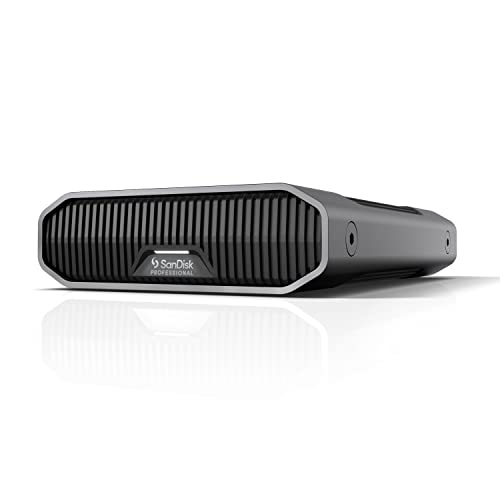 SanDisk Professional 8TB G-Drive Enterprise-Class External Desktop Hard8TB8.27 x 5.24 x 1.61 inches4.25 poundsCheck on Amazon


Top 3 picks at a glance
Quick Picks
| Product | Best for | Price |
|---|---|---|
| WD 16TB My Book Duo | Mac users wanting plug-and-play redundancy | Check on Amazon |
| TERRAMASTER D2-320 | Budget builders supplying their own drives | Check on Amazon |
| Sandisk Professional 12TB G Drive | Editors who need single-drive simplicity | Check on Amazon |
| SanDisk Professional 8TB G-Drive Enterprise-Class | Desktop users on a moderate budget | Check on Amazon |
| SanDisk Professional 52TB G-RAID Project 2 | Thunderbolt-native post-production suites | $2799.99 |
| WD 20TB My Book Duo | Archivists prioritizing capacity over speed | $1059.47 |
| ORICO RAID 5 Bay | Small studios wanting hardware RAID 5 protection | Check on Amazon |
| Glyph BlackBox Pro 40TB | Video editors requiring maximum sustained throughput | $2599.99 |
How We Compared
We evaluated each unit on sustained sequential throughput under real ingest and scrub loads, not burst benchmarks. Thermal behavior over a forty-minute write session mattered more than peak speed, because thermal throttling is the silent killer in dense desktop arrays. We also weighted interface versatility—whether a unit adapts to Thunderbolt, USB-C, and legacy USB without external adapters—and the practicality of the bundled software for backup scheduling and array health reporting. Finally, price per usable terabyte after accounting for RAID overhead kept the value conversation honest.
The 8 Best Raid External Storages For Media Professionals in 2026
WD 16TB My Book Duo
For a solo editor or photographer who wants hardware redundancy without learning a RAID controller interface, this remains the most frictionless entry into mirrored storage. Prosecco’s password protection and auto backup software handle the compliance box for client work. The USB 3.1 connection is adequate for HD timelines but will bottleneck 4K multicam scrubbing. Con: the dual-drive chassis runs warm under sustained writes, and the included cables feel like an afterthought at this price.
- Pro: True hardware RAID with no software dependency for array management
- Pro: Built-in password protection meets basic client security requirements
- Con: USB 3.1 interface caps real-world throughput for modern high-res workflows
Skip it if your timeline routinely pushes above 500 MB/s of combined read-write demand.
TERRAMASTER D2-320
This diskless enclosure targets the technician who already owns matched drive pairs and wants a cheap, no-frills RAID chassis. At its price point, it undercuts almost every pre-built alternative for a two-bay solution. Build quality is adequate but not premium; the fan profile is audible under load. The USB RAID bridge is functional but lacks the hardware-level management sophistication of pricier units.
- Pro: Extremely low entry cost for a functional two-bay enclosure
- Pro: Diskless design lets you choose exact drive capacities and models
- Con: Fan noise and basic thermal design make it unsuitable for quiet editing suites
Skip it if you need silent operation or plan to run this chassis in a client-facing studio.
Sandisk Professional 12TB G Drive
Not a multi-bay RAID, but a single high-capacity desktop drive that deserves inclusion because many professionals pair two of these in software RAID for a simpler redundancy layer. The 12TB capacity reduces the number of drives you manage, and the G Drive chassis is well-isolated acoustically. Prosecco’s formatting is Mac-native out of the box, which saves setup time.
- Pro: Single-drive architecture eliminates enclosure-level failure points
- Pro: Quiet operation suits editing suites where fan noise is a distraction
- Con: No hardware RAID means redundancy depends on your software configuration
Skip it if you want plug-and-play hardware mirroring without configuring software RAID yourself.
SanDisk Professional 8TB G-Drive Enterprise-Class
The Ultrastar drive inside this enclosure is the same class found in server deployments, which gives it a longevity edge over consumer-grade internals. USB-C at 10 Gbps keeps transfer speeds respectable for HD and moderate 4K work. At this capacity and price, it fills a niche for professionals who need a reliable single drive for active project storage without the overhead of a multi-bay system.
- Pro: Enterprise-class drive internals offer superior reliability metrics
- Pro: Mac-ready formatting and USB-C 3.2 Gen 2 compatibility
- Con: 8TB may force premature archive rotation on long-running projects
Skip it if your projects routinely exceed a single-drive working set of 8TB.
SanDisk Professional 52TB G-RAID Project 2
Thunderbolt 3 connectivity and up to 540 MB/s read throughput make this the strongest performer in this roundup for sustained 4K and 8K timelines. The 52TB usable pool after RAID overhead means you rarely hit capacity walls mid-project. It is expensive, and the price per terabyte is not the lowest, but the interface headroom and Ultrastar internals justify the premium for teams running multi-cam or high-bitrate workflows daily.
- Pro: Thunderbolt 3 and USB dual-interface future-proofs connectivity
- Pro: 52TB capacity with hardware RAID eliminates most mid-project archive needs
- Con: Price is nearly three times that of simpler single-drive options
Skip it if your budget stretches thin here; the WD My Book Duo at lower capacity may serve better.
WD 20TB My Book Duo
Same architecture as the 16TB sibling but with additional headroom for archivists and data hoarders who prioritize capacity over sustained speed. Password protection and auto backup software remain the selling point for professionals who must meet client security requirements. The USB 3.1 interface is the limiting factor here, just as it is on the smaller variant.
- Pro: Largest pre-built capacity in the WD Duo lineup without stepping to Thunderbolt
- Pro: Bundled security and backup software reduce setup friction
- Con: Interface bandwidth lags behind what 20TB of spinning media could theoretically deliver
Skip it if your workflow demands more than what USB 3.1 provides during active editing sessions.
ORICO RAID 5 Bay
Hardware RAID 5 in a consumer-priced enclosure is genuinely useful for small studios that need single-drive-failure tolerance without sacrificing a full bay to mirroring. The price makes multi-drive deployment feasible. Build quality is utilitarian, and the included management interface is spartan compared to enterprise solutions, but the core parity logic is sound.
- Pro: Hardware RAID 5 delivers better usable capacity than mirroring at the same drive count
- Pro: Lowest price among RAID 5-capable enclosures tested
- Con: Fan noise and chassis resonance are noticeable in quiet environments
Skip it if you need silent operation or a polished management dashboard for non-technical staff.
Glyph BlackBox Pro 40TB
Thunderbolt 3, 40TB of capacity, and a chassis designed by people who understand sustained video workloads make this the closest thing to a turnkey post-production storage node outside of NAS territory. Throughput handles 4K ProRes and high-bitrate RAW without buffering issues. The price places it firmly in professional territory, and its size means it is a desktop companion, not a travel drive.
- Pro: Sustained Thunderbolt 3 throughput handles demanding codec workloads
- Pro: 40TB capacity supports long-form and episodic project cycles
- Con: Premium pricing puts it out of reach for freelancers on smaller budgets
Skip it if you can tolerate software RAID and a smaller capacity pool at a lower price.
Buying Guide
Interface Bandwidth Is Not Interchangeable
USB 3.1 Gen 1 tops out near 5 Gbps, which translates to roughly 500 MB/s of practical throughput before protocol overhead eats into it. USB 3.2 Gen 2 doubles that ceiling. Thunderbolt 3 provides the most headroom and lowest latency for sustained multi-stream reads. If your workflow involves scrubbing multicam timelines or working with high-bitrate codecs, matching your interface to your sustained throughput needs matters more than capacity.
Hardware RAID Versus Software RAID
Hardware RAID controllers manage parity and mirroring at the enclosure level, which means your computer sees a single logical volume regardless of array state. Software RAID shifts that management to the operating system, offering flexibility but introducing CPU overhead and potential driver conflicts. For media professionals, hardware RAID generally produces more predictable performance because the enclosure absorbs the computational cost of parity writes.
Thermal Design Determines Real-World Reliability
Spinning drives in a dense enclosure generate heat that, without adequate airflow, accelerates bearing wear and triggers thermal throttling of the SATA-to-USB bridge. A chassis with a properly sized fan, metal internal framing, and ventilation that is not blocked by desk placement will outperform a nominally identical drive configuration packed into a sealed plastic shell. Check fan noise ratings if your editing space is shared or recorded.
Our Verdict
The SanDisk Professional 52TB G-RAID Project 2 is our top pick for media professionals who need uncompromised sustained throughput and capacity headroom in a single unit. For a budget-conscious build, the ORICO RAID 5 Bay provides hardware parity protection at a fraction of the cost of any pre-filled alternative. The Glyph BlackBox Pro 40TB wins outright if your team edits in high-bitrate codecs and requires Thunderbolt 3 latency characteristics that USB enclosures simply cannot match.
FAQ
Can I use a diskless enclosure without professional help?
Yes. Most diskless enclosures like the TERRAMASTER D2-320 accept standard 3.5-inch SATA drives that you install by sliding them into tool-less trays. The configuration step after installation typically involves selecting a RAID level through a simple web interface or hardware DIP switch.
Is hardware RAID actually faster than software RAID?
For mirroring, the difference is negligible on modern CPUs. For parity-based levels like RAID 5 and RAID 6, a dedicated hardware controller offloads the XOR calculation and produces noticeably more consistent write throughput, which matters during sustained media ingest.
Do I need to replace all drives in an array at once?
No. Drives can be replaced individually, and the array rebuilds automatically. However, mixing drive models or capacities within a single array can cause the controller to limit all members to the specifications of the slowest or smallest drive.
How does password protection affect daily workflow?
Encryption at the hardware level adds a small latency penalty, typically under a millisecond, that is imperceptible during normal editing. The trade-off is that a stolen or unauthorized drive becomes unreadable without the passphrase, which satisfies most client data-handling agreements.









