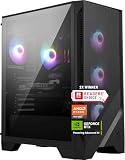
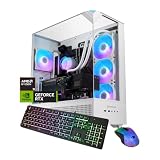
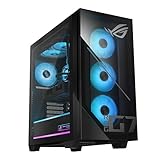
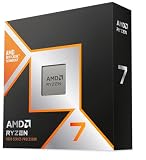
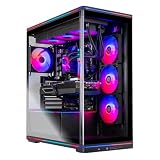
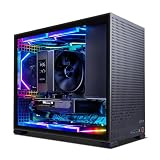
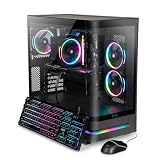
Among Skytech gaming desktops, the Ryzen 7 9800X3D build with an RTX 5070 Ti, 32GB of RAM and a 2TB SSD is the best overall choice: it combines a top gaming processor with a 16GB graphics card, which covers 1440p high-refresh and 4K with upscaling. Skytech sells prebuilt gaming desktops, and its listings put the key parts in the title, which makes the line easy to compare by specification. If you want maximum graphics power, the RTX 5080 version is the step up, and the RTX 5060 systems are the entry points.
Top 3 picks at a glance
Quick List
- Ryzen 7 9850X3D / RX 9070 XT – best for an AMD graphics alternative with 16GB of memory
- Ryzen 7 5700 / RTX 5060 – best for an entry 1080p system with plenty of memory
- Core i5-14400F / RTX 5060 – best for a simple Intel 1080p build
- Ryzen 7 9800X3D / RTX 5070 Ti – best for balanced 1440p and entry-level 4K gaming
- Ryzen 7 9850X3D / RTX 5080 – best for the highest graphics power in the Skytech lineup here
- Ryzen 7 7700 / RTX 5060 Ti 8GB – best for a mid-range AM5 system with 32GB of RAM
Which One Is Right for You?
| If you… | Choose |
|---|---|
| want a high-end card and the fastest gaming processor in the group | Ryzen 7 9850X3D / RTX 5080 |
| want a balanced build for 1440p and some 4K | Ryzen 7 9800X3D / RTX 5070 Ti |
| prefer Radeon graphics and plan to use AMD’s upscaling | Ryzen 7 9850X3D / RX 9070 XT |
| play at 1080p or 1440p and want an AM5 platform | Ryzen 7 7700 / RTX 5060 Ti |
| just need a capable 1080p PC with 32GB of RAM | Ryzen 7 5700 / RTX 5060 |
| prefer an Intel processor for 1080p play | Core i5-14400F / RTX 5060 |
Skytech’s lineup splits cleanly by graphics card. The RTX 5080 and 5070 Ti systems target high refresh at higher resolutions, the Radeon sits between them, and the RTX 5060-class builds focus on 1080p. Pick the tier that matches your monitor first, then look at memory, storage and processor platform. If you are still unsure, the RTX 5070 Ti build is the safest middle choice, and the RTX 5060 builds are for tighter setups where 1080p is the target.
All 6 Picks in Detail
1. Skytech Ryzen 7 9850X3D, RX 9070 XT, 32GB, 2TB – Best for an AMD Graphics Alternative
As an Amazon Associate we earn from qualifying purchases at no extra cost to you.

This build swaps NVIDIA for AMD’s Radeon RX 9070 XT, which has 16GB of GDDR6 and a 304W board power rating. It suits players who prefer AMD’s driver and upscaling features or who want a lot of video memory for the class. Combined with the 9850X3D, it is a strong 1440p and 4K-with-upscaling system.
AMD’s cards have generally been strong on video memory per tier, which helps with high-resolution textures. If you stream, check the encoder quality and software support for the way you record. Keep in mind that games vary in how they favor each brand, so look for reviews of the titles you play most before deciding between this and the NVIDIA alternative.
- CPU: Ryzen 7 9850X3D, 8 cores, 16 threads
- GPU: Radeon RX 9070 XT, 16GB GDDR6
- Memory: 32GB (confirm DDR5)
- Storage: 2TB SSD
- Cooling and power supply: confirm on listing
Pros:
- 16GB of video memory with AMD’s FSR 4 upscaling
- Newest X3D processor
Cons:
- No NVIDIA DLSS
- Details about the supply and cooler are left out
Compared with the RTX 5070 Ti build later in the list, it trades NVIDIA features for AMD’s, with similar overall capability.
2. Skytech Ryzen 7 5700, RTX 5060, 32GB, 1TB – Best for an Entry 1080p System

The Ryzen 7 5700 is an 8-core AM4 processor with PCIe 3.0 and no integrated graphics, and the RTX 5060 is NVIDIA’s 8GB entry card. The 32GB of memory is generous for this tier. It is a sensible 1080p system, but the platform is at the end of its life, so there is less upgrade potential than on the AM5 builds.
Think of it as a system to buy for what it is today rather than what it can become. A later upgrade will probably mean a new motherboard, processor and memory, because AM4 and DDR4 are older standards, while the graphics card and drive can move to a new build.
It is a fair choice if you mainly play esports titles and older games, and you want plenty of memory for browsing, streaming and chat apps alongside. Because the Ryzen 7 5700 uses PCIe 3.0 and the RTX 5060 uses a PCIe 5.0 x8 link, the card will run at reduced link speed, which is usually minor for an 8GB entry card but worth knowing.
- CPU: Ryzen 7 5700, 8 cores, 16 threads, AM4
- GPU: GeForce RTX 5060, 8GB
- Memory: 32GB (confirm DDR4)
- Storage: 1TB SSD
- Cooling and power supply: confirm on listing
Pros:
- 32GB of memory at the entry tier
- Eight cores
Cons:
- Older AM4 platform
- 8GB graphics memory
It has more memory than the Intel RTX 5060 build that follows, and a platform with less future room.
3. Skytech Core i5-14400F, RTX 5060, 16GB, 1TB – Best for a Simple Intel 1080p Build
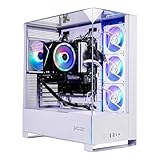
The Core i5-14400F has 10 cores (6 performance and 4 efficiency), 16 threads and no integrated graphics. With the RTX 5060 it forms a straightforward 1080p system, though 16GB of memory is the minimum we like to see. It suits someone who prefers Intel and expects to play mostly esports and mainstream titles.
The i5-14400F is a competent gaming processor for 1080p, and it does not need a high-end cooler. That keeps noise down in a small case. Its limits are the memory ceiling in this configuration and the lack of newer platform features, so treat it as a dependable starter rather than a long-term investment.
If you buy this one, plan a memory upgrade early. Sixteen gigabytes works for gaming alone but struggles when a browser, launcher and voice chat are all open. Check whether the memory is DDR4 or DDR5 on the listing, since that decides which kit to buy, and look at the number of free slots on the motherboard before you order.
- CPU: Core i5-14400F, 10 cores, 16 threads, LGA 1700
- GPU: GeForce RTX 5060, 8GB
- Memory: 16GB (confirm DDR4 or DDR5)
- Storage: 1TB SSD
- Cooling and power supply: confirm on listing
Pros:
- Capable mainstream processor
- Simple, accessible configuration
Cons:
- 16GB memory and an older platform
- Smallest upgrade path in the group
It is the most basic system of the six, a step below the Ryzen 7 5700 build in memory.
4. Skytech Ryzen 7 9800X3D, RTX 5070 Ti, 32GB, 2TB – Best for Balanced 1440p and Beyond

This is the middle of the range and the most sensible buy for most players. The 9800X3D has 8 cores and 96MB of L3 cache, the RTX 5070 Ti brings 16GB of GDDR7, and the 32GB of memory and 2TB of storage keep a library of large games on board. Skytech’s listing does not name the case, cooler or power supply, so verify those on the product page.
Players who keep one PC for four or five years tend to be well served by this tier, since the 16GB card handles the next wave of texture-heavy releases and the AM5 board leaves the processor and memory open to upgrade. If you play competitive shooters, the 9800X3D’s cache is where the extra frame rate comes from, so the card rarely limits those titles.
- CPU: Ryzen 7 9800X3D, 8 cores, 16 threads
- GPU: GeForce RTX 5070 Ti, 16GB GDDR7
- Memory: 32GB (confirm DDR5 speed)
- Storage: 2TB SSD (confirm interface)
- Cooling and power supply: confirm on listing
Pros:
- Balanced processor and graphics pairing
- Ample memory and storage
Cons:
- Supply and cooler not stated in the title
- Not the fastest graphics in the lineup
It sits below the RTX 5080 build that follows in graphics power and alongside the RX 9070 XT build earlier in the list, and it is the best all-round value of the three.
5. Skytech Ryzen 7 9850X3D, RTX 5080, 32GB, 2TB – Best for the Highest Graphics Power
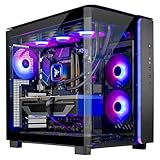
The 9850X3D is a 2026 refresh of the 9800X3D with the same 8 cores and 96MB of L3 cache and a boost clock up to 5.6GHz in AMD’s specification. Add an RTX 5080 with 16GB of GDDR7 and you have the strongest graphics in this Skytech set, suited to 4K at high settings and demanding ray tracing. The listing names 32GB of RAM and a 2TB SSD.
Because the RTX 5080 draws up to 360W, confirm the supply rating and the cooler before you buy, and make sure the case has front intake fans. Compared with the 5070 Ti, the 5080 is a larger step in graphics power than the 9850X3D is over the 9800X3D in processor speed, so if you are choosing where to put your effort, put it in the graphics card.
- CPU: Ryzen 7 9850X3D, 8 cores, 16 threads
- GPU: GeForce RTX 5080, 16GB GDDR7
- Memory: 32GB (confirm DDR5)
- Storage: 2TB SSD
- Power supply: confirm wattage on listing
Pros:
- Fast graphics and the newest X3D processor
- Good fit for 4K gaming
Cons:
- The RTX 5080 needs a strong supply, which the title does not state
- Processor gain over the 9800X3D is small in published reviews
It is the pick if graphics power matters more than anything else, and the 5070 Ti system is the more moderate alternative.
6. Skytech Ryzen 7 7700, RTX 5060 Ti 8GB, 32GB, 1TB – Best for a Mid-Range AM5 System
The Ryzen 7 7700 has 8 cores, 16 threads, a 65W rating and a 5.3GHz boost, on the AM5 platform with DDR5. Paired with the 8GB RTX 5060 Ti and 32GB of RAM, it makes a sensible 1080p and 1440p system with an upgrade path. The 8GB graphics memory is the main limit, so lower texture settings in the newest games.
A practical note: AM5 boards for this class usually offer four memory slots and at least two M.2 slots, so growing from 32GB to 64GB or adding a second drive is realistic, though the listing does not confirm the board, so check the product page.
It makes the most sense for a player on a 1080p or 1440p monitor who wants DDR5 and AM5 without paying for a faster card. The 32GB of RAM is unusual at this level and is a real advantage, because an 8GB card can borrow system memory when textures overflow. If you can step up, the 16GB version of the same card is a better long-term match, but it is not among these listings.
- CPU: Ryzen 7 7700, 8 cores, 16 threads, AM5
- GPU: GeForce RTX 5060 Ti 8GB
- Memory: 32GB (confirm DDR5)
- Storage: 1TB SSD
- Cooling and power supply: confirm on listing
Pros:
- Current AM5 platform
- 32GB of RAM helps an 8GB graphics card
Cons:
- 8GB of VRAM
- 1TB of storage
It is the upgrade over the RTX 5060 builds earlier in the list and the entry to the platform the faster systems use.
Specs Compared
| Product | CPU | GPU | RAM | Storage | Platform |
|---|---|---|---|---|---|
| 9850X3D / RX 9070 XT | Ryzen 7 9850X3D | RX 9070 XT 16GB | 32GB | 2TB SSD | AM5 |
| Ryzen 7 5700 / RTX 5060 | Ryzen 7 5700 | RTX 5060 8GB | 32GB | 1TB SSD | AM4 |
| Core i5-14400F / RTX 5060 | Core i5-14400F | RTX 5060 8GB | 16GB | 1TB SSD | LGA 1700 |
| 9800X3D / RTX 5070 Ti | Ryzen 7 9800X3D | RTX 5070 Ti 16GB | 32GB | 2TB SSD | AM5 |
| 9850X3D / RTX 5080 | Ryzen 7 9850X3D | RTX 5080 16GB | 32GB | 2TB SSD | AM5 |
| Ryzen 7 7700 / RTX 5060 Ti | Ryzen 7 7700 | RTX 5060 Ti 8GB | 32GB | 1TB SSD | AM5 |
How We Chose These
We took the six Skytech desktops in the current catalog and compared them by the processor, graphics card, memory and storage named in each title, plus manufacturer pages and published specifications for the processors and graphics cards. We ordered them by how well the graphics card and processor are matched, how current the platform is, and how much memory and storage are included. We also grouped them by graphics tier, because Skytech reuses chassis and platform choices across the line, and a clean tier comparison is the most useful way to shop it. Details the listings do not state, such as the supply, case and cooler, are flagged for confirmation. This is a specification-led comparison built from published information.
What to Look For
Match the Graphics Tier to Your Monitor
The graphics card is the largest influence on performance. The RTX 5060 and RTX 5060 Ti (both 8GB in these listings) target 1080p and, with upscaling, 1440p. The RTX 5070 Ti and Radeon RX 9070 XT, both with 16GB, are for 1440p at high refresh and 4K with upscaling. The RTX 5080, also 16GB but with a higher power rating of 360W, is the choice for 4K and demanding ray tracing. A good rule: choose the card for your monitor’s resolution first.
Platform: AM5, AM4 or Intel
AM5 is AMD’s current socket, uses DDR5 and supports upcoming processors. AM4 uses DDR4 and is at the end of its road. Intel’s LGA 1700, used with the Core i5-14400F, is also late in its life. If you want to upgrade the processor in two or three years, the AM5 builds are the only ones with a clear path, which is why the X3D systems and the Ryzen 7 7700 system rank higher than the AM4 and Intel ones for longevity.
Memory and Storage Guidelines
Use 32GB as the target, which five of the six listings provide. If a system ships with 16GB, check that the board has free slots for a second module. For storage, 1TB is the floor and 2TB is comfortable. Worked example: ten modern games averaging 90GB use 900GB, which is almost all of a 1TB drive before you count Windows, so the 2TB listings suit anyone with a large library.
Questions to Ask About a Prebuilt
Skytech’s titles are concise, so a few details need checking: the power supply wattage and rating, the type and size of the processor cooler, the case and fan count, the motherboard model and the warranty terms. Those parts affect noise, temperatures and upgrade room more than a few percent of processor speed. A 5080-class card in particular should come with a supply of 850W or more.
Upscaling, Frame Generation and What They Mean
Modern graphics cards rely on upscaling to reach high frame rates at higher resolutions. NVIDIA’s DLSS and AMD’s FSR 4 render the game at a lower internal resolution and reconstruct the image, and frame generation inserts extra frames on top. These features help an RTX 5060 or 5060 Ti reach smooth play at 1440p, and they help the larger cards reach 4K. They work best when the base frame rate is already steady, and they add some latency, so competitive players often prefer to leave frame generation off and rely on raw speed.
Check that the games you play support the technology of the card you choose. Most major releases support DLSS, and FSR 4 coverage is growing, but older titles may support neither.
Warranty, Support and Returns
A prebuilt is only as good as the support behind it. Read the warranty terms on the product page, including how long parts and labor are covered, who handles a claim, and whether opening the case to add memory or storage affects coverage. Keep your order confirmation and the serial numbers of the main parts. If the system arrives with a fault, such as a fan that does not spin or a graphics card that is not recognized, contact the seller promptly and check the return window before you start making upgrades.
Power and Heat
Graphics card ratings give a rough guide: about 145W for the RTX 5060, 180W for the RTX 5060 Ti, 300W for the RTX 5070 Ti, 304W for the RX 9070 XT and 360W for the RTX 5080. Add 65W to 150W for the processor and roughly 50W for the rest, then leave 20 to 30 percent margin. For an RTX 5080 system, that works out to a supply of roughly 850W as a sensible minimum.
Questions
Which Skytech PC is best for 1440p?
The Ryzen 7 9800X3D with RTX 5070 Ti is the most balanced for 1440p. The RX 9070 XT build is also a strong choice if you prefer AMD graphics.
Are the RTX 5060 systems enough for modern games?
For 1080p, yes, with sensible texture settings and upscaling. Their 8GB of video memory is the limit in the newest games at high settings, where you may need to lower textures to avoid stutter.
What is the difference between the 9800X3D and the 9850X3D?
Both have 8 cores and 96MB of L3 cache. The 9850X3D has a higher boost clock, up to 5.6GHz in AMD’s specification, and published reviews show a small gain in games.
Can I upgrade a Skytech PC later?
Usually yes. Memory, storage and the graphics card can generally be swapped, provided the supply has enough wattage and connectors and the case has room. Prebuilt systems sometimes use proprietary parts, so check the motherboard and supply details on the product page before planning a major upgrade.
Do these include Windows?
None of the listing titles states the operating system, so confirm what is installed and whether a license is included on the product page before you buy.
Should I pick an AMD or an NVIDIA graphics card?
NVIDIA offers DLSS and mature ray tracing support, while AMD offers 16GB at its class and FSR 4 upscaling. Choose based on the games you play and the features you value.
Update History
- October 14, 2026 – Initial publication; product set drawn from current catalog listings.
- Check the product page for current specifications and availability before buying.
Sources
- Manufacturer product and specification pages for AMD, Intel and NVIDIA
- AMD published specifications for the Ryzen 7 9850X3D and Radeon RX 9070 series
- Retailer listing titles and specification fields