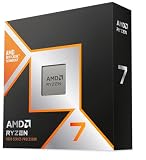
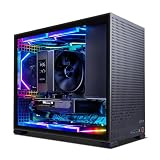
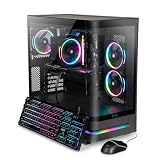
For most buyers shopping for an RTX 5090 gaming desktop, the Skytech build with a Ryzen 9 9950X3D, 64GB of RAM and a 4TB SSD is the best overall pick: it pairs the fastest gaming-oriented AMD processor with generous memory and storage, so nothing else in the box holds the flagship card back. The RTX 5090 is NVIDIA’s top GeForce card, with 32GB of GDDR7 and a 575W power rating, so these systems are about maximum frame rates at 4K, high-refresh ultrawide screens and creative or AI work.
Our Top Picks
 HP OMEN 45L GT22 RTX 5090 Gaming Desktop64GB RAM | 4TB SSD18.5 x 8.03 x 21.85 Inches49.82 PoundsCheck on Amazon


Top 3 picks at a glance
Quick List
- Skytech Ryzen 9 9950X3D, 64GB / 4TB – best for the strongest gaming-and-creator balance
- Alienware Area-51 AAT2250 – best for a premium chassis with serious cooling and support behind it
- XIDAX Core Ultra 9 285K – best for Intel buyers who want 64GB without the largest storage
- HP OMEN 45L GT22 – best for a cooling-focused Intel build with a big drive
- Skytech Ryzen 9 9950X3D, 32GB / 2TB – best for a leaner configuration of the same platform
- Skytech Ryzen 9 9950X3D, 64GB / 4TB (second listing) – best as an alternate listing of the same spec, with details to verify
Which One Is Right for You?
| If you… | Choose |
|---|---|
| want a big-brand tower with factory liquid cooling options | Alienware Area-51 AAT2250 |
| play at 4K but also edit video or render | Skytech Ryzen 9 9950X3D, 64GB / 4TB |
| prefer an Intel processor and a case designed around CPU cooling | HP OMEN 45L GT22 |
| want Intel and 64GB but can manage with 2TB of storage | XIDAX Core Ultra 9 285K |
| mostly game and want to keep the build simpler | Skytech Ryzen 9 9950X3D, 32GB / 2TB |
| are comparing two listings of the same Skytech configuration | Skytech 64GB / 4TB second listing |
At this level the processor choice splits into two camps: the 9950X3D for games and mixed work, and the Core Ultra 9 285K for broad multi-threaded loads with Intel’s platform features. Memory and storage then decide the rest. A 575W graphics card needs a serious power supply and airflow, so the details you cannot see in a title matter more than usual.
All 6 Picks in Detail
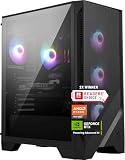
1. Skytech Ryzen 9 9950X3D, RTX 5090, 64GB, 4TB – Best for the Gaming-and-Creator Balance
As an Amazon Associate we earn from qualifying purchases at no extra cost to you.

Everything in this listing is at the top of its class: a Ryzen 9 9950X3D with 16 cores, 3D V-Cache for gaming, an RTX 5090 with 32GB of GDDR7, 64GB of RAM and a 4TB SSD. It suits someone who plays at 4K, streams, edits footage and keeps a big library installed. The listing name does not specify the case, cooler or power supply, so those are the things to confirm before purchase.
In daily use this is the configuration that makes sense for a single do-everything workstation: play at 4K in the evening, export video or run local AI models during the day. Sixty-four gigabytes of memory means large projects do not push the system into slow storage, and 4TB holds a working library plus game installs. Ask the seller for the supply wattage and radiator size, because a card with this rating needs both done properly.
The 9950X3D is the one X3D chip that does not compromise on core count, which is why it suits both play and production.
- CPU: Ryzen 9 9950X3D, 16 cores and 32 threads, AM5
- GPU: GeForce RTX 5090, 32GB GDDR7
- Memory: 64GB (confirm DDR5 and speed)
- Storage: 4TB SSD (confirm interface)
- Power supply, cooler and case: confirm on listing
Pros:
- Top gaming processor with 16 cores for creative work
- 64GB and 4TB leave real room to grow
- AM5 platform supports future AMD processors
Cons:
- Key parts such as the supply and cooler are not named
- Draws a lot of power with a 575W graphics card
Against the XIDAX, which comes later in this list, it brings more storage and the stronger gaming chip, which is why it leads.
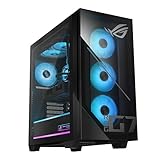
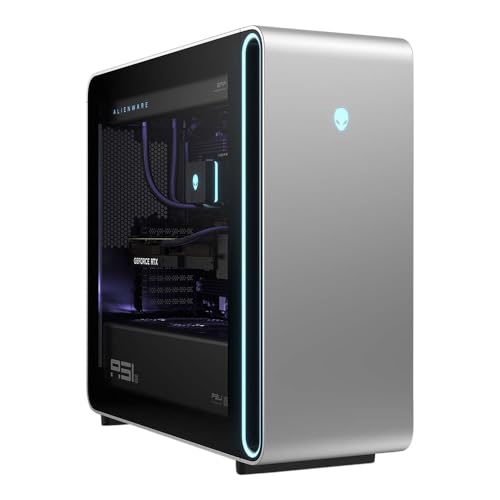
2. Alienware Area-51 AAT2250 (Core Ultra 9 285K, RTX 5090) – Best for a Premium Chassis and Cooling
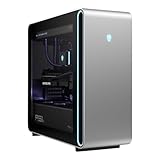
The Area-51 is Dell’s flagship Alienware tower, designed from the start for the heat of a flagship card. The listing names a Core Ultra 9 285K, an RTX 5090 with 32GB of GDDR7, 64GB of DDR5, a 4TB SSD and liquid cooling. Dell’s specification pages describe configurations with 360mm or 240mm liquid coolers and supplies rated up to 1500W, but the exact combination varies, so confirm which one this listing includes.
It fits buyers who want a single supplier, a recognizable chassis and a purpose-built layout instead of an assembled-from-parts tower. The tradeoff is size and weight: the Area-51 is a very large machine, so measure the desk space and floor clearance before you order. Dell has also changed configurations between runs, so read the listing details on supply and cooler carefully rather than assuming the largest options.
- CPU: Core Ultra 9 285K, 24 cores (8 performance + 16 efficiency)
- GPU: GeForce RTX 5090, 32GB GDDR7
- Memory: 64GB DDR5
- Storage: 4TB SSD
- Cooling: liquid cooling; radiator size and supply wattage to confirm
Pros:
- Chassis engineered for a flagship graphics card
- Large memory and storage included
- Established manufacturer support structure
Cons:
- Very large tower
- Intel’s LGA 1851 platform has a shorter track record as an upgrade path than AM5
Compared with the HP OMEN that follows the XIDAX, it is the roomier and more cooling-oriented case, while the HP offers a similar processor in a smaller form.
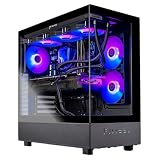
3. XIDAX Core Ultra 9 285K, RTX 5090, 64GB DDR5, 2TB – Best for Intel with 64GB

The XIDAX system gives you the same processor and graphics card as the Alienware and HP, with 64GB of DDR5 but half the storage, at 2TB. It suits buyers who want Intel’s platform and a big memory pool and plan to add an extra drive themselves. The listing is brief, so confirm the case, cooler and power supply.
The Core Ultra 9 285K is a 24-core chip with no hyper-threading, aimed at heavy multi-threaded work, and it supports DDR5 and PCIe 5.0 on the LGA 1851 socket. That makes this system a good fit for people who render, compile or run virtual machines as often as they game. Keep in mind that a brief listing is a reason to read the manufacturer’s page for the case, cooling and warranty terms before ordering.
- CPU: Core Ultra 9 285K, 24 cores
- GPU: GeForce RTX 5090, 32GB GDDR7
- Memory: 64GB DDR5
- Storage: 2TB SSD
- Cooling and power supply: confirm on listing
Pros:
- Flagship processor and card with 64GB of DDR5
- Lets you add storage later
Cons:
- Fewer details in the title than the big-brand towers
- 2TB fills fast with a large library
It is the leaner Intel option next to the Alienware before it and the HP OMEN after it.
4. HP OMEN 45L GT22 (Core Ultra 9 285K, RTX 5090) – Best for a Cooling-Focused Intel Build

HP’s 45-liter OMEN tower is built around an unusual idea: the processor’s liquid cooler sits in a separate chamber so it draws cool outside air rather than the heat of the graphics card. The listing pairs the Core Ultra 9 285K with an RTX 5090, 64GB of DDR5 and a 4TB SSD, plus Wi-Fi 6 and a software hub for lighting and fan control. The listing also mentions a bundled portable SSD; confirm what is included.
Choose it if heat is your biggest worry. Separating the processor loop from the graphics card means the two parts are not competing for the same warm air, which can keep processor temperatures steadier during long play sessions. The software hub is helpful for fan curves and lighting, although some buyers prefer a plainer machine without it. As always, confirm the supply rating on the product page.
- CPU: Core Ultra 9 285K, 24 cores, up to 5.7GHz
- GPU: GeForce RTX 5090, 32GB GDDR7
- Memory: 64GB DDR5
- Storage: 4TB SSD
- Networking: Wi-Fi 6
Pros:
- Cooling layout designed to keep processor temperatures separate from the card
- 64GB and 4TB match the top configurations
Cons:
- Wi-Fi 6 is older than the Wi-Fi 7 found on newer systems
- Large footprint
It sits close to the Alienware earlier in the list in specification, and the decision is mostly about which case design and support network you prefer.
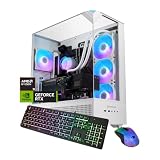
5. Skytech Ryzen 9 9950X3D, RTX 5090, 32GB, 2TB – Best for a Leaner Configuration

This is the same platform as the first pick with half the memory and half the storage. For a player who mostly games, 32GB of RAM is workable and 2TB holds a lot of titles, but a card this powerful deserves memory that matches. If you do not plan to run heavy creative software, it is the more focused value of the group.
Sensible buyers will look at the memory first. DDR5 kits are easy to add, and many boards accept two more modules, so the 32GB baseline can grow into 64GB without replacing anything, provided a pair of slots is free. The storage can be expanded the same way with a second NVMe drive. If you do plan creative work from day one, the 64GB model is the better starting point.
- CPU: Ryzen 9 9950X3D, 16 cores and 32 threads
- GPU: GeForce RTX 5090, 32GB GDDR7
- Memory: 32GB (confirm DDR5)
- Storage: 2TB SSD
- Power supply and cooling: confirm on listing
Pros:
- Same flagship parts at a simpler configuration
- Easy to add memory later
Cons:
- 32GB may limit creative and AI workloads
- Less storage than the leaders
It trades capacity for simplicity relative to the first Skytech.
6. Skytech Ryzen 9 9950X3D, RTX 5090, 64GB, 4TB (Second Listing) – Best as an Alternate of the Same Spec

The title of this listing matches the first pick word for word: Ryzen 9 9950X3D, RTX 5090, 64GB and 4TB. We cannot tell from the title what differs, which might be the case, the cooler, the supply or the included extras. That makes it a runner-up rather than a lead pick: if you are cross-shopping, open both listings side by side and compare the case, cooling and warranty.
If you are comparing, check four things on each listing: the stated power supply wattage and efficiency, the processor cooler type and radiator size, the case model and fan count, and the warranty. The second listing may differ only in a cosmetic way, or it may differ in the parts that protect a very powerful graphics card. Reading both pages is a few minutes of work that can prevent a poor match.
- CPU: Ryzen 9 9950X3D, 16 cores and 32 threads
- GPU: GeForce RTX 5090, 32GB GDDR7
- Memory: 64GB (confirm DDR5)
- Storage: 4TB SSD
- Differences from the first listing: confirm on listing
Pros:
- Top-end memory and storage
- Same processor and card as the leader
Cons:
- Cannot be distinguished from the first Skytech by title
- Critical details require checking
It is the same spec as the first pick on paper; use whichever listing proves clearer on the details.
Specs Compared
| Product | CPU | GPU | RAM | Storage | Cooling / PSU |
|---|---|---|---|---|---|
| Skytech 9950X3D (64GB / 4TB) | Ryzen 9 9950X3D | RTX 5090 32GB | 64GB (confirm type) | 4TB SSD | Confirm on listing |
| Alienware Area-51 AAT2250 | Core Ultra 9 285K | RTX 5090 32GB GDDR7 | 64GB DDR5 | 4TB SSD | Liquid cooling; PSU to confirm |
| XIDAX Ultra 9 285K | Core Ultra 9 285K | RTX 5090 32GB | 64GB DDR5 | 2TB SSD | Confirm on listing |
| HP OMEN 45L GT22 | Core Ultra 9 285K | RTX 5090 32GB | 64GB DDR5 | 4TB SSD | Liquid cooling; PSU to confirm |
| Skytech 9950X3D (32GB / 2TB) | Ryzen 9 9950X3D | RTX 5090 32GB | 32GB (confirm type) | 2TB SSD | Confirm on listing |
| Skytech 9950X3D (second 64GB / 4TB) | Ryzen 9 9950X3D | RTX 5090 32GB | 64GB (confirm type) | 4TB SSD | Confirm on listing |
How We Chose These
We selected the six RTX 5090 desktops in the current catalog and compared them using each listing’s stated processor, memory and storage, manufacturer product pages, and the published specifications of the GeForce RTX 5090, the Ryzen 9 9950X3D and the Core Ultra 9 285K. We ranked systems higher when they pair the flagship card with 64GB of memory and a large drive, and when their cooling and power details are documented. Systems with vague or repeated titles were placed lower and flagged for checking. This is a specification-led comparison built from published information, so treat unstated details as items to confirm.
What to Look For
What the RTX 5090 Needs from the Rest of the PC
The GeForce RTX 5090 has 21,760 CUDA cores, 32GB of GDDR7 on a 512-bit bus and a 575W total graphics power rating, with a recommended supply of at least 1000W from NVIDIA. It connects through a single 16-pin power connector. Because of that draw, the power supply is the most important component to confirm. A 1000W unit is the minimum; 1200W to 1500W gives headroom for a processor that can also pull well over 200W.
Choosing the Processor: 9950X3D or Core Ultra 9 285K
The Ryzen 9 9950X3D has 16 cores, 32 threads, stacked cache on one chip and a 170W rating. It leads in games that benefit from cache while keeping strong multi-threaded speed. The Core Ultra 9 285K has 24 cores (8 performance and 16 efficiency), runs up to 5.7GHz and uses the LGA 1851 socket. It does very well in highly threaded work. For a pure gaming machine, the 9950X3D is the safer pick; for mixed professional use, either is excellent.
Cooling and Case Airflow
A 575W card dumps heat into the case, so look for a large case with positive airflow, three or more intake fans and a 280mm to 360mm radiator for the processor. Towers that separate the processor cooler from the graphics card’s heat, such as the HP’s design, or that offer a large radiator, as Dell does, are better suited to the card. Worked example: a system pulling roughly 575W from the card plus 250W from the processor produces about 800W of heat at the wall under full load, which a small case cannot exhaust.
Memory and Storage Sizing
Choose 64GB of DDR5 if you edit video, run virtual machines or work with large AI models; 32GB is acceptable for pure gaming. For storage, 2TB is the floor and 4TB is comfortable, since recent games commonly exceed 100GB each. Also confirm the board has spare M.2 slots, because a second drive is easy to add later.
Power Delivery, Connectors and Safety
The RTX 5090 draws power through a single 16-pin connector that carries a very large current, so the cable must be fully seated and, ideally, not bent sharply near the plug. Prebuilt systems normally ship with the cable already installed, but check it is fully inserted if you ever move or open the case. Use a surge-protected outlet, and make sure the circuit can handle the load: a PC that pulls 900W to 1,000W from the wall under full load should not share a circuit with a space heater or other large appliance.
Keep the case in a ventilated spot with several inches of clearance around the intake and exhaust fans. Dust filters should be cleaned every few months, since restricted airflow is the most common reason a high-power PC becomes loud or throttles.
Monitor and Real-World Gains
The RTX 5090 shines at 4K and on ultrawide high-refresh panels. On a 1080p monitor, the processor tends to become the limit and you will see little benefit from the card. Pair it with a 4K display at 144Hz or higher, or a 5120×1440 ultrawide, to use it fully. DLSS 4 with multi-frame generation, a feature of the RTX 50 series, can lift frame rates further in supported games, but it works best when the base frame rate is already healthy, so treat it as a bonus rather than a requirement.
Finally, remember that a flagship card pushes data to the display quickly, so use a DisplayPort 2.1 or HDMI 2.1 cable rated for your monitor’s resolution and refresh rate; an older cable can silently cap the signal at a lower setting.
Questions
Is an RTX 5090 desktop overkill for gaming?
For 1080p and 1440p it is more than most games need. It makes sense for 4K at high refresh rates, ultrawide monitors, VR, and creative or AI workloads that use its 32GB of memory.
How big a power supply does an RTX 5090 PC need?
NVIDIA recommends at least 1000W for the card. Systems with a high-end processor are better off with 1200W or more, which also helps with transient spikes.
Is 32GB of RAM enough with this card?
For gaming alone, yes. If you edit video or work with large datasets, 64GB is a better match for the card’s capability.
Does the Ryzen 9 9950X3D or Core Ultra 9 285K work better for games?
The 9950X3D usually leads in cache-sensitive games thanks to its stacked cache, which is why it is the pick for gaming-first buyers. The Core Ultra 9 285K is strong in multi-threaded workloads and has a larger core count, so it suits rendering and compiling.
Do I need liquid cooling for these builds?
For flagship processors, a large liquid cooler or a high-end air cooler is strongly recommended. Check the listing or manufacturer page for the radiator size.
Why do two Skytech listings have the same specs?
Prebuilt sellers often list variants that differ in case, cooling, power supply or included extras. The title may not show which, so compare the product pages.
Update History
- October 14, 2026 – Initial publication; product set drawn from current catalog listings.
- Check the product page for current specifications and availability before buying.
Sources
- Manufacturer product and specification pages for Dell Alienware, HP OMEN, AMD, Intel and NVIDIA
- Retailer listing titles and specification fields
- Published specification sheets for the GeForce RTX 5090 from NVIDIA