The best RX 9070 XT prebuilt gaming PC for most people in October 2026 is the Corsair Vengeance a7500, because it pairs the card with a Ryzen 7 9800X3D, an X870 board, a quality 850W Gold power supply and a case that reviewers at PC Gamer and Tom’s Hardware both praised for cooling and build quality. If you want the same CPU and GPU for less, the iBUYPOWER Y40 Pro and Skytech O11 Vision are the usual alternatives, and a Ryzen 7 7800X3D system such as the Skytech Azure 3 is the value pick. Below we explain what separates a good RX 9070 XT prebuilt from a corner-cutting one, and which configurations to avoid.
Our Top Picks


Top 3 picks at a glance

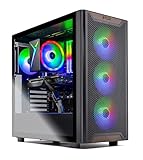
Verdict at a glance
- Best overall: Corsair Vengeance a7500 (Ryzen 7 9800X3D, RX 9070 XT, 32GB DDR5, X870, 850W Gold). Premium parts throughout and the strongest professional reviews of any system on this list.
- Best for style on a smaller budget: iBUYPOWER Y40 Pro (Ryzen 7 9800X3D, RX 9070 XT, 32GB DDR5, 2TB SSD). Looks great and games well, but Tom’s Hardware flagged fan noise and limited expansion.
- Best showcase case: Skytech O11 Vision (Ryzen 7 9800X3D or 9850X3D, RX 9070 XT, 360mm AIO, 850W Gold ATX 3). Check the exact listing, because some newer configurations ship with only 16GB of memory.
- Best value: Skytech Azure 3 or Skytech Omega with a Ryzen 7 7800X3D. The previous-generation X3D chip still keeps an RX 9070 XT fed at 1440p.
- Lowest cost of entry: Skytech Chronos with a Ryzen 7 7700, identified by TechGuided as the cheapest common route into an RX 9070 XT desktop.
Why the RX 9070 XT is the sweet spot for a prebuilt in 2026
The Radeon RX 9070 XT uses AMD’s full Navi 48 chip with 64 RDNA 4 compute units, 16GB of GDDR6 on a 256-bit bus, 64MB of Infinity Cache and a 304W typical board power, according to AMD’s own specification page. AMD recommends at least a 750W power supply for the reference design, which uses two standard 8-pin PCIe connectors rather than the 12V-2×6 plug found on most RTX 50 series cards.
Performance has improved since launch. Hardware Unboxed’s launch review placed the RX 9070 XT about 6% behind the RTX 5070 Ti across 18 games, but a later re-test reported by TechPowerUp found the Radeon had gained about 9% at 1440p from driver updates while the GeForce gained about 2.5%. That left the RX 9070 XT roughly 3% ahead at 1440p on average and level at 4K. The RTX 5070 Ti still tends to win in heavily ray traced and NVIDIA-sponsored titles, and it has more memory bandwidth, but in raster games the two are now close.
That matters for prebuilt shoppers because 2026 GPU pricing has been distorted by the memory shortage. Price trackers such as the one Tom’s Hardware maintains have shown NVIDIA’s mid-to-high cards drifting well above their launch pricing, while the RX 9070 XT has held closer to its original positioning. In practice, system builders can often fit an RX 9070 XT plus a better CPU, more memory or a bigger SSD into the same budget tier where an RTX 5070 Ti system would force compromises elsewhere.
Comparison table: RX 9070 XT prebuilts worth shortlisting
| System | CPU | Memory / storage | Cooling and PSU | Budget tier | Best for |
|---|---|---|---|---|---|
| Corsair Vengeance a7500 | Ryzen 7 9800X3D | 32GB DDR5 / 1TB M.2 | Nautilus RS liquid cooler, 850W 80+ Gold | Premium | Best overall build quality |
| iBUYPOWER Y40 Pro | Ryzen 7 9800X3D | 32GB DDR5-5200 / 2TB NVMe | AIO cooler, non-modular PSU | Upper mid-range | Style and storage |
| Skytech O11 Vision | Ryzen 7 9800X3D or 9850X3D | 16GB to 32GB DDR5 / 1TB to 2TB | 360mm ARGB AIO, 850W Gold ATX 3 | Upper mid-range | Glass showcase case |
| Skytech Azure 3 / Omega | Ryzen 7 7800X3D | 32GB DDR5 / 1TB to 2TB | AIO or tower cooler, Gold PSU | Mid-range | Best value for 1440p |
| Skytech Chronos | Ryzen 7 7700 | 32GB DDR5 / 2TB Gen 4 | Air cooling, Gold PSU | Lower mid-range | Cheapest RX 9070 XT entry |
Configurations change frequently. Use the table as a map of what each system family typically includes, then confirm the exact memory speed, SSD and motherboard on the specific listing you are looking at.
Corsair Vengeance a7500: best overall
Corsair sells a version of the Vengeance a7500 with a liquid-cooled Ryzen 7 9800X3D, the RX 9070 XT, 32GB of Vengeance RGB DDR5, a 1TB M.2 SSD, an X870 motherboard with 5G Ethernet, Wi-Fi 7 and Bluetooth 5.4. PC Guide’s coverage of that configuration lists a Nautilus RS ARGB liquid cooler, an 850W 80+ Gold power supply and six RS120 ARGB fans.
The two major professional reviews of the a7500 used an RTX 5070 Ti rather than the Radeon, but the chassis, cooling, CPU, memory and power supply are shared across versions, so their conclusions on thermals, noise and build quality carry over. Tom’s Hardware called it a standout thanks to its premium hardware and high gaming performance, with a fast PCIe 5.0 SSD and a high-quality case. PC Gamer said it is beautifully built, has an ideal CPU and GPU pairing, and runs cool and quiet.
Reasons to pick:
- The 9800X3D is still the reference gaming CPU, so the RX 9070 XT is never held back at 1080p high refresh.
- X870 board brings Wi-Fi 7, fast Ethernet and plenty of USB, which cheaper B650 systems skip.
- Quality 850W Gold PSU leaves headroom for a future GPU upgrade.
- Reviewers consistently describe it as cool and quiet.
Reasons to skip:
- It sits at the top of the mainstream prebuilt price range, so it only makes sense if you value the build quality.
- PC Gamer noted the two-year warranty is not stellar and that the cooler, fans and memory are Corsair’s more affordable lines rather than its flagship parts.
- The base 1TB drive fills quickly with modern games.
The catch: you are paying for polish and parts quality rather than extra frames, because the same CPU and GPU appear in cheaper systems below.
iBUYPOWER Y40 Pro: best for style and storage
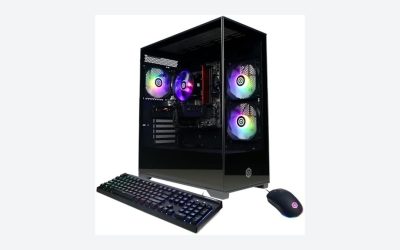
The Y40 Pro is one of the most widely stocked RX 9070 XT systems at big-box stores. The common configuration pairs a Ryzen 7 9800X3D with the RX 9070 XT, 32GB of DDR5 at 5200 MT/s and a 2TB NVMe SSD inside a glass-fronted, RGB-heavy case.
Tom’s Hardware reviewed the Y40 Pro and concluded it delivers eye-catching design and solid gaming performance, but its limited expandability and intrusive fan noise make it better suited for style-focused buyers than serious upgraders. The review noted the fans remain audible even at idle, with fan curves that react aggressively to brief CPU spikes, although you can tune them in the BIOS or the bundled software. It also called out limited storage and PCIe expansion and a non-modular power supply. Owner feedback on retailer pages commonly mentions the DDR5-5200 kit and an entry-level motherboard; some owners say they enabled faster memory settings or undervolted the CPU and GPU to bring temperatures and noise down.
Reasons to pick:
- Same 9800X3D and RX 9070 XT pairing as premium systems for a lower budget tier.
- 2TB SSD as standard on the Pro configuration.
- Widely available, which makes returns and exchanges easy.
Reasons to skip:
- Fan noise out of the box, per Tom’s Hardware.
- DDR5-5200 is below the DDR5-6000 sweet spot for Ryzen 7000 and 9000 CPUs.
- Non-modular PSU and limited expansion make later upgrades harder.
The catch: plan to spend 20 minutes in the BIOS adjusting fan curves and checking that EXPO is enabled, or the system will be louder and slightly slower than it should be.
Skytech O11 Vision: best showcase case
The O11 Vision is built around a dual-chamber, panoramic glass case and is sold in several RX 9070 XT configurations. The best-equipped versions combine a Ryzen 7 9800X3D with 32GB of DDR5-6000, a 2TB Gen 4 NVMe SSD, a 360mm ARGB AIO and an 850W Gold ATX 3 power supply. Skytech lists a one-year parts and labor warranty with lifetime technical support.
We did not find a review of this configuration from a major outlet, so treat it as a parts-list purchase. The parts list is strong on paper, but newer listings have trimmed specifications: a recent deal thread on Slickdeals showed a Ryzen 7 9850X3D configuration with only 16GB of non-RGB DDR5, a 1TB SSD and a B650 board. A faster CPU paired with half the memory is a poor trade for gaming in 2026, where many games now use more than 16GB of system RAM.
Reasons to pick:
- 360mm AIO and a roomy case give the 9800X3D and RX 9070 XT plenty of thermal headroom.
- 850W ATX 3 power supply leaves room for a future GPU.
- The case is designed to show off the hardware.
Reasons to skip:
- One-year warranty is shorter than Corsair’s.
- Specs vary widely between listings, and some cut memory to 16GB.
- No major professional review to confirm noise and thermals.
The catch: only buy the 32GB configuration; the 16GB versions save money in exactly the wrong place.
Skytech Azure 3 and Omega: best value
If you game at 1440p or 4K, the GPU does most of the work, and a Ryzen 7 7800X3D still has plenty of headroom for an RX 9070 XT. Skytech’s Azure 3 and Omega lines pair the 7800X3D with the RX 9070 XT and typically 32GB of DDR5 and a 1TB or 2TB SSD. TechGuided rated the Omega as its value pick among RX 9070 XT prebuilts.
Reasons to pick:
- The 7800X3D’s 3D V-Cache keeps frame times smooth in CPU-heavy shooters.
- Usually a full budget tier below 9800X3D systems.
- Same AM5 platform, so a later CPU upgrade is possible.
Reasons to skip:
- A little slower than the 9800X3D at 1080p with very high frame rate targets.
- Board and SSD quality vary by listing.
The catch: the savings are real only if the listing keeps 32GB of DDR5 and an 850W or 750W Gold PSU; check both.
Skytech Chronos: the cheapest RX 9070 XT entry
TechGuided identified the Skytech Chronos, with a Ryzen 7 7700, 32GB of DDR5 and a 2TB Gen 4 SSD, as the most affordable common way into an RX 9070 XT desktop. The Ryzen 7 7700 is an eight-core Zen 4 chip without 3D V-Cache. It is perfectly capable at 1440p and 4K, where the GPU is the limit, but it leaves performance on the table in esports titles at 1080p.
Reasons to pick: lowest cost of entry, eight cores for streaming and multitasking, AM5 upgrade path.
Reasons to skip: noticeably lower 1% lows than X3D chips in CPU-bound games; air cooling and budget boards on many listings.
The catch: if you mainly play competitive shooters at 1080p, the step up to an X3D system is worth more than any other upgrade.
How to choose an RX 9070 XT prebuilt
1. Match the CPU to your resolution
At 1080p with a 240Hz or faster monitor, the CPU often limits frame rate, so a Ryzen 7 9800X3D, 9850X3D or 7800X3D is worth paying for. At 1440p the X3D chips still help with 1% lows. At 4K the RX 9070 XT is almost always the bottleneck, and a Ryzen 7 7700 or Ryzen 5 9600X is fine.
2. Insist on 32GB of DDR5
Memory prices rose sharply in 2026, and some system integrators responded by cutting to 16GB. Avoid those configurations. Look for DDR5-6000 with EXPO, the widely accepted sweet spot for Ryzen 7000 and 9000. DDR5-5200 works, but expect slightly lower CPU-bound performance.
3. Check the power supply, not just the wattage
AMD recommends at least 750W for the RX 9070 XT, and partner cards can draw up to around 330W. An 850W 80+ Gold unit from a known brand is the safe choice and leaves room for a future upgrade. If the listing says only “850W” with no efficiency rating or brand, ask the seller.
4. Look at the motherboard chipset
B650 is fine for most buyers. X870 adds USB4, more PCIe 5.0 lanes and usually Wi-Fi 7. Avoid A620 boards in a system with an X3D CPU, as many have weaker power delivery and fewer M.2 slots.
5. Warranty and support
Warranties range from one year to two or three years. A longer warranty is worth more than RGB, because a failed board or PSU in year two can cost a large share of the system’s value to fix.
Setup tips after your prebuilt arrives
- Remove packing foam: many prebuilts ship with foam inside the case to protect the GPU. Remove it before powering on.
- Enable EXPO: check in the BIOS that memory runs at its rated speed.
- Update AMD Software: Adrenalin Edition: the factory driver may be months old, and the RX 9070 XT gained notable performance from driver updates.
- Turn on FSR 4 where supported: RDNA 4 is the first Radeon generation with machine-learning upscaling, and it looks noticeably better than older FSR versions.
- Plug the monitor into the GPU, not the motherboard video output.
- Tune fan curves: if the system is loud at idle, a gentler fan curve in the BIOS usually fixes it with no meaningful temperature penalty.
Common mistakes to avoid
- Buying a faster CPU configuration that halves the memory to 16GB.
- Assuming “RX 9070” and “RX 9070 XT” are the same card. The non-XT model has fewer compute units and a 220W board power.
- Ignoring the SSD. A 1TB no-name drive fills fast and can be slow; 2TB from a named brand is a better baseline.
- Choosing by RGB rather than airflow. Glass-front cases with no intake vents run hotter and louder.
- Paying a premium tier for an RTX 5070 Ti system when you mostly play raster games, where the RX 9070 XT now trades blows with it.
RX 9070 XT prebuilt or RTX 5070 Ti prebuilt?
| If you want… | Pick | Why |
|---|---|---|
| Best raster performance for the budget | RX 9070 XT | Roughly level with the 5070 Ti at 1440p after driver updates, per Hardware Unboxed data reported by TechPowerUp |
| Heavy ray tracing and path tracing | RTX 5070 Ti | NVIDIA still leads in ray-traced and NVIDIA-sponsored titles |
| Widest upscaler and frame generation support | RTX 5070 Ti | DLSS 4 is in more games than FSR 4 |
| Linux or SteamOS-style gaming | RX 9070 XT | AMD’s open-source drivers are the smoother experience on Linux |
| Simple power cabling | RX 9070 XT | Reference design uses standard 8-pin connectors |
Products Mentioned in This Guide
These are the RX 9070 XT prebuilt systems from the comparison above that are currently listed in the configurations the guide discusses.
Skytech Gaming O11 Vision (Ryzen 7, RX 9070 XT, 32GB RAM, 2TB SSD)
As an Amazon Associate we earn from qualifying purchases at no extra cost to you.

Our showcase-case pick, built around a dual-chamber panoramic glass case. This is the 32GB configuration the guide recommends over the trimmed 16GB versions.
Skytech Gaming Azure 3 (Ryzen 7 7800X3D, RX 9070 XT)
The best value pick: the previous-generation 7800X3D still keeps an RX 9070 XT fed at 1440p, usually a full budget tier below 9800X3D systems. Confirm it keeps 32GB of DDR5 and a Gold PSU.
Skytech Gaming Chronos 3 (Ryzen 7, RX 9070 XT, 32GB RAM, 2TB SSD)
The lowest-cost route into an RX 9070 XT desktop, capable at 1440p and 4K where the GPU is the limit, though competitive 1080p players are better served by an X3D system.
How we compared
We compared these systems using manufacturer specifications, published component specifications from AMD, independent reviews and measurements from the publications named in this article, and owner reports on retailer pages. We did not bench-test these units ourselves. Configurations and availability change often, so verify the exact parts on any listing before you buy.
Sources
- AMD, Radeon RX 9070 XT product specifications
- TechPowerUp, Sapphire Radeon RX 9070 XT Nitro+ review and driver performance report
- Hardware Unboxed, RX 9070 XT launch review and driver re-test
- Tom’s Hardware, Corsair Vengeance a7500 review and iBuyPower Y40 Pro review
- PC Gamer, Corsair Vengeance a7500 review
- PC Guide, Corsair Vengeance RX 9070 XT configuration coverage
- TechGuided, best RX 9070 XT prebuilt gaming PCs
- Tom’s Hardware, GPU price tracking
- Slickdeals, Skytech O11 Vision configuration listings
Frequently Asked Questions
Is an RX 9070 XT prebuilt good for 4K gaming?
Yes, with upscaling. The RX 9070 XT handles many games at 4K with high settings, and FSR 4 Quality mode helps in demanding titles. For native 4K with heavy ray tracing, you will need to lower settings.
What CPU should an RX 9070 XT prebuilt have?
For 1080p high-refresh gaming, a Ryzen 7 9800X3D, 9850X3D or 7800X3D. For 1440p and 4K, a Ryzen 7 7700 or Ryzen 5 9600X is enough, because the GPU becomes the limit.
How much RAM does an RX 9070 XT gaming PC need?
32GB of DDR5 is the right amount in 2026. Avoid 16GB configurations, which some system builders introduced during the memory shortage.
What power supply does an RX 9070 XT need?
AMD recommends at least 750W. A quality 850W 80+ Gold unit is the safest choice in a prebuilt, especially with factory-overclocked partner cards.
Is the RX 9070 XT better than the RTX 5070 Ti?
In raster games they are now roughly equal at 1440p and 4K according to Hardware Unboxed’s driver re-test. The RTX 5070 Ti is stronger in ray tracing and has broader DLSS support.
Can I upgrade an RX 9070 XT prebuilt later?
Most AM5-based systems can take future Ryzen CPUs and a bigger GPU if the power supply and case allow it. Systems with non-modular PSUs and small cases, such as the Y40 Pro per Tom’s Hardware, are harder to upgrade.
Does the RX 9070 XT use the 12V-2×6 connector?
The reference design uses two standard 8-pin PCIe connectors. A few partner cards use different arrangements, so check the specific model in your system.
Is it cheaper to build an RX 9070 XT PC yourself?
Often slightly, but during the 2026 memory shortage system builders sometimes have better access to memory and GPUs, which narrows the gap. A prebuilt also gives you one warranty for the whole system.
Related guides
- Best Gaming PC for Fortnite: Eight Prebuilt Desktops Sorted by Refresh Rate Goal (2026)
- Best RX 9070 XT Prebuilt Gaming PCs: Seven Desktops and Three Cards Compared: 10 Compared (2026)
- CyberPowerPC vs iBUYPOWER Gaming PC: How the Two Brands Compare
- Best Gaming Desktops: Top Picks for Every Budget: 12 Compared (2026)