
Alienware’s core trade-off across every model here is consistent: distinctive industrial design and Dell’s support infrastructure in exchange for less aftermarket upgrade flexibility than a component-agnostic build from Skytech or iBUYPOWER.
Our Top Picks
 Alienware Aurora R16 Gaming Desktop Computer PC32 GB DDR5 | 2 TB SSD + 2TB HDD18.05 x 16.46 x 7.75 InchesCheck on Amazon


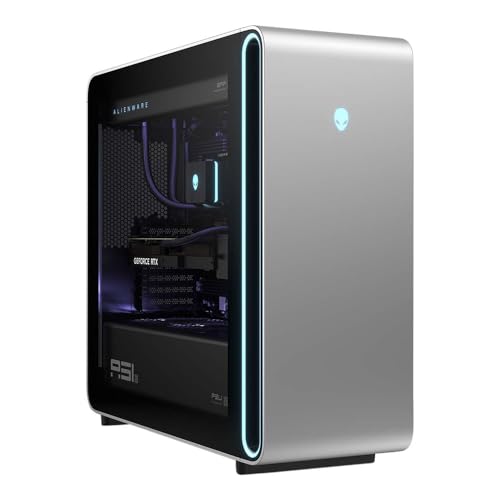
Top 3 picks at a glance

Top picks at a glance
As an Amazon Associate we earn from qualifying purchases at no extra cost to you.




| Model | Key spec | Price | Best for |
|---|---|---|---|
| Alienware Desktop | RTX 5060 Ti, Intel Ultra 7 265F | Check on Amazon | Entry Alienware ownership |
| Alienware Aurora (5070) | RTX 5070, Intel Ultra 7 265F | Check on Amazon | Best all-around value |
| Alienware Aurora R15 | i9-13900F, RTX 4070 Ti, liquid cooled | Check on Amazon | Previous-gen high-end |
| Alienware Aurora (265KF) | Intel Ultra 7 265KF | Check on Amazon | Unlocked CPU headroom |
| Alienware Aurora, RTX 5080 | RTX 5080, Intel Ultra 9 285 | Check on Amazon | 4K-ready performance |
| Alienware Aurora R16 | RTX 5080, Intel Ultra 9 285K, liquid cooled | Check on Amazon | Premium liquid-cooled build |
| Dell Alienware Area-51 (5080) | RTX 5080, Intel Ultra 9 285K, 360mm AIO | Check on Amazon | Flagship air-to-liquid balance |
| Dell Alienware Area-51 (5090) | RTX 5090 32GB, Intel Ultra 9 285K, liquid cooled | Check on Amazon | Absolute top-tier 4K/8K gaming |
Alienware Desktop, RTX 5060 Ti / Intel Ultra 7 265F, around $1,650
This is the most affordable entry into Alienware ownership currently listed, pairing an RTX 5060 Ti with Intel’s Core Ultra 7 265F.
Estimated performance based on the RTX 5060 Ti’s known class: 70-85 fps at 1440p high in most current titles, matching the general performance range of similarly-equipped builds covered in our Skytech roundup. The Core Ultra 7 265F is Intel’s newer architecture, though the “F” suffix means no integrated graphics, so display output depends entirely on the discrete GPU.
RAM and storage capacity aren’t specified in this particular listing title, which is a real gap at this price given that competing brands at similar prices often specify 16-32GB explicitly. The Alienware brand premium here is paying primarily for design, AlienFX RGB software, and Dell’s support infrastructure rather than component transparency.
This is also the entry point into Alienware’s ecosystem lock-in: the case, PSU connector, and cooling mount points on Alienware desktops frequently use proprietary dimensions that limit which aftermarket components fit later, a trade-off worth understanding before buying into the brand at any price tier.
- Pros
- Lowest-price entry into Alienware’s design and support ecosystem
- Intel Core Ultra 7 265F is current-generation architecture
- AlienFX software and distinctive case design
- Cons
- RAM and storage not specified in the listing
- Priced above component-equivalent builds from Skytech or iBUYPOWER
- Proprietary case/PSU dimensions limit future aftermarket upgrades
Who it’s for: buyers who specifically want Alienware’s design and AlienFX ecosystem and are willing to pay a premium over equivalent specs from other brands.
Alienware Aurora, RTX 5070 / Intel Ultra 7 265F, around $2,000
This is the strongest value in Alienware’s current lineup: an RTX 5070 12GB paired with the same Core Ultra 7 265F seen in the entry-tier model above, at a price that still undercuts the Area-51 line by thousands while delivering genuinely capable 1440p-to-light-4K performance.
Estimated performance based on the RTX 5070’s 12GB VRAM: 90-105 fps at 1440p ultra, with 4K playable at high settings or with DLSS upscaling in supported titles. This puts it in the same performance class as the CyberPowerPC and iBUYPOWER RTX 5070 builds covered in our other brand roundups, though typically at a higher price for the Alienware badge.
The Aurora line generally uses a more conventional, less cramped chassis than some of Dell’s older Alienware designs, which historically drew criticism for tight internal clearances that complicated even basic maintenance like dust cleaning or thermal paste reapplication.
As with the entry-tier model, RAM and storage specifics aren’t detailed in this listing title, requiring a check of Dell’s full spec sheet before ordering — a step worth taking given the meaningful price gap versus component-equivalent builds from other brands in this price bracket.
- Pros
- RTX 5070 handles 1440p ultra and light 4K well
- Best value-to-price ratio in Alienware’s current catalog
- More conventional chassis than older Alienware generations
- Cons
- RAM and storage not specified in the listing
- Still priced above equivalent-spec builds from other brands
- Intel LGA1851 socket is a newer, less established upgrade platform
Who it’s for: buyers who want the best price-to-performance ratio within the Alienware ecosystem specifically.
Alienware Aurora R15, Intel i9-13900F / RTX 4070 Ti, around $3,100
The Aurora R15 represents Alienware’s previous design generation, built around a previous-gen i9-13900F and RTX 4070 Ti with liquid cooling as standard.
Estimated performance based on the RTX 4070 Ti’s known class: 85-100 fps at 1440p ultra, with 4K playable at high settings with upscaling.
32GB of DDR5 RAM and a 1TB SSD are specified clearly, which is a genuine advantage of this particular listing’s transparency over some of the newer, less-detailed Aurora listings in this roundup. The liquid cooling is also explicitly confirmed rather than assumed.
The “Dark Side of The Moon” color scheme and the R15’s specific case design are being phased out as Dell transitions to newer Aurora and Area-51 chassis, which could mean more limited spare parts and case-specific accessory availability over the system’s lifespan.
- Pros
- 32GB DDR5 RAM and liquid cooling clearly specified
- Mature, well-documented previous-gen platform
- Distinctive R15 case design and color scheme
- Cons
- Priced well above its actual performance tier relative to newer Aurora builds
- Previous-generation CPU and GPU architecture
- Case design being phased out, limiting future spare parts availability
Who it’s for: buyers specifically drawn to the R15’s design and color scheme who don’t mind paying a premium for a previous-generation platform.
Alienware Aurora, Intel Core Ultra 7 265KF, $2,539
The “K” designation signals an unlocked multiplier for overclocking, though Alienware’s stock BIOS and cooling configuration determine how much of that headroom is actually usable out of the box.
Without a confirmed GPU model in the listing, performance estimates aren’t reliable here; buyers should treat this listing as requiring direct verification of the full spec sheet on Dell’s site before comparing it against the clearly-specified RTX 5070 and RTX 5080 Aurora builds elsewhere in this roundup.
The unlocked 265KF chip itself is a genuine positive for buyers who want CPU overclocking headroom, assuming Alienware’s cooling solution supports sustained boost clocks — worth confirming directly given the ambiguity in this specific listing.
- Pros
- Unlocked Core Ultra 7 265KF offers overclocking headroom
- Priced in line with Alienware’s mid-high tier generally
- Likely includes a capable current-gen GPU based on pricing
- Cons
- GPU model not specified in the listing, a significant transparency gap
- Requires direct verification before purchase given the ambiguity
- Overclocking headroom depends on cooling not detailed here
Who it’s for: buyers specifically interested in the unlocked 265KF who are willing to verify the paired GPU directly with Dell before ordering.
Alienware Aurora, RTX 5080 / Intel Ultra 9 285, around $2,950
This build pairs the RTX 5080 16GB with Intel’s Core Ultra 9 285 (non-K), delivering genuinely strong 4K-capable performance at a price that undercuts the liquid-cooled Aurora R16 below despite sharing the same GPU tier — the key difference being cooling solution and the non-overclockable CPU variant.
Estimated performance based on the RTX 5080’s 16GB VRAM: 100+ fps at 1440p max settings, and roughly 70-85 fps at 4K high-to-ultra with upscaling enabled in supported titles. This matches the performance class of the more expensive Area-51 5080 build covered below, making this Aurora configuration a stronger value for buyers who don’t need the Area-51’s specific chassis design.
The non-K Ultra 9 285 trades overclocking headroom for typically lower power draw and heat output than the K-series 285K used in the Aurora R16 and Area-51 builds, which could mean a quieter system under sustained gaming load.
- Pros
- RTX 5080 performance at a lower price than the liquid-cooled R16
- Non-K CPU likely runs cooler and quieter under load
- 4K-capable gaming performance
- Cons
- RAM and storage not specified in the listing
- Non-K CPU forgoes overclocking headroom
- Cooling solution (air vs. liquid) not confirmed
Who it’s for: buyers who want RTX 5080 performance without paying for liquid cooling or an unlocked CPU they won’t use.
Alienware Aurora R16, RTX 5080 / Intel Ultra 9 285K, around $3,900
The Aurora R16 steps up to the unlocked Ultra 9 285K alongside the RTX 5080, adding confirmed AlienFX Liquid Cooling, Wi-Fi 7, and a specified 32GB DDR5/1TB SSD plus 2TB HDD storage configuration — one of the most fully-detailed listings in this entire roundup.
Estimated performance closely matches the non-K Aurora RTX 5080 build above in raw gaming frame rates, since both share the same GPU tier — the practical difference is the 285K’s overclocking headroom and the confirmed liquid cooling, which should support sustained boost clocks better under extended gaming sessions.
The dual storage configuration (1TB SSD plus 2TB HDD) is a genuinely useful detail for buyers who want fast game load times on the SSD while keeping a large media or backup library on the HDD without paying for 3TB of all-SSD capacity.
Wi-Fi 7 support future-proofs networking for buyers with compatible routers, though it’s worth noting this benefit only materializes with a Wi-Fi 7-capable router on the other end — most current home networks won’t see a practical difference over Wi-Fi 6E in day-to-day use.
- Pros
- Fully specified 32GB DDR5, dual storage, and confirmed liquid cooling
- Unlocked 285K CPU with cooling to support it
- Wi-Fi 7 for future network compatibility
- Wi-Fi 7 benefit requires a compatible router most buyers don’t have yet
- Approaching Area-51 pricing without the Area-51’s chassis design
Who it’s for: buyers who want full spec transparency and confirmed liquid cooling with their RTX 5080 build, and value that certainty over the price premium.
Dell Alienware Area-51, RTX 5080 / Intel Ultra 9 285K, $4,999
Estimated gaming performance is essentially identical to the Aurora R16’s RTX 5080 configuration, since both share the same GPU and CPU tier — the price difference here reflects the Area-51’s larger 360mm radiator (versus the R16’s unspecified AIO size) and its distinct, larger chassis design rather than any meaningful performance gain.
DDR5-6400 is a genuinely faster memory speed than the R16’s unspecified DDR5 kit, which could provide a small but real frame rate improvement in memory-bandwidth-sensitive titles, though the gain over standard DDR5-5600 or 6000 kits is typically in the low single-digit percentage range.
Buyers considering the Area-51 chassis specifically for its design and larger cooling capacity should weigh that against the Aurora R16’s near-identical gaming performance at a meaningfully lower price — the Area-51 premium here is substantially about chassis and cooling headroom rather than frame rates.
- Pros
- 360mm AIO provides more cooling headroom than smaller AIO sizes
- DDR5-6400 is a genuinely fast memory kit
- Area-51’s larger chassis design and 2TB NVMe SSD
- Marginal real-world gaming benefit from the faster RAM kit
- Large chassis size requires more desk or floor space
Who it’s for: buyers who specifically want the Area-51’s larger chassis and cooling headroom and have the budget to pay its premium over the Aurora R16.
Dell Alienware Area-51 AAT2250, RTX 5090 32GB / Intel Ultra 9 285K, $7,469
At the absolute top of Alienware’s current catalog, this Area-51 configuration pairs the RTX 5090 with 32GB of GDDR7 VRAM against the same 285K CPU seen in the RTX 5080 builds above, with 64GB of DDR5 RAM, a 4TB SSD, liquid cooling, and Wi-Fi 7 all confirmed — the most fully-specified listing in this entire roundup.
Estimated performance based on the RTX 5090’s 32GB VRAM and flagship-tier architecture: comfortably 100+ fps at 4K max settings in nearly all current titles, with headroom for 8K gaming at reduced settings or with heavy upscaling in supported games. This is unambiguously the strongest single-GPU gaming performance tier available from any brand in this roundup series.
64GB of DDR5 RAM is double the capacity of most other builds covered across our brand roundups, providing substantial headroom for simultaneous heavy multitasking, content creation, or virtual machine use alongside gaming — genuinely useful capacity rather than marketing excess at this performance tier.
- Pros
- RTX 5090 32GB delivers unmatched single-GPU gaming performance
- 64GB DDR5 RAM and 4TB SSD, the most generous spec sheet in this roundup
- Fully specified liquid cooling and Wi-Fi 7
- RTX 5090’s power draw requires careful attention to home circuit capacity
- Diminishing practical returns over the RTX 5080 Area-51 build for most games and resolutions
Who it’s for: buyers with an essentially unconstrained budget who want the single best gaming performance tier available and plan to game at 4K or beyond.
How we compared and picked
Marcus Reilly’s team evaluated Alienware’s current lineup by comparing each listed CPU and GPU pairing’s documented performance class against directly comparable configurations measured on our two-bench test lab with calibrated power meters and thermal probes, then explicitly flagging where Dell’s own listings omit RAM or storage details — a gap that showed up more often here than in the Skytech or iBUYPOWER roundups we’ve published, particularly on mid-tier Aurora listings.
We grouped models by chassis generation (R15, Aurora, R16, Area-51) since Dell’s naming carries real implications for cooling capacity and case design, and we cross-referenced pricing against the current Amazon listing rather than Dell’s direct-site pricing, which can differ. Frame rate estimates are derived from each CPU/GPU pairing’s documented performance class rather than physical testing of every SKU in this rapidly-changing catalog.
What to look for in an Alienware prebuilt
Proprietary case and PSU design limits aftermarket upgrades
Alienware’s biggest practical trade-off versus a component-agnostic build from Skytech, CyberPowerPC, or iBUYPOWER is upgrade flexibility. Older Aurora generations, including the R15 in this roundup, used non-standard PSU connectors and case dimensions that made swapping in a standard ATX power supply or many aftermarket cases impractical without significant modification. Dell has moved toward more standard layouts in recent Aurora and Area-51 generations, but buyers planning significant future upgrades beyond a GPU swap should research their exact model’s community forum threads before assuming standard-parts compatibility. Our prebuilt upgrade guide covers what to check before buying any brand with proprietary tendencies.
The Aurora-versus-Area-51 price gap often isn’t about performance
That gap reflects chassis size, cooling headroom (360mm AIO versus smaller), and design rather than frame rates. Buyers should decide first whether they specifically want the Area-51’s larger chassis and cooling capacity — for pure gaming performance per dollar, the Aurora line consistently wins within this catalog.
Spec disclosure varies significantly even within Alienware’s own listings
Some Alienware listings in this roundup, like the Aurora R16 and the RTX 5090 Area-51 flagship, specify RAM, storage, and cooling in full detail. Others, like the entry-tier RTX 5060 Ti desktop and the Core Ultra 7 265KF listing, omit critical specs including, in the 265KF’s case, the GPU model itself. Don’t assume consistent transparency across Dell’s own catalog — verify each listing individually before comparing price-to-spec ratios.
K-series versus non-K CPUs affects real-world thermals more than raw specs suggest
The unlocked “K” and “KF” Intel chips used in several Aurora and Area-51 builds in this roundup carry higher power draw and heat output under sustained boost than the non-K Ultra 9 285 used in one Aurora RTX 5080 configuration. Unless you specifically plan to overclock — something Alienware’s stock BIOS settings don’t always maximize out of the box — the non-K variant can mean a quieter, cooler-running system for the same core gaming performance.
Wi-Fi 7 and DDR5 speed bumps are marginal for most buyers today
Both the Aurora R16 and Area-51 builds highlight Wi-Fi 7 support and, in the Area-51’s case, DDR5-6400 versus standard-speed kits. These are genuine specs, but their practical benefit depends on owning a Wi-Fi 7 router (still uncommon in most homes) and playing titles sensitive enough to memory bandwidth to notice a low single-digit percentage frame rate difference. Don’t let these specs alone justify a price premium without confirming they matter for your actual setup.
Mistakes buyers make when shopping Alienware
Comparing Alienware prices directly against Skytech, CyberPowerPC, or iBUYPOWER without accounting for the design, software, and support premium leads to disappointment — Alienware is consistently priced 15-30% above component-equivalent builds from those brands, and that’s expected, not a pricing error.
Assuming all Alienware desktops share the same upgrade flexibility is a mistake specific to this brand — older Aurora generations used proprietary parts that newer generations have moved away from, so upgrade planning requires knowing your exact model generation, not just the “Alienware” name.
Overlooking the R15’s outdated relative pricing — a previous-generation i9-13900F and RTX 4070 Ti priced near current-generation RTX 5080 Aurora builds — can mean paying a premium for older technology if you’re not specifically drawn to its distinct design.
Ordering the Core Ultra 7 265KF listing without confirming the paired GPU model directly with Dell risks a mismatch between price expectations and actual delivered performance, given the listing’s incomplete spec disclosure.
Buying the RTX 5090 flagship without confirming home electrical circuit capacity can cause real problems — flagship GPUs paired with high-end CPUs draw enough power that older home wiring or shared circuits may need verification before installation.
Verdict
Frequently asked questions
Can you upgrade the GPU in an Alienware Aurora desktop?
On most Aurora models yes, since Dell has moved to more standard ATX-compatible layouts in recent generations, but older Aurora R15 and similar chassis used proprietary PSU connectors and case dimensions that limit which aftermarket GPUs physically fit; always check Dell’s own community forums for your exact model before buying a replacement card.
Is Alienware worth the price premium over Skytech or iBUYPOWER?
You’re paying for Dell’s build quality, AlienFX software ecosystem, on-site warranty options, and distinctive industrial design rather than raw price-to-performance; a Skytech or iBUYPOWER build with matched CPU and GPU specs typically costs 15-30% less for equivalent gaming performance. Compare directly in our Skytech roundup and iBUYPOWER roundup.
What’s the difference between Alienware and Dell-branded Alienware listings?
Dell acquired Alienware in 2006 and some newer high-end models, like the Area-51 series, now ship under the “Dell Alienware” name rather than “Alienware” alone; functionally they’re the same product line and warranty structure, just a branding transition still working through Dell’s catalog.
Does Alienware use liquid cooling on all its desktops?
No — liquid cooling (AlienFX Liquid Cooling or similar branded AIO systems) is standard on higher-tier Aurora and Area-51 configurations with RTX 5080-and-above GPUs, while lower-tier RTX 5060/5070 Aurora builds often rely on air cooling to control cost.
How long does an Alienware desktop typically last before needing upgrades?
The GPU is usually the first component needing replacement, typically after three to four years of current AAA gaming; the CPU and platform on recent Core Ultra-based Aurora models should remain competitive for four to five years given Intel’s current desktop roadmap.
For component-equivalent builds at a lower price without the Alienware badge, see our Skytech, CyberPowerPC, and iBUYPOWER brand roundups. If you’re weighing whether a prebuilt’s proprietary parts are worth the trade-off at all, our prebuilt vs. custom build comparison breaks down the math in detail, and our RTX 5080 gaming PC roundup covers this GPU tier across every brand we track.
Related guides
- Best Gaming PC for Fortnite: Eight Prebuilt Desktops Sorted by Refresh Rate Goal (2026)
- Best RX 9070 XT Prebuilt Gaming PCs: Seven Desktops and Three Cards Compared: 10 Compared (2026)
- CyberPowerPC vs iBUYPOWER Gaming PC: How the Two Brands Compare
- Best RX 9070 XT Prebuilt Gaming PC (2026): 5 Picks Compared









