
Our Top Picks


Top 3 picks at a glance

The Short Answer
Most modern mid-tower PC cases comfortably fit liquid coolers (All-in-One or AIO systems) with radiator sizes of 240mm or 280mm. If you own a newer, more spacious mid-tower designed with modern aesthetics in mind, such as the CORSAIR 3500X RS ARGB Panoramic Mid-Tower PC Case (typically priced between $80 and $95), you can easily accommodate a larger 360mm liquid cooler on either the top, side, or front panels. However, older or more compact mid-towers may top out at a 240mm radiator on the top panel due to motherboard clearance, or require you to mount larger radiators exclusively at the front of the chassis.
When selecting a liquid cooler, the term “size” refers to the total length of the fans running along the radiator, not the exact physical dimensions of the radiator frame itself. For example, a 360mm liquid cooler actually measures closer to 395mm in length once you account for the end tanks and tubing attachments. To ensure a perfect fit, you must compare the case’s official clearance specifications against the true physical length, width, and thickness of your chosen liquid cooler.
As an Amazon Associate we earn from qualifying purchases at no extra cost to you.
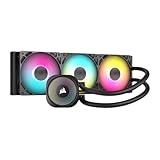


Standard Sizes
Liquid coolers are categorized by the size and number of fans they support. Standard models utilize either 120mm or 140mm fans. To help you plan your layout, the table below outlines the standard radiator sizes, their approximate physical dimensions, and their compatibility with typical mid-tower cases.
| Cooler Size | Typical Fan Setup | Radiator Dimensions (Inches) | Radiator Dimensions (cm) | Mid-Tower Compatibility Status |
|---|---|---|---|---|
| 120mm | 1 x 120mm Fan | 6.0″ x 4.7″ x 1.1″ | 15.2 x 12.0 x 2.7 cm | Universal (Fits rear, top, or front mounts) |
| 140mm | 1 x 140mm Fan | 6.3″ x 5.5″ x 1.1″ | 16.0 x 14.0 x 2.7 cm | High (Check rear width; fits most top/front mounts) |
| 240mm | 2 x 120mm Fans | 10.8″ x 4.7″ x 1.1″ | 27.4 x 12.0 x 2.7 cm | Standard (Fits top or front of almost all mid-towers) |
| 280mm | 2 x 140mm Fans | 12.3″ x 5.5″ x 1.1″ | 31.2 x 14.0 x 2.7 cm | Moderate (Requires extra width clearance on top/front) |
| 360mm | 3 x 120mm Fans | 15.6″ x 4.7″ x 1.1″ | 39.6 x 12.0 x 2.7 cm | High-End (Fits front or top of premium/panoramic cases) |
Note that the thickness listed above (typically around 1.1 inches or 2.7 cm) represents the radiator alone. Once you add standard cooling fans, which are usually 25mm (approx. 1 inch) thick, the total thickness of the assembly increases to about 5.2 cm to 5.5 cm (2.0 to 2.2 inches). This combined thickness is the most critical factor for vertical clearance inside your case.
How to Measure Your Space
Before purchasing a liquid cooler, you should physically measure your mid-tower case or consult its manual to confirm clearances. Follow these steps to ensure a precise fit:
- Locate the Mounting Rails: Open your case and locate the mounting rails or slotted screw holes on the top, front, and rear panels. This indicates where a radiator can physically attach.
- Measure the Maximum Length Clearance: Use a standard measuring tape to measure the flat area along the mounting panel. Ensure there are no structural obstructions, such as front-panel control cables, hard drive cages, or power supply shrouds. For a 360mm cooler, you will need at least 400mm (15.75 inches) of continuous, unobstructed flat space.
- Check for Motherboard and RAM Interference: This is especially crucial for top-mounted radiators. Measure the distance from the top mounting bracket of your case down to the top edge of your motherboard. You need at least 50mm to 60mm of clearance to prevent the radiator and fan assembly from colliding with your motherboard’s VRM heatsinks or high-profile RAM modules.
- Calculate Graphics Card (GPU) Clearance: If you plan to install your liquid cooler at the front of the case, measure the total interior length of your case from the back expansion slots to the front intake. Subtract the length of your graphics card. The remaining space must be wider than the combined thickness of your radiator and fans (typically around 55mm or 2.2 inches) to prevent the GPU from hitting the cooler.
By Room or Use Case
How you set up your workspace and where you position your PC tower can influence the type of liquid cooler that makes the most sense for your home environment.
The Minimalist Home Office (Quiet & Compact)
If your PC sits on a sleek writing desk in a quiet home office, noise reduction and clean aesthetics are likely your primary goals. A 240mm liquid cooler mounted to the top of a compact mid-tower is the ideal solution. This configuration leaves ample room for motherboard components, keeps the footprint of the tower small, and provides balanced cooling for daily productivity, video editing, and light gaming. Keeping the radiator on the top panel also allows natural heat dissipation, meaning the fans can spin at lower, quieter speeds.
The Dedicated Gaming Den (Maximum Performance & Visuals)
For dedicated gaming setups or high-performance creative workstations, maximizing thermal headroom is essential. In these environments, spacious panoramic mid-towers are highly popular because they showcase internal components like premium furniture pieces. A high-performance 360mm liquid cooler, such as the CORSAIR Nautilus 360 RS ARGB (priced around $90 to $110) or the budget-friendly Minorsonic 360mm AIO (ranging from $45 to $55), offers three 120mm PWM fans to handle heavy thermal loads. This setup fits beautifully in cases featuring wraparound glass panels, turning your cooling solution into a stunning focal point of the room.
Multi-Functional Entertainment Hubs & Home Bars
As we look ahead to design trends in 2026, home entertainment hubs are becoming more integrated, often combining gaming rigs, media servers, and custom beverage systems in a single room. If your entertainment space features a home bar alongside your media station, you might encounter different cooling needs. For instance, draft beer enthusiasts often use specialized tower coolers, such as the Coldtower Kegerator Super Tower Cooler (priced from $60 to $70), to keep draft lines cold and prevent foamy pours. Just as a PC liquid cooler uses circulating fluid or airflow to maintain optimal CPU temperatures, a kegerator tower cooler uses a dedicated blower system to push cold air directly up into the draft tower, ensuring your beverages and your processors are kept at their respective perfect temperatures.
Common Sizing Mistakes
Even experienced system builders can run into clearance issues during assembly. Avoiding these common mistakes will save you time and prevent unnecessary returns:
- Ignoring Total Thickness: Many builders check only the length of the radiator and forget to calculate the thickness of the fans. A radiator that fits perfectly on its own might block your 8-pin CPU power cables or rub against your RAM sticks once the 25mm-thick fans are installed.
- Assuming Front and Top Mounts Are Equal: A mid-tower case that supports a 360mm radiator in the front will not automatically support a 360mm radiator on the top. Top mounts are frequently limited to 240mm or 280mm due to motherboard clearance.
- Overlooking Tube Length and Direction: The tubes connecting the radiator to the CPU block must be long enough to reach without being stretched tight or kinked. When mounting a radiator at the front of a case, placing the tubes at the bottom is ideal for longevity and noise reduction, but this requires sufficient clearance near the bottom shroud.
- Mixing Up 140mm and 120mm Widths: A 280mm radiator uses two 140mm fans, making it noticeably wider than a 240mm radiator (which uses 120mm fans). Always verify that your case is wide enough to accommodate the extra 20mm of width required for 140mm-based cooling systems.
FAQ
Can I fit a 360mm liquid cooler in any mid-tower case?
No. While many modern, premium mid-towers are engineered to support 360mm radiators on the top or front panels, older or budget-oriented mid-towers are often too short or compact. Always verify the case manufacturer’s specs to ensure a 360mm radiator is explicitly supported.
Is a 240mm or 280mm liquid cooler better for a mid-tower?
A 280mm cooler offers roughly 10% more surface area than a 240mm cooler, providing slightly better thermal performance and quieter operation. However, 240mm coolers are much easier to install and enjoy near-universal compatibility with mid-tower top-mount layouts, making them the safer choice for tight spaces.
How much clearance do I need for both the radiator and fans?
On average, you need between 52mm and 57mm (about 2.0 to 2.2 inches) of total depth clearance. This accounts for a standard 27mm radiator and a standard 25mm fan. High-performance or extra-thick radiators may require 60mm or more of clearance.
How do I know if my RAM will block my top-mounted liquid cooler?
Check the motherboard offset of your case. If the mounting rails on the top panel are offset close to the left side window, the radiator will sit clear of the RAM. If the mounting rails are centered directly over the motherboard, you will need to use low-profile RAM modules (typically under 35mm in height) to avoid interference.









