
Our Top Picks

The Short Answer
For the vast majority of people setting up a home office, the answer to “do i need thirty two gigabytes of ram” is no. You only need 32GB of random access memory (RAM) if you regularly perform specialized, resource-intensive tasks such as editing 4K or 8K video, rendering 3D architectural models, running multiple local virtual machines, or playing highly modded simulation games. For standard remote work, web browsing, streaming, and managing spreadsheets, 16GB is the ideal sweet spot, while 8GB remains functional for budget-conscious users with basic daily needs.
What You Actually Get
To understand what 32GB of RAM actually brings to your desk, it helps to use a physical workspace analogy. Think of your laptop or desktop computer as a home office desk. Your storage drive (SSD or HDD) is your filing cabinet, where all your files are stored long-term. Your processor (CPU) is your brain, doing the actual work. Your RAM is the physical surface of the desk.
As an Amazon Associate we earn from qualifying purchases at no extra cost to you.

If you have a tiny 24-inch desk (representing 4GB or 8GB of RAM), you can only have a notebook and a single pen open at one time. If you want to look at a reference book, you have to pack up your notebook, open the filing cabinet, pull out the book, and set it down. This physical swapping slows you down. A massive 72-inch executive desk (representing 32GB of RAM) allows you to spread out twenty reports, three blueprints, a calendar, and a drawing tablet all at once. You can glance from one to the other instantly without putting anything away.
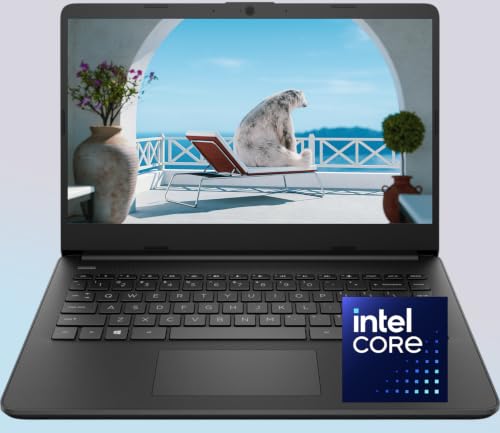
When you configure a computer with 32GB of RAM, you are purchasing digital desk space. It does not necessarily make your computer’s “brain” (the CPU) think faster, but it prevents the system from slowing down when you are working on massive projects. For example, entry-level laptops, such as the lightweight 3.1-pound WOWPC Custom HP 14″ Laptop, are often configured with an ultra-efficient Intel Pentium Silver N5030 processor. This processor draws a mere 6 watts of thermal design power (TDP). If you configure a budget-friendly machine like this with 32GB of RAM, you get an enormous digital workspace, but the modest processor will still limit how fast complex calculations are completed. RAM allows you to keep hundreds of browser tabs open simultaneously, but it won’t turn an entry-level processor into a high-end workstation chip.
Furthermore, having 32GB of RAM ensures that your operating system never has to use “paging” or “virtual memory.” When physical RAM fills up, your computer uses a portion of your solid-state drive (SSD) as temporary memory. Because even the fastest NVMe SSDs are significantly slower than physical RAM, your computer will stutter when this transition happens. With 32GB, your system almost never has to resort to this bottleneck, ensuring a seamless, stutter-free transition between heavy applications.
Pros
- Exceptional Digital Multitasking: You can run demanding programs like Adobe Photoshop, Microsoft Excel with massive datasets, and thirty Google Chrome tabs simultaneously without experiencing a single stutter.
- Future-Proofing Your Workspace: As software updates, web pages, and operating systems become heavier, memory demands will rise. Investing in 32GB now ensures your machine remains highly capable and lightning-fast well into 2026 and beyond.
- Seamless Virtualization: If your job requires you to run virtual machines (VMs) to test different operating systems or secure corporate networks, 32GB allows you to allocate 8GB or 16GB to a virtual desktop while leaving plenty of memory for your host machine.
- Improved Creative Workflows: High-resolution photo editing, audio production with dozens of virtual instrument tracks, and video editing become fluid because large preview files can load directly into the system’s ultra-fast memory rather than reading from the storage drive.
Cons
- Diminishing Returns for Average Users: If your daily routine consists of writing emails, watching Netflix, and drafting Word documents, your system will rarely use more than 10GB to 12GB of RAM. The extra 20GB will sit completely idle, offering zero noticeable speed improvement.
- Higher Upfront Costs: Upgrading a laptop or pre-built desktop from 8GB or 16GB to 32GB typically adds a premium of $100 to $250 to the purchase price, money that could be better spent on a faster processor or a larger solid-state drive.
- Hardware Bottlenecks: Pairing 32GB of RAM with a low-tier processor, like the Intel Pentium Silver N5030 found in budget-friendly, lightweight laptops, creates an imbalance where the processor becomes a bottleneck long before you can utilize the massive memory pool.
- Slightly Higher Energy Draw: While minimal, running more memory chips or higher-density RAM modules draws marginally more power (typically an extra 1 to 3 watts), which can slightly reduce battery runtimes on portable 14-inch laptops.
Who Should Buy It
You should opt for 32GB of RAM if you are a creative professional, a software developer, or a power user who treats their computer like a heavy-duty workstation. If your daily workflow involves editing 4K video footage, mixing multi-track audio, rendering 3D models in Blender, or keeping multiple local server environments running in the background, this upgrade is highly recommended. It is also an excellent choice for dedicated PC gamers who stream their gameplay to platforms like Twitch while running chat overlays, system monitors, and high-fidelity games with intensive graphics mods.
Who Should Skip It
You should skip the 32GB upgrade if your computing needs are typical of a standard home office or student lifestyle. If your primary tools are web browsers, video conferencing software like Zoom, cloud productivity suites like Google Workspace, and media streaming apps, 32GB of RAM is an unnecessary luxury. Instead, save your money or allocate that budget toward a higher-quality computer display, an ergonomic office chair, or upgrading your storage from a 256GB SSD to a spacious 1TB SSD.
Cheaper Alternatives
If you want to optimize your budget without sacrificing daily performance, there are several cost-effective memory and hardware configurations to consider. The table below outlines these alternatives, their typical price ranges, and what you sacrifice by choosing them.
| Memory Configuration | Estimated Price Range | Performance Trade-off |
|---|---|---|
| 8GB DDR4 / DDR5 RAM | $300 – $400 (Entire Laptop) | Best for strict budgets. You will notice slow-downs if you keep more than 15 browser tabs open alongside video calls. |
| 16GB DDR4 / DDR5 RAM | $450 – $700 (Mid-Range Laptop) | The ideal sweet spot. Provides smooth multitasking for 95% of standard office tasks, though it may struggle with heavy 4K video rendering. |
| 16GB RAM + 512GB NVMe SSD | $500 – $800 (Balanced Build) | Excellent overall speed. The fast storage drive handles temporary file swapping quickly, making the system feel almost as fast as a 32GB machine. |
FAQ
Does 32GB of RAM make my computer start up faster?
No. Your computer’s boot time is primarily determined by your storage drive’s read speeds and your operating system’s startup configurations. Upgrading to 32GB of RAM will not make your computer turn on or load its initial desktop screen any faster than a machine with 8GB or 16GB of RAM, assuming both use a standard modern solid-state drive (SSD).
Can I upgrade my laptop’s RAM to 32GB by myself later?
It depends entirely on your laptop’s design. Many ultra-thin, lightweight laptops have their RAM chips soldered directly onto the motherboard to save space and reduce weight, meaning they cannot be upgraded after purchase. However, larger productivity laptops and traditional desktop computers often feature upgradeable slots (SO-DIMMs or DIMMs) that allow you to purchase a cheap memory kit later and install it with a simple screwdriver.
Will 32GB of RAM improve my internet browsing speed?
Not directly. Your internet speed is determined by your service provider, your router, and your Wi-Fi signal strength. However, if you are someone who keeps dozens of media-heavy tabs open across multiple browser windows, 32GB of RAM will prevent those inactive tabs from reloading or freezing when you click back onto them, resulting in a much smoother browsing experience.
How does RAM capacity affect my laptop’s battery life?
Memory modules require a constant, small electrical current to hold data. Higher-density RAM configurations (such as a single 32GB stick or dual 16GB sticks) draw slightly more power than smaller 8GB configurations. While this extra draw is minimal—usually amounting to less than 2 watts of power—it can result in a minor reduction in total battery life, typically shaving about 15 to 30 minutes off a laptop’s maximum run time during a standard workday.









