
Our Top Picks
 ASUS ROG Strix B850-I Gaming WiFi AMD AM5Mini-ITX | M.2x2 | WiFi 79 x 3.8 x 7.3 inches2.3 PoundsCheck on Amazon
The Short Answer
Yes, a Mini-ITX gaming build is absolutely worth it, but only on one condition: you must value desk space, minimalism, and physical portability enough to justify a 20% to 30% price premium and a significantly more challenging assembly process. If your gaming setup shares space with a clean, Scandinavian-style home office or fits into a compact urban apartment, the space savings are revolutionary. However, if you are on a tight budget or want an effortless, whisper-quiet build experience, you should stick to a standard Mid-Tower ATX build.
What You Actually Get
To understand the appeal of a Mini-ITX (often called Small Form Factor, or SFF) build, you have to look at the physical footprint. A standard ATX mid-tower case occupies about 40 to 60 liters of volume and can weigh upwards of 30 to 40 pounds when fully loaded. A premium Mini-ITX case shrinks that volume down to a mere 11 to 18 liters, weighing a highly portable 10 to 15 pounds. This allows the PC to sit elegantly on top of a shallow 24-inch-deep desk, leaving ample room for a large monitor, a desk pad, and actual workspace.
As an Amazon Associate we earn from qualifying purchases at no extra cost to you.

To achieve this, every component is downsized. Standard ATX motherboards measure 12 by 9.6 inches, while a Mini-ITX motherboard is a tiny 6.7 by 6.7-inch square. Despite the microscopic footprint, modern engineering ensures you do not have to compromise on raw power. For example, the ASUS ROG Strix B850-I Gaming WiFi AMD AM5 B850 Mini-ITX mITX Motherboard (around $330) packs cutting-edge features like DDR5 support, WiFi 7, PCIe 5.0, and robust power delivery into a space no larger than a paperback book.
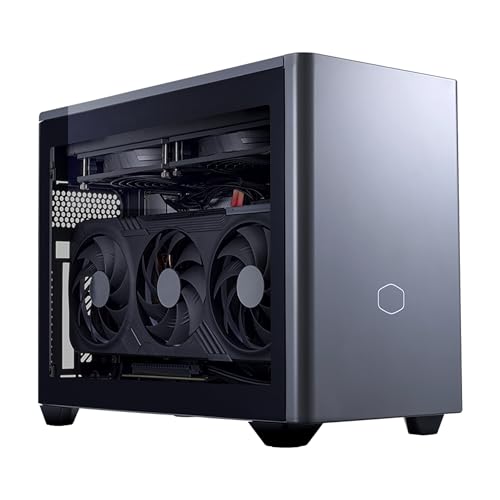
For those who want the space-saving luxury without the high-stress assembly process, pre-built options exist. The Cooler Master NR2 Pro Gaming PC 9800X3D + RTX 5070 Ti Mini ITX PC (around $3,000) demonstrates exactly what is possible in this form factor: a top-tier AMD Ryzen 7 9800X3D processor paired with an NVIDIA RTX 5070 Ti graphics card, all tucked neatly inside a beautifully ventilated, compact chassis that looks right at home on an executive desk.
Pros
- Unmatched Spatial Efficiency: Reclaims up to 60% of the desk space consumed by a traditional tower. It can easily sit on a floating shelf, a small side table, or inside an open media console.
- High-End Interior Aesthetics: A compact, dense build looks incredibly sophisticated. Without the empty, cavernous space of a half-filled ATX tower, a Mini-ITX build looks like a highly engineered piece of industrial design.
- Portability: Perfect for hybrid workers, college students traveling between home and dorms, or gamers who want a high-end system they can easily move to the living room TV for local multiplayer sessions.
- No Performance Compromises: Thanks to dense power delivery systems and innovative cooling layouts, you can run flagship CPUs and high-end graphics cards at their maximum rated clock speeds without throttling.
Cons
- The “SFF Tax” (Higher Component Costs): Miniaturized parts cost more to design and manufacture. You will pay a premium for SFX (Small Form Factor) power supplies and highly engineered motherboards like the around $330 ASUS ROG Strix B850-I.
- Difficult and Stressful Assembly: Cable management in a tight space requires a strict, puzzle-like installation sequence. One wrong step can force you to dismantle the entire build just to plug in a single fan header.
- Strict Compatibility Limitations: You must meticulously measure every component. A graphics card that is even 2 millimeters too long or a CPU cooler that is 3 millimeters too tall simply will not fit.
- Limited Future Upgradability: Mini-ITX motherboards only have two RAM slots and one PCIe slot. If you want to add a sound card, a capture card, or expand your system memory past two sticks, you are out of luck.
Who Should Buy It
You should choose a Mini-ITX build if you are an aesthetic-focused home decorator, an urban dweller with limited square footage, or a minimalist who despises bulky plastic towers cluttering the floor. It is perfect for tech enthusiasts who view the building process as a rewarding mechanical puzzle and have the patience to route cables with surgical precision.
Who Should Skip It
Skip the Mini-ITX form factor if you are building your very first computer on a strict budget. If you want the absolute most performance per dollar, that extra $150 to $300 spent on premium small-form-factor parts is better spent upgrading your GPU or CPU. You should also skip it if you prefer a completely silent system; smaller cases require smaller fans that must spin faster—and louder—to displace heat under heavy gaming loads.
Cheaper Alternatives
If you love the idea of a smaller PC but are intimidated by the high prices and tight clearances of Mini-ITX, consider these stepping-stone alternatives:
| Option | Estimated System Cost Savings | Trade-off |
|---|---|---|
| Micro-ATX (mATX) Build | Save $150 – $250 | Slightly larger footprint (approx. 25-30 liters), but offers standard component pricing, 4 RAM slots, and a much easier building experience. |
| Budget ATX Mid-Tower | Save $200 – $350 | Maximizes desk space hogging (40+ liters) and is heavy to move, but offers the absolute lowest component costs and effortless cooling. |
| High-End Gaming Laptop | Comparable to premium SFF | Zero upgradability for CPU and GPU, louder fan noise under load, but offers built-in display, keyboard, and ultimate portability. |
FAQ
Do Mini-ITX builds overheat or thermal throttle easily?
Not if you choose your components wisely. Modern Mini-ITX cases utilize mesh panels and sandwich-style layouts that place the graphics card directly against an exterior vent, allowing it to draw in cool ambient air. While they run warmer than massive ATX towers with six intake fans, a well-configured SFF build will remain safely within normal operating temperatures without thermal throttling.
Are Mini-ITX builds harder to upgrade in the future?
Yes, upgrading is more challenging. While swapping RAM or storage is relatively straightforward, replacing a graphics card can be a major headache. Looking ahead to the hardware landscape of 2026, graphics card dimensions and power requirements continue to shift. In a Mini-ITX case, a larger replacement GPU might require you to buy a completely new, larger chassis or upgrade your SFX power supply to handle the increased wattage.
Can I use a standard ATX power supply in a Mini-ITX case?
Generally, no. Most true Mini-ITX cases require a specialized, smaller SFX or SFX-L power supply to leave room for cable routing and airflow. While a few larger ITX cases do support standard ATX power supplies, using one severely limits your cable management space and can choke your graphics card’s air intake.
Is it better to buy a pre-built Mini-ITX PC or build my own?
If you enjoy hands-on projects and want to customize every component, building your own is highly rewarding. However, because SFF cable management and component matching are so difficult, buying a professionally engineered pre-built like the Cooler Master NR2 Pro (around $3,000) saves hours of frustration. Pre-builts ensure that high-wattage components, custom liquid cooling, and power cables are routed perfectly out of the box with a full warranty.









