
Building a first PC often starts with a space problem: a desk that already holds a monitor, speakers, notebooks, and the daily clutter of home life. A micro ATX case can be the practical middle ground. It gives beginners more room to work than many tiny systems while taking up less visual and physical space than a full-size tower.
The best choice depends on what matters most in your room. Some builders want a low-cost, airflow-focused case that can sit beneath a compact desk. Others want a glass-panel showpiece for a bedroom setup, a wood-accented case that feels at home beside furniture, or a flexible chassis that leaves room for future parts. For 2026, these are the best beginner-friendly picks based on price, stated compatibility, included features, and everyday setup appeal.
As an Amazon Associate we earn from qualifying purchases at no extra cost to you.


Our Top Picks
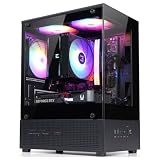
 DARKROCK EC2 ATX Mid Tower Gaming Computer PCATX/Micro-ATX/Mini-ITX17.6 x 8.6 x 15.2 InchesCheck on Amazon
 MOROVOL MATX PC Case13.39"D x 10.87"W x 12.44"H13.39 x 10.87 x 12.44 Inches10.7 PoundsCheck on Amazon


Top 3 picks at a glance
Cooler Master Q300L V1 Micro-ATX PC Case, High Airflow, Transparent PanelCheck priceMONTECH TG3 Panoramic ATX PC Case, Back-Connect Ready & 4 ARGB Fans,...Check priceQuick Picks
| Product | Best for | Price |
|---|---|---|
| Cooler Master Q300L V1 Micro-ATX PC Case | Budget airflow builds | Check on Amazon |
| MONTECH TG3 Panoramic ATX PC Case | RGB-focused first builds | Check on Amazon |
| DARKROCK EC2 ATX Mid Tower Gaming Computer PC Case | Type-C-ready value shoppers | Check on Amazon |
| MOROVOL MATX PC Case V3 | Panoramic glass on a budget | Check on Amazon |
| JONSBO D32 STD Micro-ATX PC Case | Flexible, upgrade-minded builds | Check on Amazon |
| Okinos Genuine Walnut Wood Micro ATX Case | Living-room-friendly style | Check on Amazon |
| NZXT H5 Flow Compact ATX Mid-Tower PC Case | Clean, understated setups | Check on Amazon |
| Zalman CUBIX-G Micro-ATX Compact Mini Tower | Simple compact gaming builds | Check on Amazon |
How We Compared
Beginner cases should reduce avoidable stress. We prioritized straightforward form factors, useful included components, visible airflow intent, front-panel convenience, and prices that make sense for a first system. We also considered how each case may fit into a real home: under a desk, beside a TV console, in a dorm-style room, or on a tabletop where appearance matters.
Compatibility is especially important for a first build. Before buying any case, match it to your motherboard format, power supply, graphics card, cooling hardware, and preferred front-panel connections. Several cases here are ATX models rather than micro ATX-only designs; they can still suit a micro ATX build, but they may occupy more room than a dedicated micro ATX enclosure. Prices below are the listed prices and can change.
The 8 Best Picks
1. Cooler Master Q300L V1 Micro-ATX PC Case — Best Budget Airflow Pick
The Cooler Master Q300L V1 is the most approachable option for a beginner who wants a true micro ATX case without spending much of the overall parts budget. At around $39, it leaves more money for components that affect daily performance, such as storage or memory. Its high-airflow positioning makes it a sensible starting point for builders who would rather prioritize practical ventilation than elaborate lighting. The transparent panel also lets a first-time builder enjoy the finished system without committing to a fully panoramic display case.
- Pro: Low around $39 price makes it one of the easiest cases to fit into a value-focused build.
- Pro: High-airflow design and transparent panel balance function with visible components.
- Con: It does not emphasize included RGB fans or premium front-panel extras.
Skip it if your goal is a highly styled, glass-heavy showcase build with lighting already included.
2. MONTECH TG3 Panoramic ATX PC Case — Best for an RGB Showcase
The MONTECH TG3 is for beginners who want their first PC to look finished right away. Its panoramic presentation and four included ARGB fans make it particularly appealing for a desk setup where the computer stays visible. Although it is an ATX case, it can appeal to micro ATX builders who prefer extra visual presence and the flexibility of a larger format. Back-connect readiness is another notable feature for shoppers considering a cleaner-looking cable layout. At around $66, it costs more than entry-level micro ATX cases but includes a stronger visual package.
- Pro: Four pre-installed ARGB fans reduce the need to shop for matching lighting components.
- Pro: Panoramic styling gives a first build a more display-oriented look.
- Con: An ATX case may be larger than necessary for a space-saving micro ATX system.
Skip it if your priority is the smallest possible footprint or a subdued, furniture-like appearance.
3. DARKROCK EC2 ATX Mid Tower Gaming Computer PC Case — Best Type-C-Ready Value
The DARKROCK EC2 is a useful middle-ground choice for buyers who want a gaming-oriented ATX mid tower at a moderate around $54 price. Its Type-C-ready positioning is especially relevant for beginners shopping for a case that feels current and convenient for modern peripherals. A larger mid-tower format can also feel less intimidating when organizing parts, since it generally avoids the tightly packed impression of a compact build. It is best suited to a beginner who has room for a larger case and wants flexibility more than minimalism.
- Pro: Type-C-ready design is a practical convenience for shoppers who value newer front-panel connectivity.
- Pro: around $54 is a competitive price for an ATX mid-tower gaming case.
- Con: It is not a dedicated micro ATX case, so it may take more room than some buyers need.
Skip it if your desk, shelf, or floor space specifically calls for a compact micro ATX tower.
4. MOROVOL MATX PC Case V3 — Best Panoramic Budget Choice
The MOROVOL MATX PC Case V3 is a strong match for beginners who want a dramatic glass-forward build without moving far beyond entry-level pricing. At around $44, it combines a micro ATX format with a 270-degree panoramic tempered-glass panel and three pre-installed fans. That makes it a practical option for showing off coordinated components while avoiding the added task of immediately buying case fans. The USB 3.0 front connection is also a familiar, useful feature for everyday devices. Its visual emphasis makes it better for desktop display than for hidden placement.
- Pro: 270-degree tempered-glass presentation creates a prominent showcase effect.
- Pro: Three pre-installed fans add useful out-of-the-box value at around $44.
- Con: The glass-focused design may not suit buyers who prefer a discreet case.
Skip it if you want an understated enclosure for a living room or a case designed primarily around a minimalist exterior.
5. JONSBO D32 STD Micro-ATX PC Case — Best for Future Upgrades
The JONSBO D32 STD is the most compatibility-focused micro ATX pick in this roundup. It supports micro ATX back-connect and BTF motherboards, along with graphics cards up to 365mm, a 240AIO, air coolers up to 163mm, and ATX, SFX-L, or SFX power supplies. Those stated options give a beginner useful planning flexibility before purchasing the rest of the build. It also includes USB 3.2 and is priced at around $62, putting it in the middle of this group. This is the case for shoppers who want choices, not the absolute lowest upfront cost.
- Pro: Broad stated support for motherboard, graphics card, cooler, and power supply configurations.
- Pro: Back-connect and BTF motherboard support can help create a cleaner-looking build.
- Con: Its compatibility-focused feature set may be more than a very basic first build requires.
Skip it if you want the least expensive possible case or prefer a case with decorative fans already installed.
6. Okinos Genuine Walnut Wood Micro ATX Case — Best for Home-Friendly Style
The Okinos Genuine Walnut Wood Micro ATX Case is the standout for buyers who do not want their computer to look like a conventional gaming tower. Its Cypress 3 wood styling, tempered-glass side panel, and Type-C feature set make it an appealing fit for a home office, bedroom, or living area where furniture coordination matters. It also arrives with four 120mm 3-pin non-PWM case fans pre-installed, a meaningful convenience for a first-time builder. At around $59, it offers a distinct look without moving into a premium price tier.
- Pro: Genuine walnut wood styling is easier to blend with warm furniture and home décor.
- Pro: Four pre-installed 120mm fans help simplify the initial parts list.
- Con: The included fans are 3-pin non-PWM models, which may not suit buyers seeking more advanced fan control.
Skip it if your preferred look is aggressive RGB lighting or you want to select every cooling component separately.
7. NZXT H5 Flow Compact ATX Mid-Tower PC Case — Best Clean-Look ATX Option
The NZXT H5 Flow is a compact ATX mid-tower for beginners who value a clean, restrained black case over a more decorative gaming presentation. At around $69, it is the highest-priced choice here, so it makes the most sense for buyers who are comfortable paying more for the NZXT design direction and a flow-focused identity. A micro ATX motherboard can work well in an ATX-oriented build when the buyer wants more room around the components or expects to change parts later. Its simple appearance is particularly easy to pair with a neutral desk setup.
- Pro: Compact ATX mid-tower format can offer a less cramped building experience.
- Pro: Flow-focused positioning suits buyers who prioritize a practical, uncluttered case concept.
- Con: At around $69, it costs more than the dedicated budget micro ATX options.
Skip it if you need the smallest case possible or want pre-installed ARGB lighting as part of the purchase.
8. Zalman CUBIX-G Micro-ATX MATX Compact Mini Tower — Best Simple Compact Alternative
The Zalman CUBIX-G is a straightforward compact mini-tower choice for a beginner who wants a micro ATX-focused case at around $44. Its compact positioning is the key attraction: it is aimed at shoppers trying to keep a gaming PC manageable in a smaller room without moving to an ultra-small specialty system. The black finish is easy to coordinate with most monitors, desks, and peripherals, while the simple format can be a welcome alternative to cases that lean heavily on RGB or panoramic glass. It is a sensible basics-first pick.
- Pro: Compact mini-tower format is well aligned with space-conscious micro ATX builds.
- Pro: around $44 keeps it within a beginner-friendly budget range.
- Con: Its listed feature set is more basic than cases with included fans, wood trim, or back-connect support.
Skip it if you want a showpiece case with extensive glass, pre-installed lighting, or a more feature-rich specification.
Buying Guide
Start With the Right Motherboard Format
Micro ATX cases are the most direct match for a micro ATX motherboard. ATX cases can also accommodate a micro ATX board, but they may consume more desk or floor space. Choose ATX only when you value a roomier build area, a larger visual presence, or future flexibility more than compactness.
Check Every Major Part Before Ordering
Do not buy a case based on motherboard format alone. Confirm graphics card length, CPU cooler height, radiator support, power supply type, storage needs, and front-panel ports. The JONSBO D32 STD is the clearest example of why this matters: its stated support includes 365mm graphics cards, a 240AIO, 163mm air coolers, and several power supply formats. For every other model, verify the manufacturer’s current specifications before choosing components.
Decide Whether Included Fans Matter to You
Included fans can simplify a beginner build and reduce immediate spending. The MONTECH TG3 includes four ARGB fans, the MOROVOL includes three fans, and the Okinos includes four 120mm 3-pin non-PWM fans. If you prefer a particular lighting ecosystem or want more control over fan selection, a simpler case may be the better starting point.
Our Verdict
For most beginners building a practical micro ATX PC on a tight budget, the Cooler Master Q300L V1 is the best starting point at around $39 thanks to its micro ATX focus, transparent panel, and airflow-oriented design. Choose the MOROVOL MATX PC Case V3 if you want the strongest low-cost glass showcase look with three fans included. Choose the JONSBO D32 STD if compatibility and upgrade planning are your priorities. For a PC that needs to feel more at home beside wood furniture than gaming accessories, the Okinos Genuine Walnut Wood Micro ATX Case is the most distinctive choice.
FAQ
Is micro ATX a good choice for a beginner PC build?
Yes. Micro ATX is often a practical beginner format because it can save space while remaining less restrictive than many very small cases. The key is confirming that the case supports your specific graphics card, cooler, power supply, and front-panel needs.
Can I put a micro ATX motherboard in an ATX case?
Yes, many ATX cases support micro ATX motherboards. The tradeoff is size: an ATX case may provide more working room but can take up more space in a bedroom, office, or desk area than a dedicated micro ATX case.
Which case here has the most included fans?
The MONTECH TG3 and Okinos Genuine Walnut Wood Micro ATX Case each list four included fans. The MONTECH includes four ARGB fans, while the Okinos includes four 120mm 3-pin non-PWM fans.
Should I choose a glass-panel case for my first build?
Choose glass if you want to see your components and plan a coordinated interior. The MOROVOL’s 270-degree panoramic tempered-glass panel is especially display-oriented. Choose a less showy case if the PC will be tucked under a desk or if you prefer a quieter visual presence in the room.
Related guides
- Best Gaming PC for Fortnite: Eight Prebuilt Desktops Sorted by Refresh Rate Goal (2026)
- Best RX 9070 XT Prebuilt Gaming PCs: Seven Desktops and Three Cards Compared: 10 Compared (2026)
- CyberPowerPC vs iBUYPOWER Gaming PC: How the Two Brands Compare
- Best RX 9070 XT Prebuilt Gaming PC (2026): 5 Picks Compared









