
Our Top Picks


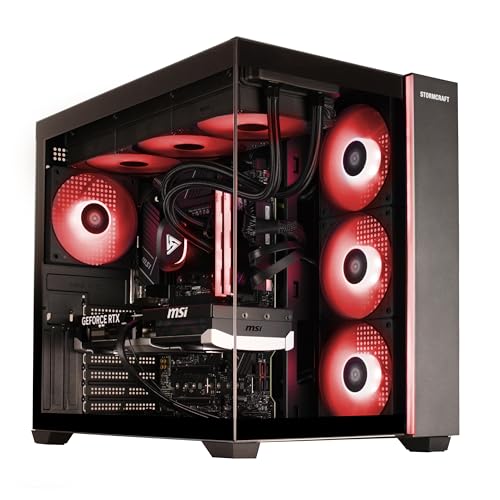

Top 3 picks at a glance
The Short Answer
For a dedicated streaming PC build in 2026, 32GB of DDR5 RAM is the sweet spot for most creators. It gives you enough headroom to run your game, encoding software like OBS Studio, browser sources, chat bots, and Discord simultaneously without stuttering or dropped frames. 16GB is the workable minimum for 1080p streaming if you keep background apps to a minimum, while 64GB is only necessary for heavy multitaskers who edit 4K video, run virtual machines, or stream and record at high bitrates at the same time.
If you are building new, choose a 2x16GB DDR5 kit at 5200MHz to 6000MHz. That dual-channel configuration doubles memory bandwidth compared to a single stick, improves gaming frame stability, and leaves two DIMM slots open on most ATX motherboards for a future upgrade to 64GB. For DDR4 builds on a tighter budget, a 2x16GB kit at 3200MHz CL16 remains fully capable for 1080p and 1440p streaming.
As an Amazon Associate we earn from qualifying purchases at no extra cost to you.



Standard Sizes
RAM itself is small, but the form factor and the case you need to house it affect your build footprint. Most streaming PCs use desktop DIMMs, while compact or small-form-factor builds may use laptop-style SO-DIMMs. Use this table to plan your motherboard and case clearance.
| Component / Form Factor | Typical Dimensions (inches) | Typical Dimensions (cm) | Notes for Streaming Builds |
|---|---|---|---|
| Desktop DDR4 / DDR5 DIMM (standard height) | 5.24 x 1.18 x 0.15 | 13.30 x 3.00 x 0.38 | Standard for ATX and Micro-ATX boards. Height matters for CPU air cooler clearance. |
| Desktop DDR5 DIMM (low-profile, e.g., Corsair Vengeance LPX style) | 5.24 x 1.22 x 0.15 | 13.30 x 3.10 x 0.38 | Fits under large air coolers. Ideal for tight cases. |
| Desktop DDR5 DIMM (tall RGB heatsink) | 5.24 x 1.73 x 0.31 | 13.30 x 4.40 x 0.80 | Check cooler and case clearance. Adds 0.5 inch height vs low-profile. |
| Laptop SO-DIMM DDR4 / DDR5 | 2.66 x 1.18 x 0.15 | 6.76 x 3.00 x 0.38 | Used in Mini-PC and some compact streaming boxes only. |
| Mid-Tower ATX Case (typical for streaming builds) | 18.0 x 8.5 x 18.5 | 45.7 x 21.6 x 47.0 | Supports full ATX board, 4 RAM slots, 330mm+ GPU length. Weight 18 to 28 lbs empty. |
| Micro-ATX Compact Case | 15.5 x 7.8 x 14.5 | 39.4 x 19.8 x 36.8 | Fits 2-4 RAM slots but verify CPU cooler height limit, usually 160-165mm. |
For reference, current prebuilt streaming PCs with 32GB DDR5 typically range from $1,600 to $2,200, including models with an RTX 5060 Ti or RTX 5070, a Ryzen 7 8700F or 7800X3D, and a 1TB to 2TB NVMe SSD. Standalone 16GB DDR4 kits like a 2x8GB 3200MHz CL16 set generally range from $45 to $140 depending on brand and heatsink design, while a 32GB DDR5 6000MHz kit ranges from $95 to $180.
How to Measure Your Space
RAM compatibility is not just about capacity. Physical clearance, motherboard support, and power headroom all matter. Measure before you buy.
- Confirm your motherboard form factor and DIMM slots: Open your case or check the spec sheet. ATX boards usually have 4 slots, Micro-ATX has 4, Mini-ITX has 2. Count usable slots and note the maximum supported capacity, typically 128GB for modern DDR5 boards and 64GB to 128GB for DDR4.
- Measure CPU cooler to RAM clearance: With the side panel off, measure from the motherboard surface to the bottom fin of your air cooler. You need at least 1.3 inches (33mm) for low-profile RAM and 1.75 inches (44mm) for tall RGB RAM. If clearance is under 1.4 inches, choose low-profile memory.
- Check case depth for full-height modules: Measure internal height from the motherboard tray to the side panel. Most mid-towers offer 165mm to 175mm CPU cooler clearance, which is sufficient for any DDR5 DIMM. Compact cases under 14 inches tall may limit you to 34mm-height RAM.
- Verify power and airflow: RAM draws very little power, 3 to 5 watts per DIMM, but your total streaming system load matters. A typical streaming build with a Ryzen 7 and RTX 5070 draws 450 to 650 watts under load. Ensure your power supply is rated 750W or higher with at least 2 inches of clearance around DIMMs for airflow.
- Measure desk footprint: Place painter’s tape on your desk to outline your intended case size. A mid-tower at 18 x 8.5 inches needs at least 22 x 12 inches of desk or floor space to allow 2 to 3 inches of rear clearance for cables and exhaust.
By Room or Use Case
How much RAM you need depends on what you stream, your resolution, and how many apps run alongside your game.
1080p Casual Streaming – 16GB Minimum
If you stream 1080p at 30 or 60 fps using GPU encoding such as NVENC on an RTX 5060 Ti or RTX 5070, and you keep multitasking light, 16GB in a 2x8GB configuration is workable. Expect memory usage of 10GB to 13GB with a game, OBS Studio at 6000 kbps, one or two browser sources, and Discord. This setup is common in smaller bedrooms or dorms where a Micro-ATX build saves space. Keep browser tabs under 10 and close video editors while live.
1440p Gaming Plus Streaming – 32GB Recommended
This is the standard for most home streaming setups. You are gaming at 1440p while encoding a 1080p 60 fps stream, monitoring chat on a second display, and possibly running Spotify, StreamElements, and a webcam filter. Usage typically lands at 14GB to 20GB. A 2x16GB DDR5 5600MHz to 6000MHz kit gives you smooth alt-tabbing and prevents frame drops when Windows caches game assets. At 32GB, you can also leave Chrome, Photoshop, or Premiere Pro in the background without crashing your stream.
Dual-PC Streaming or 4K Recording – 32GB to 64GB
In a dual-PC setup, the gaming PC can stay at 32GB while the dedicated streaming and encoding PC handles OBS, multiple scenes, and recording. If that second PC also records locally at high bitrate or captures 4K60 footage to a 1TB or 2TB drive, 64GB in a 2x32GB kit prevents memory bottlenecks during long sessions. This is ideal for a dedicated office or studio room where you have space for two mid-towers and dual monitors. Weight for two complete systems with peripherals is typically 45 to 60 lbs combined.
Heavy Multitasking and Content Creation – 64GB
Choose 64GB if your streaming PC doubles as an editing workstation. Editing 4K video, working with large After Effects compositions, running virtual machines, or hosting a local Minecraft or chat server while streaming can push usage above 28GB. A 2x32GB DDR5 kit keeps you under 70 percent utilization during those workloads and extends the life of your build for three to five years without an upgrade. Only consider 128GB if you regularly work with 8K raw footage or complex 3D rendering.
Common Sizing Mistakes
Buying a single 32GB stick instead of 2x16GB: One stick cuts your memory bandwidth in half because it runs in single-channel mode. That can cost 10 to 15 percent in gaming frame rates and cause stutters in CPU-intensive games while streaming. Always buy matched pairs.
Choosing tall RGB RAM with a large air cooler: Big air coolers like the 160mm tower style overhang the first two DIMM slots. Tall RGB modules at 44mm height will not fit underneath. If you want a large air cooler, buy low-profile memory or switch to a 240mm or 360mm AIO liquid cooler that leaves RAM fully exposed.
Mixing kits or mismatched speeds: Adding a second kit later with different speed, latency, or voltage can force all sticks to run at the slowest speed or fail to boot. If you plan to go from 32GB to 64GB, buy the exact same model number and speed, or better yet, buy the full capacity as one kit from the start.
Ignoring motherboard QVL and height limits: Not every 6000MHz kit is stable on every board. Check the motherboard qualified vendor list for RAM speed support, and confirm your case lists at least 165mm CPU cooler clearance if you use tall DIMMs.
Overbuying capacity and underspending on speed: For streaming, 64GB of slow 4800MHz RAM will feel worse than 32GB of fast 6000MHz CL30 RAM in most games. Capacity matters, but once you have 32GB, faster timings and dual-channel operation give a more noticeable boost than adding more gigabytes you will not use.
FAQ
Is 16GB enough for streaming PC gaming in 2026?
Yes for entry-level 1080p streaming, but it is tight. Modern games alone can use 9GB to 12GB, and OBS plus browser sources add another 2GB to 4GB. You will stay above 80 percent memory usage often, which leaves little room for Discord, Chrome, or background updates. If you can stretch your budget by $40 to $70, moving to 32GB in a 2x16GB kit eliminates most memory-related stutters and lets you multitask comfortably.
Do I need DDR5 or is DDR4 still good for streaming?
Both work. DDR4 at 3200MHz CL16 in a 32GB kit is still capable for 1080p and 1440p streaming and costs less, which is helpful if you are reusing an older AM4 or Intel LGA 1700 board. DDR5 at 5600MHz to 6000MHz offers higher bandwidth, better efficiency at 1.25V to 1.35V, and more future upgrade headroom on AM5 and newer Intel platforms. For a new build, choose DDR5. For an upgrade to an existing DDR4 system, staying on DDR4 is more cost effective than replacing the motherboard and CPU.
Will more RAM increase my streaming FPS?
Up to a point. Going from 8GB to 16GB improves streaming performance significantly, and 16GB to 32GB smooths out 1 percent lows and prevents drops when multitasking. Beyond 32GB, you will not see higher in-game FPS unless you were previously running out of memory and hitting page file swaps. For streaming quality, RAM is about stability and headroom, while your GPU encoder and CPU handle the actual frame encoding. Pair 32GB RAM with a modern GPU with hardware encoding for the best result.
Can I add more RAM later if I start with 16GB?
Yes, if your motherboard has four DIMM slots and you started with a 2x8GB kit. You can add a second identical 2x8GB kit to reach 32GB, or replace it with a 2x16GB kit and sell the old kit. If you have a two-slot Mini-ITX board, you must replace the sticks entirely. To keep upgrade options open, most builders start with 2x16GB on a four-slot board, which leaves two slots free and makes a future move to 64GB simple without discarding memory.









