
Fitting a true 4K gaming rig into a small apartment living room or a compact home office desk is a different challenge than building a full tower for a basement game room. You want something that disappears behind the TV, sits quietly on a bookshelf, or tucks under a wall-mounted monitor without blocking airflow, yet still drives a 4K television at 60Hz for both gaming and streaming.
That is where the small form factor PC makes sense, but not every mini PC marketed as 4K-ready can actually handle modern games at that resolution. In 2026 the most realistic approach is to match your expectations and your display setup to the right tier of hardware, from efficient integrated graphics for lighter titles and media to a discrete GPU system built for demanding AAA gaming. Below are eight current options ranked for different needs and budgets.
As an Amazon Associate we earn from qualifying purchases at no extra cost to you.


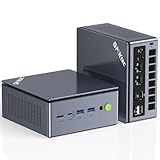
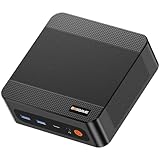


Our Top Picks


Top 3 picks at a glance
Quick Picks
| Product | Best for | Price |
|---|---|---|
| KAMRUI E3B Mini PC, AMD Ryzen 5 7530U, 16GB LPDDR4X, 512GB SSD | Best Budget Efficiency Pick | Check on Amazon |
| Glorlin Mini PC Ryzen 5 6600H (Beats 7730U), 16G LPDDR5 512G NVMe SSD, Mini Desktop Computer with 4K Triple Display, WiFi 6 BT5.3 Dual LAN | Best for Triple 4K Displays on a Budget | Check on Amazon |
| ACEMAGIC K1 Gaming Mini PC Ryzen 7 7735HS 24GB 512GB SSD Windows 11 Pro | Best Value for Light 4K Gaming | Check on Amazon |
| GMKtec Gaming PC Mini Computer, M7 Ultra Ryzen 7 PRO 6850U 32GB DDR5 RAM + 512GB PCIe SSD Oculink Dual NIC LAN 2.5G Desktop, Dual USB4, HDMI 2.1, USB-C | Best for Connectivity and Future Expansion | Check on Amazon |
| BOSGAME P6 Ryzen 9 6900HX Mini PC, 24GB RAM 4800MT/s 1TB PCIe4.0 SSD | Best Mid-Range Performance | Check on Amazon |
| MINISFORUM G1 Pro Mini PC, Ryzen 9 8945HX, 16C/32T up to 5.4GHz, GeForce RTX 5060 8GB GDDR7, 32GB DDR5, 1TB SSD, 5GbE, Wi-Fi 7, Quad 4K, 245W Performance Gaming PC | Best True 4K Gaming Pick | $1719 |
| Bmax Mini PC Micro Desktop Computer 12GB DDR4 RAM 512GB NVMe SSD, Win 11 Pro, Intel Core i3-1000NG4 (Up to 3.2GHz), 4K Triple Display (Dual HDMI+Type-C) | Best Ultra-Compact Office and HTPC Pick | Check on Amazon |
| Beelink SER3 Mini PC, AMD Ryzen 3 3200U 2C/4T, 16G DDR4 RAM 500G SSD | Best Entry-Level Pick | $299 |
How We Compared
We focused on systems that can output a 4K signal reliably for desktop use, streaming, and gaming, then separated true 4K gaming capability from 4K display support. That distinction matters because many mini PCs can drive a 4K monitor for movies and productivity but rely on integrated graphics that need lower resolutions or settings for demanding games. We prioritized CPU generation and graphics architecture, memory type and capacity, storage speed and size, port selection including HDMI 2.1, USB4 and OCuLink where available, and wireless standards. Price to performance was weighted for each size class, with extra credit for systems that include Windows 11 Pro and for those that offer practical features for small spaces like quiet cooling, Wi-Fi 6 or Wi-Fi 7, and multi-display support. We did not run lab benchmarks and we do not present invented test scores.
The 8 Best Picks
1. KAMRUI E3B Mini PC, AMD Ryzen 5 7530U, 16GB LPDDR4X, 512GB SSD — around $430
This KAMRUI model is for buyers who want a low-power, low-noise mini PC for a living room TV stand or dorm desk that can handle everyday 4K streaming, web browsing, and lighter games. The Ryzen 5 7530U is an efficient 6-core chip with Radeon integrated graphics, paired with 16GB of LPDDR4X and a 512GB SSD that keeps boot times and app launches fast without a large chassis. It is easy to hide behind a display and leaves room in the budget for a good wireless keyboard and controller.
- Pro: Efficient processor and 16GB RAM handle multitasking and 4K video playback well for its size and price
- Pro: 512GB SSD provides ample fast storage for the operating system and essential apps
- Con: Integrated graphics means demanding AAA titles will need reduced resolution or settings
When to skip: Skip if you expect ultra settings at native 4K in recent AAA games; you will need a discrete GPU system.
2. Glorlin Mini PC Ryzen 5 6600H (Beats 7730U), 16G LPDDR5 512G NVMe SSD, Mini Desktop Computer with 4K Triple Display, WiFi 6 BT5.3 Dual LAN — around $430
Built for home offices that run multiple monitors, this Glorlin mini PC targets users who need triple 4K display support from a single small box. The Ryzen 5 6600H with RDNA 2 integrated graphics and faster LPDDR5 memory is a step up for integrated graphics performance, while the 512GB NVMe SSD, Wi-Fi 6, Bluetooth 5.3, and dual LAN give it solid networking flexibility. At around $430 it balances productivity and casual gaming without taking up desk space.
- Pro: LPDDR5 memory and newer integrated graphics improve responsiveness for creative apps and light gaming
- Pro: Triple 4K display support plus Wi-Fi 6 and dual LAN is ideal for office and business setups
- Con: Still relies on integrated graphics, so native 4K AAA gaming remains out of reach
When to skip: Skip if you need a discrete GPU or want to drive high refresh rate 4K gaming; this is a productivity-first system.
3. ACEMAGIC K1 Gaming Mini PC Ryzen 7 7735HS 24GB 512GB SSD Windows 11 Pro — around $460
The ACEMAGIC K1 is aimed at budget-conscious gamers who want the best integrated graphics value for 1080p and 1440p play with 4K output for media. The Ryzen 7 7735HS brings 8 cores and capable Radeon 680M graphics, and the 24GB of RAM is generous for multitasking, browser tabs, and modern titles at modest settings. With a 512GB SSD and Windows 11 Pro included at around $460, it is a ready-to-go option for a small bedroom setup where a full tower will not fit.
- Pro: 24GB RAM provides headroom for gaming, streaming, and multitasking simultaneously
- Pro: Ryzen 7 7735HS offers strong integrated graphics efficiency for its price tier
- Con: No discrete GPU, so true native 4K gaming in demanding titles is not realistic
When to skip: Skip if you require high frame rates at native 4K; consider a discrete GPU mini PC instead.
4. GMKtec Gaming PC Mini Computer, M7 Ultra Ryzen 7 PRO 6850U 32GB DDR5 RAM + 512GB PCIe SSD Oculink Dual NIC LAN 2.5G Desktop, Dual USB4, HDMI 2.1, USB-C — around $680
The GMKtec M7 Ultra is for enthusiasts who want premium connectivity and an expansion path in a compact chassis. The Ryzen 7 PRO 6850U is an efficient 8-core processor with Radeon 680M graphics, backed by 32GB of DDR5 RAM and a 512GB PCIe SSD. What sets it apart is the port set: dual USB4, HDMI 2.1, USB-C, dual 2.5G LAN, and an OCuLink port for an external GPU dock. At around $680 you are paying for flexibility as much as raw speed, which is useful if you plan to add graphics power later.
- Pro: OCuLink plus dual USB4 and HDMI 2.1 allow for external GPU expansion and high-resolution displays
- Pro: 32GB DDR5 ensures smooth performance for heavy multitasking and future software demands
- Con: Higher price without a built-in discrete GPU, so out-of-box 4K gaming still depends on integrated graphics
When to skip: Skip if you want native 4K AAA gaming immediately without buying an additional external GPU enclosure.
5. BOSGAME P6 Ryzen 9 6900HX Mini PC, 24GB RAM 4800MT/s 1TB PCIe4.0 SSD — around $550
The BOSGAME P6 suits users who want near-top integrated graphics performance without stepping up to a discrete GPU price. The Ryzen 9 6900HX is an 8-core processor with strong Radeon 680M graphics, paired with 24GB of RAM at 4800MT/s and a roomy 1TB PCIe 4.0 SSD for a large game library. At around $550 it offers more storage and CPU headroom than most budget mini PCs, making it a good fit for a compact desk where you play a mix of esports, older AAA, and indie titles while outputting 4K for video.
- Pro: 1TB PCIe 4.0 SSD offers double the storage of many competitors for games and media
- Pro: Ryzen 9 6900HX delivers excellent integrated graphics performance for its class
- Con: Still limited to integrated graphics for gaming, so native 4K in demanding games requires compromises
When to skip: Skip if you need consistent native 4K ultra settings; you will need the discrete GPU tier.
6. MINISFORUM G1 Pro Mini PC, Ryzen 9 8945HX, 16C/32T up to 5.4GHz, GeForce RTX 5060 8GB GDDR7, 32GB DDR5, 1TB SSD, 5GbE, Wi-Fi 7, Quad 4K, 245W Performance Gaming PC — $1719
This is the only system in this roundup built for true native 4K gaming in a small form factor. The MINISFORUM G1 Pro combines a 16-core Ryzen 9 8945HX up to 5.4GHz with a GeForce RTX 5060 8GB GDDR7 discrete GPU, 32GB DDR5, and a 1TB SSD, with a 245W power design to sustain performance. It supports quad 4K output, 5GbE networking, and Wi-Fi 7, so it can anchor a living room TV and a multi-monitor desk at once. At $1719 it costs more, but it is the appropriate choice if your primary goal is 4K gaming without a full tower.
- Pro: Discrete RTX 5060 8GB GPU enables native 4K gaming in modern titles, unlike integrated options
- Pro: High-core-count CPU, 32GB DDR5, and Wi-Fi 7 provide long-term performance and connectivity
- Con: Premium price and higher wattage mean more cost and more heat to manage in tight spaces
When to skip: Skip if you mainly stream video and play lighter games; a $300 to $550 integrated model will save money.
7. Bmax Mini PC Micro Desktop Computer 12GB DDR4 RAM 512GB NVMe SSD, Win 11 Pro, Intel Core i3-1000NG4 (Up to 3.2GHz), 4K Triple Display (Dual HDMI+Type-C) — around $240
The Bmax B6 Plus is for buyers who need the smallest, most affordable 4K-capable PC for office work, web browsing, and home theater streaming rather than gaming. The Intel Core i3-1000NG4 up to 3.2GHz with 12GB DDR4 and a 512GB NVMe SSD covers everyday tasks, and dual HDMI plus Type-C enables triple 4K display setups for productivity. At around $240 with Windows 11 Pro, it is an inexpensive way to turn any 4K TV into a smart desktop without a large footprint or power draw.
- Pro: Lowest price in the roundup with Windows 11 Pro and triple display support
- Pro: Micro chassis and efficient Intel platform are ideal for HTPC and home office use
- Con: Limited CPU and graphics power for anything beyond casual or cloud gaming
When to skip: Skip if gaming performance is a priority; this system is best for media and productivity.
8. Beelink SER3 Mini PC, AMD Ryzen 3 3200U 2C/4T, 16G DDR4 RAM 500G SSD — $299
The Beelink SER3 is an entry-level mini PC for basic computing needs where 4K output is for video and desktop use, not demanding games. The dual-core Ryzen 3 3200U with 4 threads, 16GB DDR4, and a 500GB SSD handles web apps, office suites, and 4K streaming at a modest $299. It is best suited to a secondary room, workshop, or kids study area where simplicity and compact size matter more than frame rates.
- Pro: 16GB RAM at this price supports smooth multitasking for everyday apps
- Pro: Compact, simple platform for 4K media playback and general home use
- Con: Older dual-core processor limits gaming and heavy multitasking compared to newer Ryzen 5000 to 7000 series chips
When to skip: Skip if you plan to play recent games locally; choose a newer Ryzen 5 or Ryzen 7 system or a discrete GPU model.
Buying Guide
Integrated Graphics vs. Discrete GPU for 4K
Most mini PCs in the $235 to $680 range use integrated Radeon or Intel graphics that can display a 4K desktop and stream 4K video flawlessly, but they play demanding games best at 1080p or 1440p, often with medium settings. Upscaling features can help, yet they do not equal native 4K performance. If your goal is native 4K at high settings in current AAA titles, you need a discrete GPU system like the MINISFORUM G1 Pro with its RTX 5060. Decide whether you need true 4K gaming or just 4K output, and budget accordingly.
Memory, Storage, and Ports That Matter in Small Spaces
For a small form factor PC that will sit near a TV, look for at least 16GB of RAM, with 24GB to 32GB preferred if you keep many apps open while gaming or streaming. A 512GB SSD is the minimum for a primary drive, while 1TB gives you room for several large games without constant uninstalls. Port selection is critical when space is tight: HDMI 2.1 ensures full 4K at 60Hz or higher on modern TVs, USB4 and USB-C simplify docking, and features like OCuLink on the GMKtec M7 Ultra or 5GbE and Wi-Fi 7 on the MINISFORUM G1 Pro add future-proofing without adding boxes and cables.
Thermals, Noise, and Power in Compact Chassis
Small cases concentrate heat, so check how a system manages sustained loads in a closed media console or on a crowded desk. Efficient U and HS series processors draw less power and run quieter, which is ideal for a bedroom or living room, while a 245W performance system will need open airflow and will produce more fan noise under load. Place the PC with clearance on all sides, consider a small stand for vertical orientation, and remember that external GPU solutions add performance but also add desk space and heat elsewhere. Choose a wattage and cooling design that fits where you actually plan to put the PC.
Our Verdict
For true 4K gaming in a compact case, the MINISFORUM G1 Pro is the clear choice because its RTX 5060 discrete GPU is the only option here designed for native 4K play in demanding games. If you want the best value for everyday 4K streaming with light gaming, the ACEMAGIC K1 at around $460 and BOSGAME P6 at around $550 offer the strongest balance of CPU power, memory, and storage for the price. Shoppers who prioritize connectivity and a future external GPU path should look at the GMKtec M7 Ultra, while those who need the most affordable 4K media and office solution will find the Bmax B6 Plus at around $240 hard to beat.
FAQ
Can these mini PCs really game at 4K?
All eight can output a 4K signal for desktop use and video streaming, but only the MINISFORUM G1 Pro with its discrete RTX 5060 is intended for native 4K gaming in demanding titles. The other seven use integrated graphics, which are best for 4K media, productivity, and gaming at lower resolutions or with reduced settings. Many gamers use those systems at 1080p or 1440p on a 4K TV and let the display scale the image.
How much RAM and storage do I need for 4K gaming in a small form factor?
Aim for 16GB of RAM as a minimum, with 24GB or 32GB giving you more headroom for multitasking while gaming. For storage, 512GB covers the operating system and a few large games, while 1TB as seen on the BOSGAME P6 and MINISFORUM G1 Pro is preferable if you keep a larger library installed. Fast NVMe and PCIe 4.0 drives also reduce load times.
What ports should I look for to connect to a 4K TV?
HDMI 2.1 is ideal for 4K TVs because it supports 4K at 60Hz and higher with a single cable. USB4 and USB-C with DisplayPort support add flexibility for monitors and docks, and having multiple display outputs enables triple or quad 4K setups. If you plan to add graphics power later, an OCuLink port like on the GMKtec model allows a direct connection to an external GPU enclosure.
Do small form factor PCs run hot and loud?
They can, depending on the processor and power design. Low-wattage U series chips such as the Ryzen 5 7530U and Ryzen 7 PRO 6850U are designed for efficiency and quiet operation, which helps in living rooms and bedrooms. Higher performance chips and discrete GPUs need more power and airflow, so they benefit from open placement and regular dusting to keep fans quiet.
Related guides
- Best Gaming PC for Fortnite: Eight Prebuilt Desktops Sorted by Refresh Rate Goal (2026)
- Best RX 9070 XT Prebuilt Gaming PCs: Seven Desktops and Three Cards Compared: 10 Compared (2026)
- CyberPowerPC vs iBUYPOWER Gaming PC: How the Two Brands Compare
- Best RX 9070 XT Prebuilt Gaming PC (2026): 5 Picks Compared









