
Our Top Picks
 Creative Sound Blaster Audigy Fx Pro Hi-Res PCIe4.13 inches6.93 x 5.59 x 1.57 Inches0.1 poundsCheck on Amazon
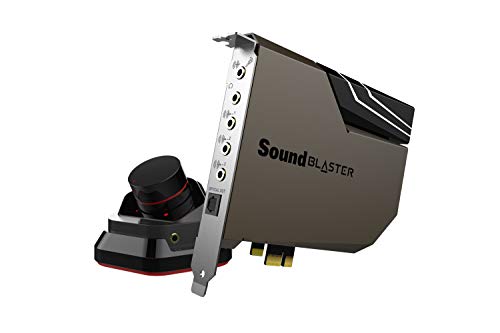 Creative Sound Blaster AE-7 Hi-Res PCIe Gaming SoundPack of 15.71 x 0.79 x 5.04 inches1.59 poundsCheck on Amazon
The Short Answer
For most gamers, the honest answer is no, you don’t need a sound card for gaming. The audio hardware built into modern motherboards — even budget boards — is genuinely good enough for the games most people play. There’s exactly one condition that changes the answer: if you’ve invested in a high-end gaming headset or a proper set of analog speakers and you’re hearing static, hiss, or weak, muddy sound, a dedicated sound card (or an external DAC/amp) can meaningfully improve things. If your current audio sounds clean and loud enough, a sound card will buy you almost nothing.
What You Actually Get
A dedicated sound card sits in a PCIe slot and takes over audio processing from your motherboard’s built-in chipset. Modern cards are built around a higher-quality DAC (digital-to-analog converter) and headphone amplifier than what’s soldered onto a typical motherboard. In practice, that translates to three tangible benefits:
As an Amazon Associate we earn from qualifying purchases at no extra cost to you.

Cleaner power delivery to your headphones. If you’re plugging a 250-ohm headset like a Beyerdynamic DT 990 or an Sennheiser HD 600-series can into the front-panel jack of a cheap motherboard, you may hear background hiss or find you need to crank the volume to 90% for reasonable listening. A card with a dedicated headphone amp pushes those demanding headphones properly.
Shielded audio path. The inside of a PC case is electrically noisy. Motherboard audio is usually well-shielded these days, but interference (that faint whine that changes pitch when your GPU loads up) still shows up on some builds. A sound card moves the audio circuitry away from the noisiest components.
Software features. Creative’s cards, for example, include DSP processing — virtual surround modes (their Sound Blaster suite handles headphone surround virtualization), EQ presets, and per-game audio profiles. Some players genuinely find positional audio easier to read with these tools, though it’s a preference, not an objective upgrade.
What you don’t get is more FPS, lower latency, or any in-game advantage from raw hardware. Audio output has no measurable effect on game performance on any CPU made in the last decade.
Pros
- Noticeably better headphone driving power — cards like the Sound Blaster AE-7 include a discrete headphone amplifier rated up to 600-ohm headphones, something no mainstream motherboard matches.
- Higher-resolution DACs support 32-bit/384 kHz playback, useful if you also listen to hi-res music on the same PC.
- Eliminates static, hiss, and GPU whine on builds with poorly shielded motherboard audio.
- Swappable op-amps on higher-end models (the AE-7’s ACM module allows this) let tinkerers tune the sound signature.
- Software suite adds virtual surround, EQ, and dialogue-enhancement modes that some competitive players prefer over default stereo.
- PCIe cards like the Sound Blaster Audigy Fx Pro occupy no desk space and draw only a few watts, needing no separate power connection in most cases.
Cons
- Motherboard audio is already good. If yours sounds fine, the upgrade is subtle at best — this is one of the lowest-impact PC upgrades money can buy.
- PCIe cards occupy a slot and sit inside the GPU’s heat exhaust area; in compact cases, slot access can be blocked entirely.
- No benefit for USB headsets. Most gaming headsets connect via USB and bypass the sound card entirely — a card literally cannot improve them.
- Software bloat. Sound card control suites can be fussy, and driver conflicts with motherboard audio (Realtek especially) occasionally require troubleshooting.
- A $75–$180 spend on a card is money that could instead go toward better headphones or speakers, which improve sound far more dramatically.
- External USB DAC/amp solutions offer similar quality without installation, and can move between devices.
Who Should Buy It
Buy a sound card if all three of these describe you: you use analog headphones or speakers (3.5mm connection, not USB), you own demanding headphones (roughly 150 ohms and up, or plan to), and you’ve actually noticed hiss, static, or insufficient volume from your current setup. It’s also a reasonable buy if you do audio production or serious music listening on your gaming PC and want the cleaner DAC path without a separate desktop amp taking up desk space.
For those buyers, the Creative Sound Blaster Audigy Fx Pro Hi-Res PCIe Sound Card at around $76 covers the basics — a hi-res DAC and headphone amp in a low-profile card. If you want the stronger amplifier, swappable op-amps, and the ACM control module for quick headphone gain and input switching, the Sound Blaster AE-7 at roughly $181 is the step-up choice, and it’s one of the few cards that supports 5.1/7.1 discrete channel output for analog multi-channel speaker setups.
Who Should Skip It
Skip it if you use a USB gaming headset (the vast majority of gaming headsets sold today), if your motherboard audio already sounds clean at your normal listening volume, if your case is short on free PCIe slots, or if your upgrade budget is limited — $76 toward a better pair of headphones will do more for your ears than any sound card. Also skip it if you’re chasing competitive advantage: there’s no evidence a sound card improves reaction time or win rates.
Cheaper Alternatives
| Option | Cost | Trade-off |
|---|---|---|
| Do nothing (use motherboard audio) | $0 | Perfectly good for most games; only weak point is driving high-impedance headphones loudly. |
| USB DAC/headphone amp dongle | $20–$120 | Cleaner audio with zero installation; no in-card DSP or virtual surround software; takes a USB port. |
| Firmware and driver cleanup | $0 | Updating Realtek drivers and disabling audio “enhancements” fixes hiss and crackle on many boards. |
| Better headphones first | $60–$150 | Biggest real-world sound improvement per dollar; may still need amplification afterward. |
| USB gaming headset upgrade | $50–$150 | Bypasses the sound card question entirely; less flexible than analog + amp. |
FAQ
Do sound cards improve FPS or game performance?
No. On any modern CPU, audio processing is a rounding error in total system load. A sound card will not raise your frame rate or reduce input latency by any amount you could measure.
Is a sound card better than onboard audio for competitive gaming?
Marginally at best, and mostly through software. Virtual surround processing can make footsteps easier for some players to localize, but that DSP can run on motherboard audio too via free software. The card’s superior amp and DAC don’t create information that isn’t already in the game’s audio mix.
Do I need a sound card for a 250-ohm headphone?
This is the one case where the answer shifts toward yes — or at least toward a dedicated amplifier. Motherboard headphone jacks typically output enough power for headphones under 80 ohms. Above roughly 150–250 ohms, you’ll want the stronger amp that cards like the Sound Blaster AE-7 provide, or an equivalent external headphone amplifier.
Will a sound card work with my USB headset?
No. USB headsets contain their own internal DAC and connect digitally, so they never pass through the sound card at all. If you want to benefit from a sound card, you need analog headphones with a 3.5mm plug, or analog speakers.









