
Our Top Picks


The Short Answer
Yes — RGB fans are worth the extra cost if you have a tempered-glass side panel and you care how your build looks. The performance difference between a lit and unlit fan of the same specs is essentially zero, so you’re paying roughly $3–$8 more per fan purely for aesthetics. If your case has a solid side panel or you’re building a silent workstation tucked under a desk, skip the RGB and put that money toward better airflow or a quieter fan instead.
What You Actually Get
RGB fans are standard 120mm or 140mm case fans with LEDs built into the hub or blades. Airflow and static pressure are determined by the fan’s motor, blade design, and speed — not the lighting. A 120mm RGB fan spinning at 1,500 RPM moves roughly the same air as a non-RGB fan at the same speed.
As an Amazon Associate we earn from qualifying purchases at no extra cost to you.

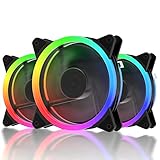
What you’re paying extra for is the lighting system itself. Basic RGB fans use a 12V 4-pin connector with a fixed color palette, while addressable RGB (ARGB) fans use a 5V 3-pin connector that lets each LED be controlled individually. ARGB is what gives you the smooth rainbow waves, gradients, and music-sync effects you see in showcase builds.
Real-world pricing makes the premium easy to see. A three-pack of budget RGB fans like the upHere 120mm RGB kit runs about $19, which works out to under $7 per fan. Comparable non-RGB fans start around $4–$5 each. Mid-range ARGB kits with a controller and remote — like six-fan sets with a mix of forward and reverse blades — land around $35–$60. Premium options from Corsair, Lian Li, or be quiet! can run $25–$40 per individual fan.
Most RGB fans also add practical features these days: PWM control (4-pin) for automatic speed adjustment via the motherboard, daisy-chainable connectors to reduce cable clutter, and reverse-blade options for clean intake through mesh panels and radiators.
Pros
- Genuine visual payoff: In a glass-panel case, lighting transforms the look of a build more than any other single component upgrade.
- No performance penalty: Well-made RGB fans cool just as effectively as their unlit equivalents at the same RPM and noise level.
- Cheaper than ever: Entry kits have fallen to the $20 range for three fans — the RGB premium was easily $10+ per fan a few years ago.
- Useful extras bundled in: Many kits include PWM control, controllers with remotes or SATA power, and reverse-blade fans for unobstructed lighting on intake sides.
- System-wide sync: ARGB fans can tie into motherboard software (ASUS Aura Sync, MSI Mystic Light, Gigabyte RGB Fusion) so fans, RAM, and GPU lighting match.
Cons
- Pure aesthetic cost: You’re spending $3–$15 extra per fan for lights, not cooling. That money could buy a better PSU, more storage, or faster RAM.
- Cable and controller clutter: Budget kits often need a SATA-powered hub or controller box, adding wires inside an otherwise tidy build.
- Software frustration: Sync software can be buggy, and mixing brands sometimes means running two or more lighting apps at once.
- Quality varies wildly: Sub-$10 RGB fans often use sleeve bearings that wear out in 2–3 years and can produce a faint electrical whine from the LEDs.
- Light bleed and hotspots: Cheap diffusers create blotchy rings instead of smooth illumination, which looks worse than no lighting at all.
- Failure means replacement: If the LEDs die, you replace the whole fan — lighting and cooling are one unit.
Who Should Buy It
Buy RGB fans if your case has a tempered-glass or acrylic side panel, your build sits somewhere visible, and you enjoy the look. They’re also a smart pick if you’re building a first PC with a limited budget — a $20–$35 three-pack or six-pack delivers a dramatic visual upgrade for the price of a pizza. Gamers and streamers who want a cohesive, synced look across components will get the most from addressable RGB models connected to motherboard headers.
Who Should Skip It
Skip RGB if your case has a solid side panel — the lights will be invisible, making the premium a total waste. Also skip them if you’re building a max-airflow or near-silent machine: the money saved across four to six fans ($20–$90) buys a genuinely better fan like a Noctua or be quiet! model with superior bearings, lower noise at equivalent airflow, and a longer lifespan. Office, home-server, and HTPC builders gain nothing from lighting.
Cheaper Alternatives
| Option | Cost | Trade-off |
|---|---|---|
| Standard non-RGB 120mm PWM fans (e.g., generic or Arctic P12) | $4–$8 each | No lighting, but often better bearings, quieter operation, and equal or better airflow. |
| Budget RGB 3-pack (e.g., upHere RGB123-3) | ~$20 for three | Lighting on a tight budget, but fixed-effect RGB rather than full addressable control, and shorter expected lifespan. |
| One or two premium RGB fans front and top only | $25–$50 total | Gets visible glow where it matters; interior fans stay cheap and unlit. |
| RGB LED strips instead of lit fans | $10–$20 | Adds glow to the case interior for a fraction of the cost, while fans stay plain and high-quality. |
FAQ
Do RGB fans cool better than normal fans?
No. Lighting has no effect on airflow, static pressure, or noise. Cooling performance depends on fan size, blade design, and RPM. Judge any RGB fan by its CFM (typically 40–60 CFM for 120mm models) and noise rating (dB), just as you would a plain fan.
How much more do RGB fans cost than regular fans?
Expect to pay $3–$8 more per fan at the budget end — a $20 three-pack versus roughly $12–$15 for three plain fans. At the premium end, the gap widens to $10–$20 per fan.
Do I need a controller for RGB fans?
Not always. Fans with a 5V 3-pin ARGB connector can plug directly into a compatible motherboard header and be controlled through motherboard software. Budget 12V RGB fans, or builds with more fans than headers, need a separate controller — many kits in the $30–$40 range include one.
Do RGB fans use a lot of power?
No. The fan motor typically draws 1.5–3W, and the LEDs add only 0.5–1.5W per fan. Even a six-fan setup adds less than 30W to your system — negligible compared to a modern graphics card drawing 200–450W. Prices and lighting effects have only improved heading into 2026, so the value question today is almost purely about whether you want the look, not whether the hardware is practical.









