
The Short Answer
Yes, barebones keyboard kits are worth buying — on one condition: you actually enjoy (or want to learn) building things yourself. If the idea of lubing switches, mounting a PCB, and flashing firmware sounds like a fun weekend project rather than a chore, a kit like the ZMX GMK87 at around $69 delivers features that pre-built boards charge $130 or more for. If you just want a keyboard that works the moment you unbox it, buy a pre-built instead and skip the kit entirely.
What You Actually Get
A barebones kit is the keyboard equivalent of a car sold without wheels. You get the chassis, the PCB (the circuit board that registers your keystrokes), and the stabilizers — but no switches and no keycaps. In the case of the ZMX GMK87, here is what lands on your doorstep:
As an Amazon Associate we earn from qualifying purchases at no extra cost to you.
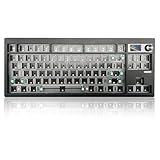

- Gasket-mounted chassis — the PCB sits on foam strips rather than being screwed down solid, which softens the typing feel and muffles sound.
- Hot-swappable PCB — pull out a switch, push in another, no soldering required. Swap switches in seconds whenever your tastes change.
- Triple-mode connectivity — Bluetooth 5.0, 2.4GHz wireless via a USB dongle, and a wired USB Type-C connection.
- VIA programmability — remap keys, set up layers, and tweak lighting in a browser-based tool without installing anything.
- Custom TFT screen — a small color display that can show the time, connection status, or custom images.
- Rotary knob — a metal volume/multimedia dial on the top corner.
- Per-key RGB lighting visible through compatible keycaps.
What you still need to buy separately: switches (typically $25–$45 for a pack of enough to fill an 87-key layout) and a keycap set ($20–$60 for decent PBT doubleshot or dye-sub caps). Budget roughly $115–$175 all-in for a finished GMK87 build, versus $69 for the barebones kit itself. The board is a compact 87-key (tenkeyless-style) layout with an internal battery, and the whole unit weighs a bit over two pounds once assembled — light enough to toss in a backpack, stable enough not to slide around during gaming.
Pros
- Feature density per dollar. Gasket mount, hot-swap PCB, three connection modes, VIA support, a TFT screen, and a knob for around $68 is a lot of hardware. Comparable pre-built boards with this spec sheet routinely sell for $120–$180.
- No soldering barrier to entry. Older DIY keyboards required an iron and steady hands. Hot-swap sockets make this a genuinely beginner-friendly build — assembly takes most first-timers under an hour.
- Upgrade path. Because the PCB is hot-swap, the board you build today isn’t frozen. Bored with linear switches? Pull them and drop in tactiles next month without buying a new keyboard.
- VIA is the good kind of software. It runs in a browser, changes apply instantly, and unlike some vendor software it doesn’t nag you with updates or hog system resources.
- Wireless flexibility. Bluetooth for tablet and phone use, 2.4GHz for low-latency gaming, and Type-C wired as a fallback — you’re not locked into one connection style.
- Personalization. You choose the switch feel, the sound profile, and the keycap look. The finished board is yours in a way no pre-built is.
Cons
- The sticker price is not the real price. around $68 becomes $115–$175 once you add switches and keycaps. If you don’t already own spares, the savings versus a pre-built shrink considerably.
- Assembly is on you. Seat a switch crooked into a hot-swap socket and you can bend a pin. It’s fixable, but beginners should work slowly and check each switch before pressing it home.
- Stock sound and feel are decent, not elite. Budget gasket boards benefit from added foam or tape mods. Enthusiasts will want to tinker; the “done in an hour” crowd may find the stock tuning merely fine.
- Plastic build. This is not a heavy aluminum case. If you want that dense, thocky, premium heft, you’re shopping in the $150+ bracket, not at $69.
- Knob and TFT are nice, not essential. You’re paying a few dollars for features you may never touch — which is only a “con” if you’d rather have the cheapest possible board.
- Troubleshooting falls to you. If a key doesn’t register after your build, diagnosing it — reseating the switch, checking the socket, updating firmware — is part of the deal. Manufacturers’ support for budget kits is hit-or-miss.
Who Should Buy It
Buy a barebones kit like the GMK87 if you’re a first-time builder who wants gasket-mount feel and hot-swap flexibility without a $150 entry fee. Buy it if you already own spare switches and caps from a previous board — in that case the math is overwhelmingly in your favor. Buy it if you like the idea of a wireless gaming keyboard you can re-tune every few months, or if the TFT screen and knob appeal to your desk-setup sensibilities. It’s also a smart pick as a gifts-and-projects board: assembling one with a teenager or a partner is genuinely fun, and the result is a working keyboard, not a shelf trophy.
Who Should Skip It
Skip it if you need a working keyboard tomorrow morning — order a pre-built and be done. Skip it if your total budget is under $100 and you don’t own any parts, because a good pre-built in that range will outperform a rushed budget build. Skip it if you want an aluminum case, true enthusiast-grade acoustics out of the box, or QMK-level deep customization; those expectations belong to a higher price tier. And skip it if the prospect of seating 87 switches fills you with dread rather than anticipation — life is too short for hobby projects you resent.
Cheaper Alternatives
| Option | Cost | Trade-off |
|---|---|---|
| Basic pre-built mechanical keyboard (e.g., hot-swap budget boards from Redragon or Royal Kludge) | $35–$70 | Works out of the box; usually slab-mount rather than gasket, heavier software, no TFT screen or knob, but hot-swap keeps a future upgrade path open. |
| Buy the GMK87 kit and add only budget switches, keeping stock caps | $95–$115 total | Keeps the gasket mount and hot-swap PCB at minimum spend; stock keycaps are serviceable but thinner and less refined than a $30 PBT set. |
| Used or secondhand pre-built from enthusiast marketplaces | $50–$90 | Potentially much better hardware for the money; risk of worn switches, missing parts, or no warranty. |
| Full-size office membrane or scissor keyboard | $15–$30 | Cheapest functional option; no mechanical feel, no customization, no wireless usually — fine for pure productivity. |
FAQ
Do barebones keyboard kits come with switches?
No. A barebones kit includes the case, PCB, stabilizers, and accessories, but switches and keycaps are sold separately. Plan on $25–$45 for switches and $20–$60 for keycaps on top of the kit’s around $68 price.
How hard is it to build a barebones kit if I’ve never done it before?
With a hot-swap PCB, it’s genuinely easy — no soldering, no wiring. You seat the stabilizers, snap the foam and PCB into the case, and press each switch into its socket. Most first-timers finish in 45–90 minutes. The only real risk is bending a switch pin by forcing it in at an angle.
Is a gasket-mount keyboard actually better?
It’s different, and most people prefer it. Gasket mounting lets the PCB flex slightly on each keystroke, producing a softer bottom-out feel and a more muted, even sound. Whether it’s “better” comes down to taste, but at the $69 price point it’s a feature you’d previously pay twice as much to get.
Are barebones kits still a good value heading into 2026?
Yes, arguably more than ever. Budget kits now ship with features — hot-swap sockets, VIA support, tri-mode wireless, displays — that were premium-tier two or three years ago. As long as you factor in the true total cost with switches and keycaps, the value proposition is strong.
Related guides
- Best Gaming PC for Fortnite: Eight Prebuilt Desktops Sorted by Refresh Rate Goal (2026)
- Best RX 9070 XT Prebuilt Gaming PCs: Seven Desktops and Three Cards Compared: 10 Compared (2026)
- CyberPowerPC vs iBUYPOWER Gaming PC: How the Two Brands Compare
- Best RX 9070 XT Prebuilt Gaming PC (2026): 5 Picks Compared









