
You’ve got the rig dialed in — a capable GPU pushing triple-digit frame rates in Valorant, CS2, or Apex Legends — but your display is still limping along at 60 or 75Hz. That’s the bottleneck most esports players don’t realize they have. At 1080p, competitive gaming lives and dies by refresh rate and motion clarity, not resolution, and a 240Hz panel can genuinely tighten your flicks and tracking in ways a faster CPU never will. The good news: this is the one upgrade category where serious competitive performance has gotten dramatically cheaper. You no longer need to spend $500+ to get a true 240Hz experience.
The catch is that the budget tier is crowded with panels that cut corners in places that matter — dim backlights, washed-out colors, mediocre stands, and response times that smear fast motion. We sorted through the sub-$250 field to find the displays that actually deliver on the 240Hz promise, from a $86 entry point to a premium fast-IPS option with built-in speakers. Whether you’re building a tournament-ready battlestation or just want your aim to feel as crisp as your mechanics, here’s how the field stacks up.
As an Amazon Associate we earn from qualifying purchases at no extra cost to you.




Our Top Picks
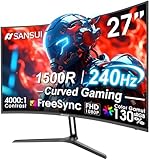
 SANSUI 27 Inch Curved 240Hz Gaming Monitor FHD27.017.66 x 24.13 x 17.84 Inches7.26 poundsCheck on Amazon


Top 3 picks at a glance
Quick Picks
| Product | Best for | Price |
|---|---|---|
| Dell 24 240Hz Gaming Monitor – SE2426HG | Best overall value for esports | Check on Amazon |
| MSI MAG 274CF X24 | Best budget 27-inch 240Hz | Check on Amazon |
| Dell 27 240Hz Gaming Monitor – SE2726HG | Best 27-inch for mixed gaming | Check on Amazon |
| SANSUI 27-Inch Curved 240Hz | Best immersive curved option | Check on Amazon |
| SANSUI 24.5-Inch 300Hz/240Hz | Best for max frame rates on a budget | Check on Amazon |
| ASUS TUF Gaming VG259QM5A | Best for G-SYNC setups | Check on Amazon |
| ArcticPro 24-Inch 240Hz | Best under-$90 entry point | Check on Amazon |
| Pixio PX249 Wave White | Best premium fast-IPS build | Check on Amazon |
How We Compared
We focused on hard requirements first: a native 1920×1080 resolution and a true 240Hz refresh rate (or better), which is the baseline for serious 1080p esports play. From there, we weighted panel technology — IPS and fast IPS panels earn preference for color consistency and viewing angles, which matter in fast-panning shooters — along with adaptive sync support (AMD FreeSync Premium or NVIDIA G-SYNC) to eliminate tearing when your frame rate dips below 240. We also factored in response time specs, connectivity (DisplayPort 1.4 and dual HDMI are the practical minimum for a dedicated gaming display plus a console or secondary device), ergonomics like tilt and VESA mounting, and eye-comfort features such as TÜV certification and low blue light modes for long practice sessions. Price-to-performance separated the list: every pick here delivers 240Hz for under $210, with most under $150. We did not conduct independent lab measurements; the specifications cited are manufacturer-published figures.
The 8 Best Picks
1. Dell 24 240Hz Gaming Monitor – SE2426HG (around $99)
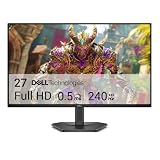
This is our top pick for most competitive players, and it’s not close. A 23.8-inch IPS panel at 1920×1080 with a 240Hz refresh rate hits the sweet spot for esports: the smaller diagonal means your eyes catch the whole screen without excessive head movement, and Dell’s IPS implementation keeps colors consistent across wide viewing angles. AMD FreeSync Premium synchronizes the panel to your GPU, TÜV 3-Star certification makes marathon ranked sessions easier on your eyes, and connectivity covers the essentials with 2x HDMI plus DisplayPort 1.4. The tilt-only stand is basic, but at this price it’s a fair trade.
- IPS panel with TÜV 3-Star eye comfort certification
- Full connectivity: 2x HDMI and DisplayPort 1.4
Con: Tilt-only stand with no height adjustment — plan for a monitor arm or riser.
Skip it if: you want a screen larger than 24 inches or built-in speakers; step up to the 27-inch Dell instead.
2. MSI MAG 274CF X24 (around $130)
If you want 240Hz on a bigger canvas without breaking $130, MSI’s MAG 274CF X24 is the value play. The 27-inch FHD panel keeps pixel density reasonable for competitive play while giving you more peripheral awareness in battle royales and open-world shooters. You get AMD FreeSync Premium, HDR readiness, a quick 0.5ms response time spec, and a full mounting story — VESA compatibility plus tilt — with HDMI and VGA inputs covering older hardware too. The black chassis fits cleanly into any desk setup.
- 27-inch 240Hz at just around $130 — outstanding size-to-price ratio
- 0.5ms response time spec and HDR-ready panel
Con: The VGA port is a dated inclusion, and FHD at 27 inches means visible pixel density trade-offs up close.
Skip it if: you sit very close to your screen and prioritize text sharpness for mixed work and gaming.
3. Dell 27 240Hz Gaming Monitor – SE2726HG (around $150)
The big brother to our top pick takes everything we like about the SE2426HG and stretches it to 27 inches. You still get the same fundamentals that make the 24-inch version shine: an IPS panel for consistent color, AMD FreeSync Premium for tear-free motion, TÜV 3-Star certification for eye comfort, and the same 2x HDMI plus DisplayPort 1.4 input array. It’s the right call if 1080p esports is your main use but you also watch content, play single-player games, or simply prefer a larger desktop footprint.
- Same strong Dell feature set as the 24-inch, on a 27-inch IPS panel
- TÜV 3-Star certification for extended sessions
Con: At around $150 it costs 50% more than the 24-inch model for the same core panel specs.
Skip it if: pure competitive advantage is the goal — the 24-inch variant puts more action in your central vision for less money.
4. SANSUI 27-Inch Curved 240Hz Gaming Monitor (around $140)
SANSUI’s curved entry brings immersion to the budget bracket. The 1500R curve wraps a 27-inch FHD panel around your field of view, which genuinely helps with peripheral tracking in racing sims andimmersively framed shooters. The spec sheet is generous for the price: 130% sRGB coverage, a 4000:1 contrast ratio, HDR support, FreeSync, MPRT 1ms, and low blue light mode. A metal stand adds stability that plastic feet at this price often lack, and HDMI and DP ports plus an included cable mean you’re set up out of the box.
- 1500R curve with 130% sRGB and 4000:1 contrast for a punchy image
- Metal stand and included cable — good out-of-box value
Con: The 1500R curve can introduce slight distortion for precise vertical lineups in tactical shooters.
Skip it if: you share the monitor with design or spreadsheet work where flat-panel geometry is preferable.
5. SANSUI 24.5-Inch 300Hz/240Hz FHD Gaming Monitor (around $120)
For FPS specialists, this 24.5-inch panel pushes past the 240Hz baseline into 300Hz territory at a price most 240Hz screens can’t touch. The 24.5-inch diagonal is the classic esports size — the same footprint favored in pro tournament setups — keeping everything within a tight eye sweep. FHD resolution, adaptive sync, and low-input-lag tuning make this a sneaky-good pick for players grinding ranked ladders who want headroom as GPUs get faster.
- 300Hz capability at a 240Hz-class price
- Pro-standard 24.5-inch esports form factor
Con: SANSUI’s brand support and warranty network is thinner than Dell’s or ASUS’s.
Skip it if: you want guaranteed HDMI 2.1-bandwidth features or a premium stand; the budget shows in the chassis.
6. ASUS TUF Gaming VG259QM5A (around $180)
NVIDIA-side players should look here. The ASUS TUF VG259QM5A pairs a 25-inch 1080p panel with a 240Hz refresh rate and G-SYNC compatibility, which is the cleanest way to eliminate tearing and stutter on GeForce cards. ASUS’s TUF line brings better build standards and quality control than the budget tier typically offers, and the 25-inch size splits the difference between tournament-standard 24.5-inch panels and roomier 27-inch screens. If your rig is NVIDIA-powered and you want a name-brand esports display, this is the pick.
- G-SYNC support tuned for NVIDIA GPUs
- TUF Gaming build quality and brand support
Con: At around $180 it’s the second-priciest panel here, and AMD card owners gain little from the premium.
Skip it if: you run an AMD GPU — the FreeSync options above deliver similar results for less.
7. ArcticPro 24-Inch 240Hz Gaming Monitor (around $85)
The gateway drug of high-refresh gaming. At around $85, ArcticPro’s 24-inch panel makes 240Hz accessible to literally any budget, with FHD resolution and Adaptive Sync smoothing out frame pacing. It’s the display we’d recommend for a first battlestation, a dorm room, a secondary LAN-party screen, or anyone skeptical that refresh rate matters — at this price, the experiment costs less than a AAA game. Just temper expectations on finish, stand quality, and color calibration.
- Lowest price on this list by a wide margin
- Full 240Hz and Adaptive Sync at under $90
Con: Expect a basic panel, minimal ergonomics, and no premium extras at this price point.
Skip it if: you can stretch to around $99 — the Dell SE2426HG’s IPS panel is worth the extra $14.
8. Pixio PX249 Wave White (around $210)
The premium pick, and the one for players who want it all. The PX249 Wave combines a 24-inch FHD fast IPS panel — the panel type engineered specifically to cut pixel transition times for motion clarity — with a 1ms GTG response spec, 240Hz refresh, Adaptive Sync, and a rarity in this bracket: built-in speakers. The white finish is genuinely striking and rare among gaming monitors, making it the pick for clean, light-themed setups. Pixio has built its reputation on esports-focused displays, and this is their polished flagship expression of the formula.
- Fast IPS panel with 1ms GTG response spec and built-in speakers
- Distinctive white design for light-themed builds
Con: At around $210, you’re paying roughly double our top pick for panel speed and aesthetics rather than raw features.
Skip it if: budget matters more than aesthetics and motion clarity — the Dell delivers 90% of the competitive experience for half the price.
Buying Guide
Panel Type Matters More Than You Think
At 240Hz, the panel technology determines how clean fast motion actually looks. IPS panels — like those in both Dell models — offer the best color consistency and viewing angles, ideal if you also consume media or share your screen. Fast IPS, found in the Pixio PX249 Wave, pushes response times down further for the crispest motion tracking in flick-heavy shooters. Budget VA and unspecified panels (common in the sub-$140 tier) can show smearing on dark scenes. If the listing doesn’t state the panel type clearly, treat that as a yellow flag.
Sync Technology: Match It to Your GPU
Adaptive sync eliminates screen tearing, but you should match the flavor to your graphics card. AMD FreeSync Premium (on the Dells, MSI, SANSUI, and Pixio) works with both AMD cards and most modern NVIDIA cards via VESA Adaptive Sync. Native G-SYNC compatibility, like the ASUS TUF VG259QM5A offers, is the safest bet for GeForce rigs. Either way, don’t buy a 240Hz monitor without some form of adaptive sync — running unlocked frames at this refresh rate without it makes tearing obvious.
Size, Ergonomics, and Desk Fit
For pure esports, 24 to 24.5 inches is the competitive standard — it keeps the entire play area within your central vision, which is why tournament organizers use that size. Go 27 inches only if you split time between competitive and immersive single-player gaming. Check the stand before buying: several picks here are tilt-only, so budget $25–40 for a VESA monitor arm if you need height adjustment. Confirm your GPU can actually push 240+ frames in your game of choice, and always connect via DisplayPort — it’s the reliable path to full refresh rate at 1080p.
Our Verdict
For most players building a 1080p 240Hz esports setup, the Dell SE2426HG at around $99 is the clear winner: a proper IPS panel, FreeSync Premium, TÜV eye certification, and full DisplayPort 1.4 connectivity at a price that leaves budget for the peripherals that matter. Step up to the Dell SE2726HG if you want 27 inches, the SANSUI 24.5-inch if raw 300Hz frame rates are your priority, or the Pixio PX249 Wave if you want the fastest panel type and a standout white design. And if you simply want to taste 240Hz for the price of a new game, the ArcticPro at around $85 proves high-refresh gaming no longer requires a premium budget. Whichever you choose, pair it with a GPU and settings tuned to actually deliver those frames — the monitor is only half of the equation.
FAQ
Is 240Hz really noticeable over 144Hz for esports?
Yes, particularly in fast-panning motion and target tracking. The jump from 60Hz to 144Hz is the biggest single leap, but 144Hz to 240Hz shortens frame delivery intervals from roughly 6.9ms to 4.2ms, which reduces perceived input lag and motion blur. Competitive players generally adapt to it within a week and report cleaner tracking in shooters. It matters most in games running at or above 200 frames per second.
Do I need DisplayPort for 240Hz at 1080p?
In most cases, yes — or at least a recent HDMI version. DisplayPort 1.4 (included on both Dell models) handles 1080p at 240Hz with full bandwidth headroom. Older HDMI ports may cap you at lower refresh rates, so use the DisplayPort cable whenever one is included. Check your GPU’s outputs before buying if you plan to use HDMI.
Is a 24-inch or 27-inch monitor better for competitive gaming?
For pure esports, 24 to 24.5 inches is the standard — it’s the size used at most tournaments because it keeps all the action in your central vision and minimizes eye movement. Choose 27 inches if you play a mix of competitive and immersive titles, or if you sit more than about three feet from your screen. Both sizes work fine at 1080p; 27-inch FHD simply has lower pixel density.
What should my PC specs be to drive 240Hz at 1080p?
Esports titles are forgiving: CS2, Valorant, and Rocket League can hit 240+ frames on midrange GPUs from the last several generations at competitive settings, especially with effects dialed down. Demanding AAA games will not reach 240Hz, which is fine — adaptive sync will keep motion clean at whatever frame rate your system delivers. Prioritize CPU and GPU balance, and use DisplayPort for the connection.
Related guides
- Best Gaming PC for Fortnite: Eight Prebuilt Desktops Sorted by Refresh Rate Goal (2026)
- Best RX 9070 XT Prebuilt Gaming PCs: Seven Desktops and Three Cards Compared: 10 Compared (2026)
- CyberPowerPC vs iBUYPOWER Gaming PC: How the Two Brands Compare
- Best RX 9070 XT Prebuilt Gaming PC (2026): 5 Picks Compared









