
Bringing a gaming PC into your home is no longer just a decision about processor speeds and graphic frame rates. Today, as we integrate our workspaces and leisure areas, a home computer is a significant piece of functional furniture. It affects the acoustics of your living room, the cable management behind your desk, the aesthetic harmony of your study, and even your utility bills. When setting up a home gaming station, you face a fundamental crossroads: do you buy a barebones gaming kit, or do you source every single part individually?
A barebones kit provides a pre-assembled foundation—typically the chassis, motherboard, and power supply unit (PSU)—leaving you to choose and install the processor, RAM, storage, and graphics card. Buying all separate parts, on the other hand, gives you total control over every screw, fan, and silicon chip. This decision impacts not only your initial assembly afternoon but also how your system will scale, look, and sound in your living space over the next several years.
As an Amazon Associate we earn from qualifying purchases at no extra cost to you.



Our Top Picks


Top 3 picks at a glance
Quick Verdict
For most homeowners who value physical space, clean aesthetics, and a swift setup process, a barebones gaming kit is the superior choice. It eliminates compatibility headaches and fits neatly into compact, stylish chassis designs that blend seamlessly into modern home decor. However, if you have dedicated space, demand whisper-quiet acoustics under heavy loads, or want the absolute best value-to-performance ratio with an unrestricted upgrade path, buying all separate parts remains the gold standard for custom home setups.
Side by Side
To understand how these two approaches impact your home environment, let us look at their core characteristics side by side:
| Feature | Barebones Gaming Kit | Buying All Separate Parts |
|---|---|---|
| Acoustic Comfort | Moderate to high fan noise due to compact, dense chassis layouts. | Excellent; larger cases allow for massive, slow-spinning, quiet fans. |
| Physical Durability | Very high; custom-engineered steel/aluminum enclosures are highly rigid. | Variable; depends entirely on the quality of the individual case you purchase. |
| Price Range | $200 to $800 for the kit base; total build around $600 to $1,800. | $500 to $3,000+ depending on component tier and customization. |
| Home Maintenance | Simple dust-blowing; tight spaces can make deep cleaning tedious. | Easy to access, clean, and replace individual parts over time. |
| Space Needed on Desk | Minimal footprint (typically 8 to 15 liters in volume). | Moderate to large footprint (typically 30 to 60 liters in volume). |
| Visual Look | Sleek, minimalist, console-like, or small-form-factor design. | Highly customizable (RGB lighting, panoramic glass, custom colors). |
| Resale & Repurposing | Easy to sell as a compact unit or repurpose as a home theater PC. | High resale value for individual premium parts on the secondary market. |
| Best for… | Minimalist offices, living room setups, and busy professionals. | Dedicated gaming rooms, DIY enthusiasts, and budget-optimization. |
Where Barebones Gaming Kit Wins
The primary appeal of a barebones gaming kit lies in its elegant integration. When you purchase a kit like the ASRock DeskMeet X300 Mini PC Barebone Kit (priced at around $200), you are getting a highly compact 8-liter chassis, a custom motherboard, and a pre-installed 500W power supply designed specifically to fit together with millimeter-level precision. You do not have to spend hours routing thick power cables around sharp metal corners or worrying if your power supply cables are long enough to reach the top of the motherboard.
This compact engineering makes barebones kits ideal for modern interior design. Instead of a massive, glowing tower dominating your desk, a kit like the BRENUC NUC 11 Extreme Kit Beast Canyon NUC11BTMi7 ($599) offers a small-footprint gaming powerhouse that supports up to a 12-inch graphics card while sitting quietly in a bookshelf or alongside a television console. The built-in Wi-Fi, Bluetooth, and optimized port layout mean fewer unsightly wires trailing across your desk or floor.
Furthermore, barebones kits save valuable time. You skip the stressful steps of mounting the power supply, installing motherboard standoffs, and connecting tiny, confusing front-panel header pins. For those who want a personalized computer but do not have a full weekend to dedicate to troubleshooting compatibility issues, the barebones route offers a satisfying, streamlined DIY experience.
Where Buying All Separate Parts Wins
Building a PC entirely from scratch offers unparalleled freedom. Buying in parts can feel like collecting a beautiful, multi-volume library set, such as the Mushaf Tajweed – 30 Separate Parts for $55.2, where each individual piece has its dedicated, carefully curated place in your study. When you choose every part, you control the exact brand, color, noise rating, and performance profile of every component in your home.
The biggest advantage of a custom-built PC from separate parts is thermal management and acoustics. Compact barebones kits must rely on small, high-RPM fans to exhaust heat from tight spaces, which can result in a high-pitched whine during intense gaming sessions. A custom mid-tower or full-tower build allows you to install large 140mm fans or liquid cooling radiators that move massive amounts of air at whisper-quiet speeds, keeping your living room peaceful.
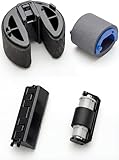
Additionally, standard custom builds offer a limitless upgrade path. If a component fails or becomes obsolete, you can replace just that single part. Just as keeping your home office running smoothly might require a specific hardware maintenance part like the Full Paper Pickup Roller Kit Compatible with HP Printer CP1210 CP1215 CP2025 CP1515 CP1525 CP1518 CM2320 M451DN M475 M476 for around $11, a fully custom PC allows you to swap out a single fan, a power supply, or a motherboard without discarding the rest of your system. With barebones kits, the proprietary motherboard and power supply form factors mean that if one proprietary part fails out of warranty, you may have to replace the entire kit chassis.
Cost Over 5 Years
When calculating the true cost of ownership for your home, you must look beyond the initial checkout screen. Let us examine how the expenses shake out over a five-year lifecycle.
Year 1 (Initial Investment): A barebones kit like the BRENUC NUC 11 ($599) combined with an Intel Core i7 CPU, 32GB of DDR4 RAM, a 1TB NVMe SSD, and a mid-range graphics card will cost you roughly $1,200 to $1,400. A comparable custom build using all separate parts will cost around $1,050 to $1,250. The custom build is slightly cheaper upfront because you are not paying the premium for proprietary small-form-factor engineering and pre-assembly labor.
Years 2 to 3 (Maintenance & Power): Both systems run similarly, but the custom build with a high-efficiency, standard ATX power supply may save you a few dollars a year on your electric bill due to better thermal efficiency. Dust accumulation in the compact barebones unit requires more frequent cleaning with compressed air to prevent thermal throttling.
Years 4 to 5 (The Upgrade Wall): This is where the financial paths diverge significantly. By 2026 and beyond, you may want to upgrade to a next-generation graphics card or a brand-new processor architecture. In a custom separate-parts build, you can simply spend $300 on a new motherboard and CPU, keeping your case, power supply, and fans. In a compact barebones kit, the power supply wattage (e.g., 500W in the DeskMeet X300) or the physical space constraints may prevent you from installing newer, power-hungry graphics cards, forcing you to buy a completely new system.
Which One for Your Home?
Small Apartment
If you live in a cozy studio or a small urban apartment where every square inch of desk real estate is at a premium, a barebones gaming kit is the clear winner. Its compact footprint (often less than 9 inches wide and deep) allows it to sit elegantly on a small writing desk or even behind a monitor, leaving plenty of room for your keyboard, mouse, and a warm cup of coffee.
Family with Kids and Pets
In a bustling household with curious children and shedding pets, buying all separate parts in a sturdy, elevated mid-tower case is highly recommended. You can choose a solid metal chassis without tempered glass panels that could shatter, place it safely on a high shelf, and install magnetic dust filters that are easy to slide off and wash. The larger fans are also less likely to inhale pet dander at the rapid rate of a compact barebones blower fan.
Rental Home
If you move frequently between rental properties, portability is a massive factor. A barebones gaming kit fits easily into a standard backpack or a small carry-on bag, weighing under 10 pounds fully loaded. Moving a massive, fragile glass custom-built PC tower can be a logistical nightmare during a busy move, making the compact kit highly attractive for renters.
Long-Term Home
For homeowners settled in a long-term residence with a dedicated home office or gaming room, buying all separate parts is the ideal investment. It allows you to build a stunning, personalized desk setup that matches your office cabinetry. It also gives you the freedom to perform quiet, low-stress upgrades over the years, ensuring your computer evolves alongside your home workspace.
FAQ
Are barebones gaming kits harder to build than regular PCs?
No, they are significantly easier. Because the motherboard, power supply, and chassis are already assembled and pre-routed, you only need to install the CPU, memory, storage, and graphics card. This eliminates the most tedious and error-prone steps of the PC-building process.
Can I upgrade the graphics card in a barebones kit later on?
Yes, but you are limited by physical length and power supply wattage. For example, some kits only support cards up to 8 inches, while larger kits support up to 12-inch cards. Always check the physical clearance and the power supply unit (PSU) wattage before purchasing an upgrade.
Do separate parts builds last longer than barebones kits?
In terms of component lifespan, they are equal. However, separate parts builds “last” longer in your home because they are much easier to upgrade piece-by-piece as technology advances, whereas a barebones kit may eventually require a full replacement due to its proprietary chassis or power supply design.
Which option is quieter for a quiet home office?
A custom build using separate parts is almost always quieter. Larger computer cases allow for the installation of 140mm fans and large CPU air coolers that run at lower, whisper-quiet speeds. Compact barebones kits have tight airways and smaller fans that must spin faster and louder to keep components cool under heavy loads.









