
It’s easy to pour every dollar into the tower and forget that you interact with a computer entirely through its peripherals. A brilliant build feels mediocre on a blurry monitor, a mushy keyboard, and tinny speakers. Planning a realistic peripheral budget alongside the PC itself is what turns good parts into a genuinely good experience, and it deserves a proper share of the total.
As an Amazon Associate we earn from qualifying purchases at no extra cost to you.



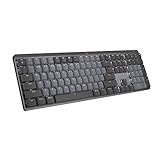
Our Top Picks
 Logitech G PRO Mechanical TKL Tenkeyless Gaming KeyboardTKL - Wired14.9 x 6.5 x 1.9 Inches2.16 poundsCheck on Amazon
 Logitech MX Mechanical Wireless Illuminated Keyboard TactileFull Size17.9 x 5.9 x 2.1 inches2.55 PoundsCheck on Amazon


Top 3 picks at a glance
The overlooked half of your setup
A sensible rule of thumb is to reserve roughly 20% to 35% of your total spend for peripherals, more if you’re starting from nothing. The monitor, in particular, deserves real money because it shapes every moment you use the machine, and a good one outlasts several tower upgrades.
| Peripheral | Entry | Mid | Premium | Notes |
|---|---|---|---|---|
| Monitor | $130–200 | $250–400 | $500+ | Biggest experience impact |
| Keyboard | $30–50 | $80–120 | $150+ | Membrane vs mechanical |
| Mouse | $25–40 | $50–80 | $100+ | Weight and sensor quality |
| Headset / audio | $40–60 | $90–150 | $200+ | Headset or speakers + mic |
| Webcam / misc | $30–50 | $60–100 | $150+ | Only if you need it |
Where to spend and where to save
Prioritize the monitor
Match the display to what the PC can drive. A high-refresh 1080p or 1440p panel pairs well with most gaming builds, while creative users should prioritize color accuracy and resolution over refresh rate. Spending here returns more everyday satisfaction than an equivalent bump to the graphics card.
Keyboard and mouse are personal
These are the parts your hands touch constantly, so comfort matters more than spec-sheet features. A mid-range mechanical keyboard and a well-shaped mouse with a good sensor make daily use pleasant without breaking the budget. Try shapes if you can, since fit is individual.
Don’t forget the small essentials
Budget a little for the unglamorous items that complete a setup: a surge protector or small uninterruptible power supply to protect your investment, a decent desk mat, and cables of the right length. If you stream or take calls, add a microphone and webcam. These small costs are easy to overlook until you’re mid-build and short.
Build a phased plan if money is tight
You don’t have to buy everything at once. If the budget is stretched, prioritize the monitor and a workable keyboard and mouse now, then upgrade audio, a webcam or a nicer mechanical keyboard later as funds allow. A phased approach gets you a usable setup immediately without compromising the tower’s core parts.
Keep an eye on reuse, too. If you already own a decent monitor or headset, redirect that saved money into the parts that will last longest, whether that’s a better display down the line or a sturdier desk. Peripherals often outlive several PCs, so buying quality once can be cheaper than replacing cheap gear repeatedly.
FAQ
What percentage of my budget should go to peripherals?
A practical range is 20% to 35% of your total, weighted toward the monitor. If you already own a good display and input devices, you can spend less; if you’re building a setup from scratch, plan toward the higher end so the experience matches the machine.
Is it better to spend on the monitor or the graphics card?
Balance the two, but don’t starve the monitor. A great GPU feeding a poor display wastes its potential, while a quality monitor makes even a mid-range build feel excellent. Buy a graphics card and monitor that suit the same resolution and refresh target so neither bottlenecks your enjoyment.
Bottom line
Peripherals aren’t an afterthought; they’re how you experience the whole machine. Reserve roughly 20–35% of your budget for them, prioritize a monitor that matches your build’s resolution and refresh, choose a comfortable keyboard and mouse, and leave a little for audio and protection. Plan them alongside the tower from the start, and your new PC will feel as good as its parts deserve.

