
For most people the Logitech Lift is the best vertical mouse, especially for small to medium hands, while the Logitech MX Vertical suits medium to large hands and users who want a rechargeable battery and multi-device switching. Both place the hand at a 57 degree angle, so the choice mostly comes down to hand size, battery preference and handedness.
As an Amazon Associate we earn from qualifying purchases at no extra cost to you.


Our Top Picks
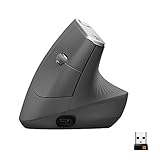
 Logitech MX Vertical Wireless Mouse Ergonomic Design1 Pack4.7 x 3.11 x 3.09 inches0.5 poundsCheck on Amazon
 Anker 2.4G Wireless Ergonomic Mouse4.72"L x 2.94"W3.98 x 3.23 x 3.15 inches0.28 poundsCheck on Amazon


Top 3 picks at a glance
What a Vertical Mouse Does
A vertical mouse tilts your hand into a handshake position instead of lying flat. This reduces forearm twisting (pronation), and some people find it more comfortable over long sessions. It is not a medical treatment. If you have persistent wrist, hand or arm pain, numbness or tingling, see a doctor or physiotherapist, and consider an ergonomic assessment of your whole desk setup.
For gamers, vertical mice are mainly used for desk work, strategy games, and casual play. They are generally not designed for fast-twitch shooters, since their shape and weight differ from esports mice, and sensors are tuned for office use. Competitive players who want ergonomics should look at lightweight ergonomic gaming mice instead.
At a Glance: Vertical Mouse Comparison
| Mouse | Best for | Key stated details | Limits |
|---|---|---|---|
| Logitech Lift | Small to medium hands | The maker lists a 57 degree angle, quiet clicks, a rubber grip with thumb rest, and right- and left-handed versions | Not designed for large hands; limited gaming use |
| Logitech MX Vertical | Medium to large hands | 57 degree angle, rechargeable battery via USB-C, a 4,000 DPI sensor, and Easy-Switch across up to three devices (per reviewers) | Right-handed only; higher cost tier |
| Contour UniMouse | Adjustable angle seekers | Mousegearhq lists an adjustable angle design | Larger and pricier; wired or wireless versions vary |
| Anker 2.4G vertical mouse | First-time budget buyers | Cited as a cheap entry vertical mouse | Plastic feel, fewer features |
Detailed Looks
Logitech Lift
CNN Underscored describes the Lift as the best vertical mouse it has tried, a position it has held for years. Logitech lists a 57 degree angle, a soft rubber grip, a thumb rest, and quiet clicks. Reviewers report it uses a single AA battery with a very long rated life, and PCWorld notes the clicks are noticeably quieter than the MX Vertical’s. It is smaller and lower in cost, and it comes in a left-handed model, which is rare among vertical mice. A common sizing guideline from one guide is to start with the Lift if your palm is narrower than about four inches.
Logitech MX Vertical
This is the larger and more feature-rich option. Reviewers note it fits medium to large hands better and has a rubbery grip area. It uses a rechargeable battery with USB-C charging, a higher-DPI sensor, and Logitech’s Easy-Switch to pair with up to three computers. It is right-handed only. The sensor and button layout are more suited to productivity than gaming.
Contour UniMouse
A different take with an adjustable angle, useful if you want to test how much tilt suits you. It is larger and more expensive, and fit varies by hand size.
Anker 2.4G Vertical Mouse
A budget entry for people who want to try a vertical mouse before committing. The build and sensor are basic, but it lets you test whether the vertical form helps your comfort.
How to Choose
Hand size
Measure from the wrist crease to the tip of your middle finger and compare with the maker’s size guidance. A mouse that is too small forces the fingers to curl; too large pushes the hand to stretch.
Handedness
Left-handed users have few options. The Lift offers a left-handed model, and a few other brands sell mirrored versions. Always confirm handedness before ordering.
Battery and connectivity
Choose between a replaceable AA battery (simple and long-lasting) and a rechargeable cell (lighter and USB-C). Most models connect via a USB receiver or Bluetooth, and some via both.
Buttons and software
Check how many buttons the mouse has and whether software lets you remap them. The Logitech apps support customization on both Logitech models.
Gaming suitability
For casual or strategy gaming, a vertical mouse is fine. For fast shooters, a lightweight ergonomic gaming mouse tends to be a better fit because of lower weight and faster sensors.
Fit and Adjustment Tips
- Allow one to two weeks to adjust. The movement feels different at first, especially for precision tasks.
- Lower your DPI or raise your mouse speed in system settings to reduce long arm movements.
- Keep your forearm supported and your wrist straight. A vertical mouse cannot fix poor desk posture.
- Take regular breaks and stretch. If discomfort persists, consult a health professional.
- Use a smooth mouse pad. Vertical mice can feel heavier than flat mice.
Budget Tiers
- Budget: Entry vertical mice like the Anker 2.4G for trying the format.
- Mid-range: The Logitech Lift, the usual best pick for most users.
- Premium: The Logitech MX Vertical and adjustable designs such as the Contour UniMouse.
Pick X If …
| If you … | Pick | Why |
|---|---|---|
| Have small to medium hands | Logitech Lift | Sized for smaller hands, quiet clicks |
| Have large hands | Logitech MX Vertical | Bigger body and rubber grip |
| Are left-handed | Logitech Lift (left-handed version) | One of few left-handed options |
| Want rechargeable and multi-device | Logitech MX Vertical | USB-C charging and Easy-Switch |
| Want to experiment with angle | Contour UniMouse | Adjustable angle |
| Want to try vertical cheaply | Anker 2.4G | Low-cost entry |
Alternatives Worth Considering
- Trackball mice: Keep the hand still and move only the thumb or fingers; useful for tight desks.
- Ergonomic semi-vertical mice: Less tilted designs that feel closer to a normal mouse.
- Lightweight ergonomic gaming mice: For gamers who need speed and some comfort.
- Ergonomic keyboard and desk setup: Often matters more than the mouse itself.
Who Should Skip a Vertical Mouse
Vertical mice are not for everyone. People who rely on fast, precise flicks, such as competitive shooter players, often find the vertical shape slower to control. Those who use a mouse mainly on a small laptop desk may find the tall body awkward, and anyone who travels often may prefer a compact flat mouse. If you share a computer with others, remember that handedness-specific shapes can frustrate the next user. A low-cost trial model is a sensible way to find out before spending more.
Comparing Vertical, Trackball and Flat Mice
| Type | Hand position | Good for | Trade-off |
|---|---|---|---|
| Vertical mouse | Handshake angle, forearm less twisted | Long desk sessions, comfort-focused users | Adjustment period; bulkier; limited gaming use |
| Trackball | Hand stays still, thumb or fingers move the ball | Tight desks, reduced arm movement | Different skill to learn; not suited to fast aiming |
| Flat ergonomic mouse | Palm down with contoured shell | Gamers and general use | Does not reduce forearm twisting as much |
Using a Vertical Mouse Comfortably
A vertical mouse is one part of a comfortable setup. Position the keyboard and mouse at elbow height, keep shoulders relaxed, and rest the forearm on the desk rather than floating it. Place the mouse close to the keyboard so you do not reach sideways. Change grip occasionally and avoid gripping tightly. If you notice pain that does not ease with rest, stop and speak to a doctor or physiotherapist rather than trying more gear. Workplace ergonomics services can also assess your desk if you work long hours.
For cleaning, wipe the shell with a slightly damp cloth, keep the sensor window clear of dust and hair, and follow the maker’s battery guidance. Replace rubber grips or the mouse itself when the surface wears smooth, since worn grips make you squeeze harder.
Connectivity Options
Most vertical mice offer a USB receiver, Bluetooth or both. A receiver generally gives steadier response for work and casual games, while Bluetooth frees up a USB port and suits laptops and tablets. Multi-device switching, as on the MX Vertical, helps people who move between a desktop and a laptop during the day. Wired models avoid batteries altogether and are worth considering for a fixed desk, though they are less common in this category.
If you are unsure, buy from a seller with a clear return window and use the mouse for your normal daily work for at least a week before deciding. Comfort is personal, and a model praised by reviewers may still not suit your hand.
Frequently Asked Questions
Are vertical mice good for gaming?
They work for casual and strategy games, but their shape and weight are not tuned for fast shooters. Competitive players usually prefer lightweight ergonomic or symmetrical gaming mice.
Can a vertical mouse prevent wrist pain?
Makers and reviewers say it can reduce forearm twisting, but it is not a medical treatment. If you have ongoing pain, numbness or tingling, see a doctor or physiotherapist.
How long does it take to get used to one?
Many reviewers suggest about one to two weeks. Accuracy feels different at first, and slowing your pointer speed can help.
Is the Lift or the MX Vertical better?
The Lift fits small to medium hands and is quieter and more affordable. The MX Vertical fits larger hands and adds rechargeable power and multi-device switching.
Do vertical mice come in left-handed versions?
A few do. The Logitech Lift has a left-handed model, while the MX Vertical is right-handed only.
Do I need special software?
The mouse works without it, but Logitech’s software helps remap buttons and adjust sensitivity.


