
For an Intel Core i7-14700K, a Z790 board with a strong power stage, such as the MSI MAG Z790 Tomahawk WiFi, Gigabyte Z790 Aorus Elite AX or ASUS TUF Gaming Z790-Plus WiFi, suits most buyers, while a B760 board such as the MSI B760 Gaming Plus WiFi is the sensible saving if you will not overclock the multiplier. High-end boards like the ROG Strix Z790-E Gaming WiFi II or ASRock Z790 Taichi Lite only make sense if you want extra connectivity or heavy tuning. This guide covers how to choose between them and what to check before you buy.
As an Amazon Associate we earn from qualifying purchases at no extra cost to you.

Our Top Picks

What the i7-14700K needs from a motherboard
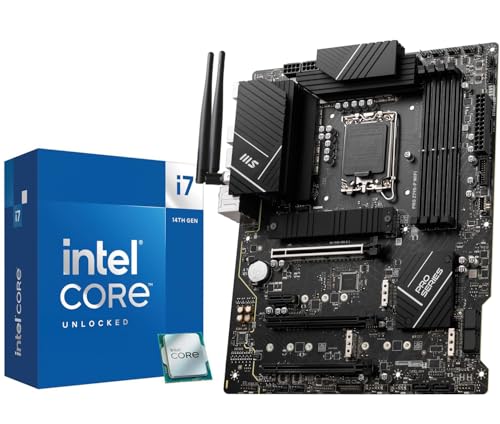
Intel lists the Core i7-14700K as a 20-core processor (8 performance cores and 12 efficient cores, 28 threads) for the LGA1700 socket, with a 125 W base power and a maximum turbo power of 253 W. It supports both DDR5 and DDR4 memory, depending on the board. Those numbers define the shopping criteria: a compatible socket and chipset, a VRM able to deliver sustained power without throttling, the right memory type, and enough PCIe and M.2 connectivity for your parts.
Intel’s 13th and 14th generation chips are part of a platform that has since been succeeded by Core Ultra 200S on the LGA1851 socket, so a 14700K board is not an upgrade path to the newest Intel chips. It is a mature platform, with widely available boards and a stable BIOS history, which is part of its appeal.
Motherboard options at a glance
| Board | Best for | Key points reviewers and makers cite | Limits |
|---|---|---|---|
| MSI MAG Z790 Tomahawk WiFi (and MAX variant) | Most 14700K builds | Tech4Gamers names the MAG Z790 Tomahawk MAX best overall for power delivery and features; Wi-Fi onboard | Mid-range cost, DDR5 only |
| Gigabyte Z790 Aorus Elite AX (and ICE) | Value Z790 with overclocking | Roundups cite a 16+1+2 phase VRM, DDR5 and four M.2 slots; XDA recommends the ICE version for most builds | Fewer extras than premium boards |
| ASUS TUF Gaming Z790-Plus WiFi | All-round gaming and creation | Review Consensus picks it as its top choice for durable power design and I/O | Not the cheapest Z790 |
| MSI B760 Gaming Plus WiFi | Non-overclockers on a budget | PC Guide’s budget pick for getting the chip’s full stock performance | No CPU multiplier overclocking, fewer fast PCIe lanes |
| MSI PRO B760-P WiFi DDR4 | Reusing DDR4 memory | Budget answer for existing DDR4 kits | DDR4 limits memory bandwidth |
| ASUS ROG Strix Z790-E Gaming WiFi II | Wi-Fi 7, strong VRM, easy BIOS | A Medium guide names it the best balance of power delivery and features | Premium tier |
| ASRock Z790 Taichi Lite | Enthusiasts and heavy multitasking | Tech4Gamers cites a 24+1+2 phase VRM and an 8-layer PCB | Cost, size |
Treat these roundups with some caution: several are about two years old and some read as affiliate content, so use them to build a shortlist and then confirm features on each maker’s product page.
Z790 versus B760
The chipset is the first decision. Z790 supports CPU multiplier overclocking, memory overclocking, and typically offers more PCIe lanes and USB ports. B760 supports memory tuning but locks the CPU multiplier, and it usually has fewer high-speed lanes. Because the 14700K is an unlocked K processor that already boosts aggressively, many buyers do not overclock the multiplier at all. In that case B760 is a logical way to put more of the budget toward the graphics card. Reviewers note that Z790 boards generally pair the chipset with stronger VRM cooling, which helps the chip hold its boost clocks during long workloads.
Power delivery and cooling
With a 253 W maximum turbo power rating, the 14700K can pull a lot of current during rendering or compiling. A board with a heatsinked VRM, an 8-pin plus 4-pin or dual 8-pin CPU power input and solid phase count is a safer match than the cheapest B760 models. For gaming alone the chip rarely sits at its limit, but long all-core tasks can reveal weak VRM designs through throttling. Pair the board with a 240 mm or larger liquid cooler or a high-end dual-tower air cooler, and confirm that your cooler supports the LGA1700 mounting bracket.
BIOS and stability notes
Intel acknowledged instability issues on 13th and 14th generation desktop processors and released microcode updates, with a 0x12B microcode version addressing elevated voltage behavior; Intel also extended warranty coverage on affected boxed processors. Whichever board you pick, update to a current BIOS before installing the chip, and consider the Intel Default Settings profile in the BIOS rather than aggressive board-vendor presets. This is a software precaution rather than a hardware difference between boards.
DDR5 or DDR4
Intel lists support for DDR5-5600 and DDR4-3200 on the 14700K. A DDR5 board costs more, but it offers higher bandwidth and is the better choice for new builds. A DDR4 board only makes sense if you already own a good kit, because the boards are not interchangeable: DDR4 sticks do not fit DDR5 slots. Confirm the memory type printed in the board’s specification before ordering.
Connectivity checklist
- M.2 slots: two to four, with at least one PCIe 5.0 or fast PCIe 4.0 slot. Check which slots share bandwidth with SATA ports.
- Wi-Fi: Wi-Fi 6E is common on mid-range models, and Wi-Fi 7 appears on premium boards like the ROG Strix Z790-E II.
- USB: look for USB-C on the rear panel and a USB-C front-panel header if your case has a Type-C port.
- Networking: 2.5 GbE is standard at mid-range, while faster Ethernet appears on premium models.
- Form factor: most picks above are ATX; micro-ATX B760 boards suit compact cases.
VRM, heatsinks and what the phase count means
Marketing often quotes a phase count such as 16+1+2 or 24+1+2. The first number is the phases feeding the CPU cores, the second feeds integrated graphics, and the third feeds other rails. More phases spread current across more power stages, which can lower temperatures at the same load, but the quality of the power stages and the size of the heatsink matter as much as the headline number. For a chip with a 253 W maximum turbo power, a board with large VRM heatsinks and a stated power-stage rating comfortably above the chip’s draw is the safer pick. Entry B760 boards with small heatsinks can work for gaming, yet reviewers warn they may throttle under long all-core renders.
Form factor and case fit
Standard ATX boards give the most expansion slots and the best VRM cooling. Micro-ATX B760 boards, such as compact options from MSI and Gigabyte, suit small cases and cost less, but they usually have fewer M.2 slots and a smaller VRM heatsink. Mini-ITX Z790 boards exist for tiny builds, though they cost more and are harder to cool. Whichever size you pick, check that your case supports it and that the rear I/O cutout matches your cooler and graphics card clearance.
Pick this if you want
| Pick this if you … | Choose |
|---|---|
| Want the safest all-round Z790 | MSI MAG Z790 Tomahawk WiFi or ASUS TUF Gaming Z790-Plus WiFi |
| Want Z790 features for less | Gigabyte Z790 Aorus Elite AX |
| Will never overclock the multiplier | MSI B760 Gaming Plus WiFi |
| Own DDR4 and want to reuse it | MSI PRO B760-P WiFi DDR4 |
| Run long rendering jobs and want headroom | ASRock Z790 Taichi Lite or ROG Strix Z790-E Gaming WiFi II |
| Want the cheapest Z790 entry | MSI PRO Z790-P WiFi |
Alternatives
- ASRock Z790 PG Riptide WiFi: a Z790 option that roundups mention as a value-minded pick.
- ASUS ROG Maximus Z790 Hero: reviewers cite it for overclockers, with the Dark Hero named for power stability.
- Move to a newer platform: if you have not bought the CPU yet, Core Ultra 200S on LGA1851 or Ryzen 9000 on AM5 offer newer platforms and longer upgrade paths than LGA1700.
Frequently Asked Questions
Is a B760 board good enough for the i7-14700K?
Yes, if you will not overclock the multiplier. It runs the chip at its stock behavior, and you can still tune memory. Choose a model with a heatsinked VRM so sustained loads do not cause throttling.
Do I need Z790 to overclock the 14700K?
Multiplier overclocking requires a Z-series chipset. B760 allows memory overclocking only. Many users find stock boosting is enough because the chip already runs close to its limit.
Should I choose DDR4 or DDR5?
DDR5 is the better long-term choice for new builds. DDR4 is a cost-saver if you already own memory, but the board must be a DDR4 model and the RAM cannot be moved to a DDR5 board later.
Will the 14700K work on older Z690 boards?
Z690 boards are compatible with a BIOS update, since the socket is the same LGA1700. Confirm that the maker lists support for the 14700K and update the BIOS before installing the chip.
What cooler fits an LGA1700 board?
Any cooler that lists LGA1700 support will fit. Because the chip can reach a 253 W turbo power, a 240 mm liquid cooler or a large dual-tower air cooler is a better match than a basic tower.
Is it worth buying LGA1700 now?
It is worthwhile when you already own or are getting a 14700K at a good price. For a fresh build, newer sockets provide more upgrade headroom, though LGA1700 boards remain widely available and well supported.


