
No Man’s Sky has grown from a rocky launch into a vast, constantly updated space-exploration game that runs well on a wide range of hardware and even supports VR. A build for it is pleasantly flexible: a balanced mid-range machine handles flat-screen play easily, while VR explorers should lean toward a stronger graphics card.
As an Amazon Associate we earn from qualifying purchases at no extra cost to you.


Our Top Picks
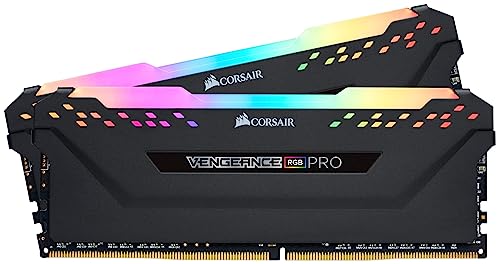
 CORSAIR Vengeance RGB DDR5 RAM 32GB32GB (2 x 16GB)5.43 x 0.27 x 1.77 inches0.11 poundsCheck on Amazon
 CORSAIR Vengeance LPX DDR4 RAM 32GB2 count (pack of 1)5.32 x 0.28 x 1.32 inches0 poundsCheck on Amazon

Top 3 picks at a glance
What No Man’s Sky asks of your hardware
The game is reasonably well optimised and only moderately demanding on a monitor, with a balanced load between CPU and GPU as it generates planets, creatures and bases on the fly. Busy bases and dense scenes are the heaviest moments, but they rarely trouble a solid mid-range build.
VR is a different story, roughly doubling the rendering load and calling for a stronger GPU for a smooth, comfortable experience. 16GB of RAM covers flat play, a 60 or 70-class card handles 1440p, and a fast SSD keeps planet loading quick.
Recommended build tiers
Match a balanced mid-range machine to your resolution for flat play, and step the GPU up if you explore in VR.
| Budget band | CPU | GPU | RAM | Target performance |
|---|---|---|---|---|
| $900-1,100 | Modern 6-core | Current 60-class, 8GB+ | 16GB DDR5-6000 | 1080p high settings, smooth |
| $1,250-1,550 | Modern 6/8-core | Current 70-class, 12GB | 16GB DDR5-6000 | 1440p high settings or entry VR |
| $2,000+ | Modern 8-core | Current 80-class, 16GB | 32GB DDR5-6000 | 4K high settings or high-fidelity VR |
1080p explorer rig
A modern 6-core and a 60-class card run No Man’s Sky at 1080p high settings smoothly. At $900 to $1,100 it is an ideal, affordable way to explore the galaxy on a monitor.
1440p or entry-VR rig
A modern CPU with a 70-class 12GB GPU handles 1440p high settings, or entry-level VR, since a headset roughly doubles the load. A flexible pick for players who might try VR later.
4K or VR rig
An 80-class 16GB card with a modern 8-core CPU pushes 4K high settings or high-fidelity VR. VR is the more demanding target, so the stronger GPU is what keeps headset exploration smooth.
Where to spend and where to save
Spend according to how you play: a balanced mid-range machine is all flat-screen exploration needs, but VR players should put the extra money into the graphics card since a headset roughly doubles the rendering load. Deciding on VR up front is the key budgeting choice for this game.
Save by not overbuilding for monitor play, where a 60 or 70-class card at your resolution runs the game smoothly. Put any spare budget into a fast SSD for quick planet loading rather than a bigger CPU, since No Man’s Sky splits its load fairly evenly and rarely stresses the processor.
Getting a smooth galaxy
On a monitor, No Man’s Sky rarely needs heavy tuning; a mid-range GPU at your resolution is enough. In VR, prioritise the graphics card and dial pixel density to what it can sustain for a comfortable, stutter-free experience.
Keep the game on an SSD for fast planet and base loading, run RAM at rated speed, and enable an upscaler if you want extra frames at 4K or in VR. Busy player bases are the main performance test, so leave a little GPU headroom.
Frequently asked questions
Is No Man’s Sky hard to run?
Not on a monitor; it is reasonably optimised and a mid-range build handles it well at 1080p or 1440p. VR is more demanding and calls for a stronger graphics card for a smooth, comfortable experience.
Can I play No Man’s Sky in VR?
Yes, it has full VR support, but VR roughly doubles the rendering load. Aim for a 70-class or better GPU and tune pixel density to your card for smooth, comfortable headset exploration.
Do I need a stronger PC for No Man’s Sky in VR?
Yes. VR roughly doubles the rendering load versus a monitor, so lean toward a stronger graphics card if you plan to explore in a headset. For flat-screen play, a balanced mid-range build is plenty.
Bottom line
For No Man’s Sky, a balanced mid-range machine does the job: a modern 6 to 8 core CPU, a 60 or 70-class GPU for your resolution, 16GB of DDR5 and a fast SSD. Step the graphics card up if you explore in VR, and the galaxy stays smooth whether you play on a monitor or through a headset.

