
Nine hundred dollars is a genuinely good budget for a custom gaming PC. It sits above the entry level, where compromises pinch, but below the point where prices climb faster than performance. Built carefully, a sub-$900 machine delivers a smooth 1080p high-refresh experience and solid 1440p gaming with tuned settings, and it leaves an upgrade path open for the future.
As an Amazon Associate we earn from qualifying purchases at no extra cost to you.


Our Top Picks
 CORSAIR CX750 80 Plus Bronze Non Modular Low-Noise750 Watts4.92 x 5.91 x 3.39 inches4.41 PoundsCheck on Amazon
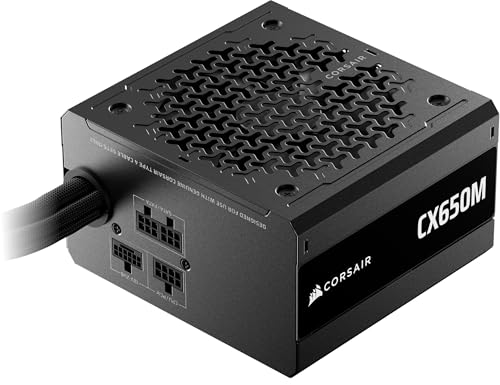

Top 3 picks at a glance
Where the money should go
At this budget the graphics card is your single most important purchase and should claim the largest slice, roughly 35-40 percent of the total. The CPU can be a strong 6-core chip, which is plenty for gaming, and you save by choosing a sensible B-series motherboard rather than a premium board. Do not skimp on the power supply; a quality unit protects everything else in the box.
Sample allocation
| Component | Budget slice | Approx. spend |
|---|---|---|
| Graphics card | ~38% | $320-360 |
| CPU (6-core) | ~17% | $150-170 |
| Motherboard (B-series) | ~12% | $100-120 |
| 16GB DDR5 RAM | ~7% | $55-70 |
| 1TB Gen4 NVMe | ~8% | $65-80 |
| PSU (650W 80+ Gold) | ~9% | $70-85 |
| Case + cooler | ~9% | $75-95 |
Performance to expect
A build like this comfortably plays esports titles well above 144 fps at 1080p and handles modern AAA games at 1080p high settings around 70-100 fps. Turn on upscaling and it stretches to 1440p in most titles at 60 fps or better. It is a machine that plays everything today and can be nudged forward with a GPU upgrade in a couple of years.
Smart ways to save without regret
Start with 16GB of RAM in a dual-channel kit; you can add a second kit later. A single 1TB NVMe is fine for now, since adding storage is trivial. The stock CPU cooler is adequate for a 6-core chip, letting you skip an aftermarket cooler. What you should not cut is the PSU quality or the GPU tier, because those two decisions define the whole experience.
Planning your upgrade path
One of the biggest advantages of a custom build at this price is that it is not a dead end. By choosing standard, non-proprietary parts and a power supply with a little headroom, you leave the door open to meaningful upgrades later. The most impactful future step is a graphics card swap, which can extend the machine’s life by years, so make sure your PSU can handle a step up in GPU tier when you buy it. A 650W quality unit gives you that flexibility.
Storage and memory are the other easy wins down the line. Starting with a single 1TB NVMe and 16GB of RAM keeps the initial cost down, and both are trivial to expand: drop in a second drive when your library grows, and add a matching memory kit to reach 32GB when prices are right. Because you are not locked into a manufacturer’s custom motherboard or case, each of these upgrades is a simple, cheap operation. That upgradeability is exactly what separates a thoughtfully built sub-$900 custom PC from a bargain prebuilt that traps you with proprietary parts.
Frequently asked questions
Should I buy 16GB or 32GB of RAM at this budget?
16GB is the right call under $900. It handles current games well, and RAM is the easiest, cheapest upgrade to make later when prices drop or your needs grow. Spending the difference on a better graphics card gives you far more gaming performance today than doubling the memory would.
Can this build handle 1440p gaming?
Yes, with realistic expectations. Many games run 1440p at 60 fps on high settings, and enabling upscaling pushes frame rates higher. Competitive titles hit triple-digit frame rates at 1440p easily. For 1440p at 144 fps in demanding AAA games, you would want to step up the GPU, but the sub-$900 build is a strong 1440p-capable starting point.
Bottom line: Under $900, put the biggest slice into the graphics card, pair it with a capable 6-core CPU and a quality power supply, and start with 16GB of RAM. The result is a smooth 1080p high-refresh gamer that punches into 1440p and has clear room to grow.

