
When you decide on liquid cooling, the next question is radiator size: a compact 240 mm unit or a larger 360 mm one. Both are all-in-one coolers with the same basic pump-and-block design; the difference is surface area, and that changes how much heat they shed and how loudly they do it. Matching radiator size to your CPU’s power draw and your case is what separates a quiet, well-cooled build from a noisy, thermally throttled one.
As an Amazon Associate we earn from qualifying purchases at no extra cost to you.
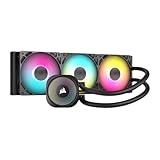


Our Top Picks
 ARCTIC Liquid Freezer III Pro 360 A-RGBLiquid Freezer III Pro 360 A-RGB15.7 x 4.7 x 2.9 inches4.5 PoundsCheck on Amazon


Top 3 picks at a glance
How radiator size affects cooling
A radiator dissipates heat proportional to its surface area and airflow. A 360 mm rad carries three 120 mm fans versus two on a 240 mm, giving it roughly 50% more cooling surface. In practice that translates to a 4–8 °C lower CPU temperature under sustained load, or the same temperature at noticeably lower fan speeds. The bigger benefit for many people is not lower temps but lower noise at the same temps.
CPU power draw is the deciding factor
Cooler choice should follow the chip. A 65 W Ryzen 7600 or an efficient X3D chip runs cool enough that a 240 mm AIO — or even a good air cooler — is plenty. A power-hungry Core i7-14700K or i9 that pulls 250 W+ under all-core load genuinely benefits from a 360 mm rad to stay off the throttle limit during rendering or heavy multitasking.
240mm vs 360mm comparison
| Aspect | 240 mm | 360 mm |
|---|---|---|
| Fans | 2 × 120 mm | 3 × 120 mm |
| Load temp (250 W CPU) | ~85–90 °C | ~78–83 °C |
| Noise at same temp | Higher | Lower |
| Typical price | $70–110 | $100–160 |
| Case support | Most mid towers | Larger mid/full towers |
| Best for | ≤150 W chips, compact cases | 200 W+ chips, quiet builds |
Case clearance comes first
Before choosing, confirm your case’s radiator support. Many compact mid towers only take a 240 mm rad up top, while a 360 mm may only fit in the front — where it can conflict with tall RAM or a reservoir. Always check the case spec sheet for supported radiator lengths and mounting locations, and account for fan thickness.
Gaming versus mixed workloads
Pure gaming rarely maxes a CPU, so even a hot chip may never need a 360 mm during play. The larger radiator earns its keep in sustained all-core work — video renders, compiles, Blender — where the CPU sits near 100% for minutes at a time. Buy for your heaviest realistic workload, not the average.
Mounting orientation and pump longevity
How you mount an AIO affects both temperatures and lifespan. Ideally the radiator sits at the front or top with the tubes positioned low, so any air bubbles collect away from the pump. Mounting the radiator below the pump can cause gurgling and premature pump wear as air pools at the pump head. A front-mounted radiator pulls cool outside air across the fins for the best CPU temps, while a top mount favors GPU cooling by exhausting heat. Either works; just keep the pump lower than the top of the radiator and your loop stays quiet for years.
FAQ
Is a 360mm AIO overkill for gaming?
For an efficient CPU, often yes — a 240 mm keeps most gaming chips cool. The 360 mm mainly pays off for high-wattage CPUs or if you want the lowest possible noise.
Will a 240mm AIO throttle a Core i7-14700K?
Under long all-core loads it may brush the thermal limit, especially in a warm case. For gaming alone it is usually fine, but a 360 mm gives welcome headroom for rendering.
Bottom line
Size the radiator to your CPU’s power draw and your case. A 240 mm AIO cools efficient and mid-range chips quietly and cheaply; a 360 mm pays off for 200 W+ processors and anyone prioritizing low noise under sustained load. Check radiator clearance before you buy, and remember that for many gamers the extra rad buys silence more than raw temperature.

