
The best gaming PC under 1000 in 2026 is a balanced custom build centered on a mid-range graphics card like the Radeon RX 9060 XT 16GB, GeForce RTX 5060 Ti 16GB or Intel Arc B580, paired with a 6-core processor like the Ryzen 5 7600 or Core i5-14400F, 32GB of DDR5 memory, and a 1TB NVMe SSD.
As an Amazon Associate we earn from qualifying purchases at no extra cost to you.
Our Top Picks
 GIGABYTE GeForce RTX 5060 WINDFORCE OC 8G GraphicsRTX5060|OC|8GB7.83 x 4.57 x 1.57 InchesCheck on Amazon


Top 3 picks at a glance
Verdict at a glance
- Best value GPU: AMD Radeon RX 9060 XT 16GB (ASRock Challenger 16GB OC). 16GB of VRAM at the mid-range tier and raster performance that trades blows with the RTX 5060 Ti.
- Best Nvidia GPU: GeForce RTX 5060 Ti 16GB (MSI Shadow 2X OC). DLSS 4.5 and Multi Frame Generation with enough memory for 1440p; pick it when it sits close to the 9060 XT’s tier.
- Best Intel GPU: Intel Arc B580 12GB (Sparkle Titan OC). The budget-tier way to get 12GB, best paired with a modern CPU.
- Best CPU for the build: AMD Ryzen 5 7600 on a B650 board, with the Ryzen 5 9600X as the slightly faster alternative.
- Avoid: 8GB graphics cards for new 1440p builds; see the VRAM warning below.
Why 1000 Dollars Is the Sweet Spot for a Gaming Rig Under 1000
A 1000 dollar gaming PC sits at the point where every major component can be genuinely gaming-capable without major compromise. Below this budget, builders are often forced to choose between a weaker graphics card, only 16GB of memory, a small SSD, or a low-quality power supply. Above this budget, performance still improves, but the cost per extra frame rises quickly.
For the best gaming computer for under 1000, the goal is not to maximize one specification. It is to avoid bottlenecks. A strong graphics card needs a capable CPU to feed it, enough fast memory to avoid stutter, fast storage to keep modern games loading smoothly, and clean, stable power to run reliably for years. When that balance is right, a best gaming desktop under 1000 can serve as both a high-refresh 1080p machine and a very capable 1440p machine with sensible settings.
Custom building matters more here than at any other price. Prebuilt systems at this price often cut costs in hidden places such as the motherboard, memory speed, SSD type, or power supply. Building custom, or ordering a custom configuration with standard parts, lets you control those choices and preserve an upgrade path.
Best 1000 Dollar Gaming PC: What to Prioritize
Most buyers searching for the best gaming rig under 1000 want to know where to put the money. The answer is consistent for 2026: graphics card first, then a balanced platform around it.
Plan for the graphics card to take roughly 35 to 40 percent of the total component budget. That typically means a current mid-range card. Options that fit this bracket in 2026 include the AMD Radeon RX 9060 XT 16GB, GeForce RTX 5060 Ti 16GB, Intel Arc B580 and, for esports-focused builds, the GeForce RTX 5060. All of these are designed for high-detail 1080p gaming and competent 1440p gaming with appropriate settings.
The processor should take roughly 15 to 18 percent of the budget. A modern 6-core CPU is the right target. The AMD Ryzen 5 7600 and Ryzen 5 7600X remain excellent gaming values on the AM5 platform, while the Ryzen 5 8400F is a lower-cost alternative when available. On the Intel side, the Core i5-12400F, Core i5-13400F, and Core i5-14400F paired with a B660 or B760 motherboard offer similar gaming performance for the money. There is no need for an 8-core or higher chip for gaming alone at this budget, and moving to one usually means taking money away from the graphics card where it matters more.
Around 20 to 25 percent combined should go to memory and storage. In 2026, 32GB of DDR5 in a 2x16GB kit is the sensible standard for a new build. DDR5 prices rose in 2026, so the gap over 16GB is larger than it used to be, but 32GB provides headroom for background applications, streaming, and newer games that use more memory. Look for DDR5-6000 with AMD EXPO or Intel XMP support, such as Corsair Vengeance, G.Skill Ripjaws S5, or G.Skill Flare X5 kits. For storage, a 1TB NVMe PCIe 4.0 SSD is the minimum, with 2TB preferred if the graphics card choice allows it. Models like the WD Black SN770, Samsung 990 EVO, and Crucial P3 Plus represent the type of drive to target: NVMe, not SATA, with DRAM-less but modern controllers that are fine for gaming.
The remaining budget covers motherboard, power supply, case, and cooling. This is where long-term reliability is decided. A B650 or B650M board for AMD, or B760 or B760M board for Intel, provides the connectivity and power delivery a mid-range gaming CPU needs without paying for overclocking features most buyers will not use. A quality 650W 80 Plus Gold power supply from an established series such as Corsair RM series, Seasonic Focus, or MSI MAG A-GL is the right class for this build and leaves headroom for a future graphics card upgrade.
Current-Generation Picks for This Budget
Older cards such as the RTX 4060 Ti and RX 7700 XT are now previous-generation models and are increasingly hard to find new. In 2026 the graphics cards that fit this budget are Nvidia’s RTX 5060 family, AMD’s RX 9060 XT and Intel’s Arc B580. Below are the specific cards and the CPU we would build around.
Warning: 8GB vs 16GB Graphics Cards
Both the RTX 5060 Ti and the RX 9060 XT are sold in 8GB and 16GB versions with the same name, and the cheaper 8GB models are easy to buy by mistake. In current games at high texture settings, independent reviewers including Hardware Unboxed and TechPowerUp have repeatedly shown 8GB cards running out of memory at 1440p and even at 1080p in some titles, causing stutter, texture pop-in or sharp drops in 1% lows that the 16GB version of the same GPU avoids. For a new build meant to last three or four years, choose the 16GB version of either card or step to the 12GB Arc B580. An 8GB card such as the RTX 5060 only makes sense for a strictly 1080p, esports-focused build where every bit of budget counts.
ASRock Radeon RX 9060 XT Challenger 16GB OC

Label: Best value / best AMD. The RX 9060 XT is AMD’s RDNA 4 mid-range card, with 32 compute units, 16GB of GDDR6 on a 128-bit bus and a PCIe 5.0 x16 interface. ASRock’s Challenger OC version keeps things simple: a dual-fan cooler with a 0dB mode that stops the fans at idle, a factory overclock with a boost clock listed at up to 3,290MHz, and a compact board that suits micro-ATX and mid-tower cases alike.
Who it is for: builders who want the most VRAM and raster performance per unit of budget. Published reviews place the 16GB RX 9060 XT roughly level with the RTX 5060 Ti 16GB in rasterised games, and several 2026 build guides choose it as the default GPU for this budget.
Strengths: 16GB of VRAM at the mid-range tier, FSR 4 machine-learning upscaling for sharper image quality than older FSR versions, quiet idle operation and modest power draw that a quality 650W PSU handles easily.
Drawbacks: ray tracing performance trails Nvidia, FSR 4 is supported in fewer games than DLSS, and the 128-bit memory bus limits it at higher resolutions compared with larger cards.
How it compares: it replaces the previous-generation RX 7700 XT, with better efficiency, more VRAM and a stronger upscaler. Choose it over the RTX 5060 Ti 16GB whenever the Nvidia card sits a tier higher.
MSI GeForce RTX 5060 Ti 16G Shadow 2X OC
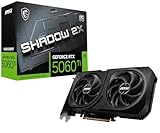
Label: Best Nvidia. The RTX 5060 Ti 16GB uses Nvidia’s Blackwell architecture with 4,608 CUDA cores, 16GB of GDDR7 on a 128-bit bus and a 180W power rating. MSI’s Shadow 2X OC is a compact dual-fan design aimed at small and mid-size cases, with a mild factory overclock.
Who it is for: gamers who value DLSS 4.5, Multi Frame Generation, stronger ray tracing and Nvidia’s NVENC encoder for streaming. DLSS support in hundreds of games makes it the easiest card in this tier to run at 1440p with good image quality.
Strengths: excellent upscaling and frame generation, efficient power draw, strong video encoding, and a short card that fits almost any case.
Drawbacks: partner card pricing has been volatile through 2026, and it often sits a tier above the RX 9060 XT 16GB, which squeezes the rest of the build. The PCIe 5.0 x8 interface loses a little performance on older PCIe 3.0 boards.
How it compares: a true upgrade over the previous-generation RTX 4060 Ti, mainly through 16GB of faster GDDR7 and DLSS 4.5 frame generation. Take it over the 9060 XT if streaming, ray tracing or DLSS matter to you and the price gap is small.
Sparkle Intel Arc B580 Titan OC 12GB
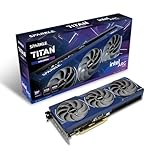
Label: Best Intel / best budget 12GB. The Arc B580 is Intel’s Battlemage card with 20 Xe2 cores, 12GB of GDDR6 on a 192-bit bus and a PCIe 4.0 x8 interface. Sparkle’s Titan OC adds a triple-fan cooler, a metal backplate and a factory overclock.
Who it is for: builders at the low end of this budget who want more than 8GB of VRAM without paying for a 16GB card. It leaves money for a better CPU, a 2TB SSD or a nicer case.
Strengths: 12GB of memory at the budget tier, good 1440p performance in modern DirectX 12 and Vulkan games, XeSS upscaling and frame generation, and strong AV1 encoding.
Drawbacks: reviewers including Hardware Unboxed found the B580 loses notable performance with older or slower CPUs because of driver overhead, so pair it with a Ryzen 5 7600 or similar rather than an older budget chip. Performance in some older DirectX 11 games is less consistent than on AMD or Nvidia cards.
How it compares: generally a step below the RX 9060 XT 16GB and RTX 5060 Ti 16GB in raw speed, but at a lower tier and with more VRAM than any 8GB card.
GIGABYTE GeForce RTX 5060 WINDFORCE OC 8G

Label: Best for 1080p esports only. The RTX 5060 uses 3,840 Blackwell CUDA cores with 8GB of GDDR7 on a 128-bit bus and a 145W power rating. GIGABYTE’s WINDFORCE OC is a no-frills dual-fan design that keeps the cost down.
Who it is for: players who mainly run Valorant, Counter-Strike 2, Fortnite or Rocket League at 1080p high refresh and want to put the savings into a faster monitor or a larger SSD.
Strengths: very efficient, quiet, DLSS 4.5 and Multi Frame Generation support, and low power requirements that suit compact builds.
Drawbacks: 8GB of VRAM is the limiting factor in demanding new releases, even at 1080p with high textures, as covered in the warning above. It is not a 1440p card for AAA games.
How it compares: the current-generation pick for this guide’s competitive 1080p row. For anything beyond esports, the 16GB cards are the better long-term buy.
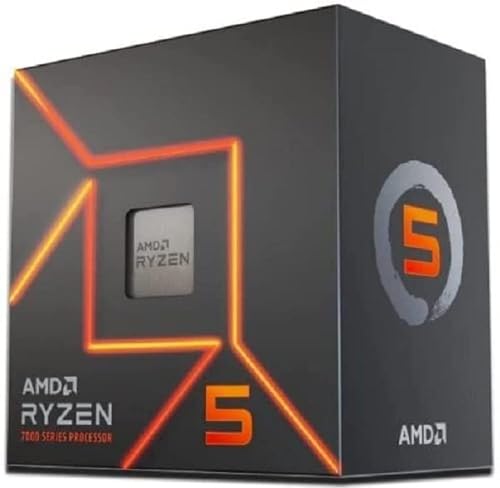
AMD Ryzen 5 7600
Label: Best CPU for this build. The Ryzen 5 7600 remains the reference processor for a balanced gaming PC at this budget: six Zen 4 cores and twelve threads, a boost clock of up to 5.1GHz, 32MB of L3 cache and a 65W TDP on the AM5 socket. Unlike the X models, it includes AMD’s Wraith Stealth cooler in the box.
Who it is for: anyone building around an RX 9060 XT, RTX 5060 Ti or Arc B580. None of these GPUs is fast enough to be held back meaningfully by the 7600 at 1080p or 1440p in most games.
Strengths: low power and heat, a bundled cooler that saves money, and AM5 compatibility that allows a later drop-in upgrade to a Ryzen 7 X3D chip without changing board or memory.
Drawbacks: the stock cooler is adequate rather than quiet under sustained load; a basic tower cooler improves noise. Zen 5’s Ryzen 5 9600X is a few percent faster in games if you find it at a similar tier.
How it compares: matches the Ryzen 5 7600 recommendation already in this guide, and it is the better long-term platform choice than the Core i5-14400F on LGA 1700, which will not see new CPUs.
Decision Matrix: Which Best Gaming Desktop Under 1000 Is Right for You
There is no single parts list that is best for everyone searching for the best gaming computer for under 1000. The right balance depends on resolution, game types, and whether you stream or multitask. Use this matrix to steer your choices before you finalize parts.
| Primary Use Case | Prioritize | GPU Lean | CPU and Platform Lean |
|---|---|---|---|
| Competitive 1080p: Valorant, Fortnite, Apex Legends, Rocket League | High frame rate stability and low latency | GeForce RTX 5060 or Arc B580 class is sufficient | Ryzen 5 7600 or Core i5-14400F, 32GB DDR5-6000, 1TB NVMe |
| AAA 1080p and entry 1440p: Cyberpunk 2077, Starfield, Alan Wake 2, Elden Ring | Graphics memory and raster power | Radeon RX 9060 XT 16GB or GeForce RTX 5060 Ti 16GB class | 6-core CPU is sufficient, put savings into GPU VRAM and 2TB SSD if possible |
| Gaming plus streaming and Discord plus browser | Multitasking headroom | GeForce RTX 5060 Ti 16GB or RTX 5060 class for efficient NVENC encoding | 32GB memory is essential, consider Ryzen 5 7600X or Core i5-13400F |
| First build with 3 to 4 year upgrade plan | Platform longevity and power headroom | Mid-range card now, keep PSU headroom | AM5 B650 board or Intel B760 board, 650W Gold PSU, mesh airflow case |
| White gaming PC under 1000 theme build | Appearance without breaking balance | White dual-fan version of same GPU class, do not step down a tier for color | White case like NZXT H5 Flow White or Fractal Pop Air White, white memory heatspreaders |
GPU and CPU Pairings That Make Sense at This Budget
The most common mistake in a best gaming rig under 1000 is pairing a graphics card that is too strong with a processor or power system that is too weak, or vice versa. These combinations keep performance balanced.
For high-refresh 1080p with lower power draw, a GeForce RTX 5060 or Arc B580 paired with a Ryzen 5 7600 is a logical foundation. This type of combination is efficient, runs cool with a basic tower cooler or stock cooler, and leaves budget for 32GB of memory and a quality SSD. It is well suited to competitive players who value consistency.
For mixed 1080p and 1440p gaming with heavier single-player titles, a Radeon RX 9060 XT 16GB or GeForce RTX 5060 Ti 16GB paired with a Ryzen 5 7600 or Core i5-14400F shifts more of the budget to graphics performance. The tradeoff is that you may need to stay with a 1TB SSD instead of 2TB to remain near 1000 dollars, and case selection needs to be value-focused rather than premium.
For Intel-based alternatives, a Core i5-12400F or Core i5-14400F on a B760M board such as MSI Pro B760M-A or ASUS Prime B760M-A paired with DDR5 memory delivers gaming performance broadly comparable to the Ryzen options. Platform choice matters less than getting the memory configuration right: two sticks for dual-channel operation, DDR5 rather than DDR4 for a new 2026 build, and EXPO or XMP enabled in the BIOS.
Memory, Storage, and Power: Where Budget Builds Win or Lose
Memory speed and configuration affect minimum frame rates and stutter more than many spec sheets suggest. Always use two matched sticks rather than one, even if total capacity is the same. A single 32GB stick in single-channel mode can hold back an otherwise capable CPU and GPU. DDR5-6000 CL30 to CL36 is the current value sweet spot for AM5, while DDR5-5600 to DDR5-6000 is appropriate for Intel LGA 1700 boards. There is little gaming benefit in paying extra for very high-end memory at this budget.
Storage affects load times, texture streaming, and how many large games you can keep installed. Modern AAA installations commonly exceed 100GB, so 1TB fills quickly. If you primarily play two or three games, 1TB NVMe is workable. If you rotate through many large titles, it is worth choosing a slightly less expensive case or cooler to reach 2TB. Avoid SATA SSDs or hard drives as primary drives for a new gaming build in 2026. NVMe PCIe 4.0 drives are now the standard.
The power supply should never be the part that makes the budget work. A low-quality unit can cause instability, limit upgrades, and put other components at risk. Criteria to apply: 650W capacity, 80 Plus Gold efficiency, modern protections, and support for current GPU power connectors, either native or via included cables. Fully modular cabling is convenient for a clean white gaming PC under 1000, but semi-modular is fine for a value build. What matters is the internal platform and warranty, not wattage alone. A quality 650W unit is preferable to a low-quality 750W unit.
Case and Cooling on a 1000 Dollar Budget
Airflow directly affects noise and sustained performance. Look for a mid-tower or micro-ATX case with a mesh front panel, room for at least two front intake fans and one rear exhaust, and clearance for a dual-fan graphics card. Models in the spirit of the NZXT H5 Flow, Fractal Design Pop Air, Corsair 4000D Airflow, and Montech Air 100 illustrate the feature set to target, though exact selection should follow current market availability and included fans.
CPU cooling does not need to be expensive. The bundled cooler included with some Ryzen and Intel processors is adequate for stock operation in a ventilated case. A single-tower air cooler with a 120mm fan, such as those in the Thermalright Assassin X or DeepCool AK series class, is a worthwhile low-cost upgrade for lower noise and more thermal headroom. Liquid cooling is unnecessary at this budget and takes funds away from performance parts.
Sample Builds by Tier
These three configurations show how the current-generation parts above combine. Tiers are relative to this budget; check current market pricing, which has moved sharply in 2026 for memory and storage.
| Component | Budget build (1080p) | Best value build (1080p / 1440p) | Premium build (1440p) |
|---|---|---|---|
| GPU | Arc B580 12GB or RTX 5060 8GB (esports) | RX 9060 XT 16GB | RTX 5060 Ti 16GB |
| CPU | Ryzen 5 7600 (stock cooler) | Ryzen 5 7600 or Ryzen 5 9600X | Ryzen 5 9600X with tower cooler |
| Motherboard | B650M | B650 / B650M with Wi-Fi | B850 with PCIe 5.0 M.2 |
| Memory | 32GB DDR5-6000 (2x16GB) | 32GB DDR5-6000 CL30 | 32GB DDR5-6000 CL30 |
| Storage | 1TB PCIe 4.0 NVMe | 1TB to 2TB PCIe 4.0 NVMe | 2TB PCIe 4.0 NVMe |
| Power supply | 650W 80 Plus Gold | 650W Gold, ATX 3.1 | 750W Gold, ATX 3.1, native 12V-2×6 |
| Best for | Esports and lighter AAA at 1080p | AAA at 1080p ultra, 1440p high | 1440p high with DLSS and ray tracing |
GPU Labels at a Glance
| GPU | Label | VRAM | Upscaler | Tier |
|---|---|---|---|---|
| RX 9060 XT 16GB | Best value / best AMD | 16GB GDDR6 | FSR 4 | Mid-range |
| RTX 5060 Ti 16GB | Best Nvidia | 16GB GDDR7 | DLSS 4.5 | Mid-range to upper |
| Arc B580 | Best Intel / budget 12GB | 12GB GDDR6 | XeSS | Budget |
| RTX 5060 | 1080p esports only | 8GB GDDR7 | DLSS 4.5 | Budget |
White Gaming PC Under 1000: How to Do It Without Losing Performance
A white gaming PC under 1000 is achievable, but it requires discipline because white components often carry a small price premium. The rule is simple: never drop down a GPU tier or to a weaker power supply to afford a white finish.
Start with a white airflow case with pre-installed fans, since the case defines the theme most. Add white memory heatspreaders and a white CPU cooler shroud if available in the same specification you already selected. For the graphics card, choose a white dual-fan model only if it is in the same performance class and broad price range as the standard choice. If the white version costs significantly more, keep the standard card in black and let the case, fans, and cable management carry the theme. Interior lighting and white cable extensions can complete the look for less than the cost of stepping up to premium white editions of core parts.
Best Gaming PC Setup Under 1000: The Complete System View
Many people searching for the best gaming PC setup under 1000 mean the full desk setup, not just the tower. If 1000 dollars must cover tower plus monitor, keyboard, mouse, and headset, the tower budget shrinks considerably, which changes component choices.
If you already own peripherals, put the full budget into the tower. If you are starting from zero, consider this split: reserve a portion for a 1080p high-refresh IPS monitor with adaptive sync support, and choose proven budget peripherals first. A mechanical-feel membrane keyboard or entry mechanical keyboard, a lightweight wired mouse with a reliable sensor, and a basic stereo headset are sufficient to start. It is better to get the tower right with standard, upgradeable parts and improve peripherals later than to weaken the GPU and power supply to afford premium accessories now.
For display settings, match expectations to hardware. At 1080p, high settings with balanced upscaling where supported is the right starting point for demanding games. At 1440p, high settings rather than maximum settings, with upscaling set to quality or balanced mode in supported titles, generally provides the best tradeoff between image quality and smoothness. Enable resizable BAR, enable EXPO or XMP, install chipset and graphics drivers, and set Windows power and game mode defaults before judging performance.
What to Avoid When Shopping for a Best Gaming Computer for Under 1000
Avoid configurations with only 16GB of memory in single-channel, especially one 16GB stick, since this limits a modern platform from the start. Avoid small SATA boot drives paired with large hard drives. Avoid unknown power supply brands or units without clear 80 Plus Gold certification and safety protections. Avoid oversized CPU upgrades paired with entry graphics cards, because gaming performance will still be limited by the GPU.
Also be cautious with older high-end parts used to hit a price point. A previous-generation flagship CPU or GPU can look appealing on paper but may lack efficiency, current features, warranty coverage, and upgrade compatibility compared to current mid-range parts. At this budget in 2026, current mid-range components on a modern socket generally offer better long-term value than older high-end components on a discontinued platform.
2026 Memory and SSD Pricing: What Changed
The biggest shift for budget builders in 2026 is not graphics cards but memory. A global DRAM and NAND shortage pushed DDR5 kits and NVMe SSDs well above their 2025 levels, and several build guides now report that a parts list which used to land near this budget can run noticeably over it. Practical ways to adapt without hurting gaming performance:
- Keep the GPU tier. Frame rates depend on it most, so trim elsewhere first.
- Consider 2x8GB as a temporary step. If a 32GB kit breaks the budget, a dual-channel 16GB kit runs most games well; add capacity when prices ease. Avoid a single stick.
- Start with 1TB. A 1TB PCIe 4.0 drive is fine to start; add a second M.2 drive later.
- Use the stock cooler. The Ryzen 5 7600’s bundled cooler saves money for memory.
- Compare prebuilts. System builders buy memory in bulk, so a well-configured prebuilt with standard parts can occasionally undercut a self-build. Check the PSU and motherboard models before buying.
How We Compared
We did not build or bench-test these systems ourselves. Recommendations are based on official AMD, Nvidia and Intel specifications, independent benchmark data from outlets including TechPowerUp, Hardware Unboxed and Tom’s Hardware, current 2026 build guides from those and similar publications, and owner reports on noise, drivers and reliability. We weighted 1080p and 1440p gaming performance, VRAM capacity, platform upgrade path, power requirements and price tier. Parts and market conditions reflect October 2026.
FAQ
Is 1000 dollars enough for a good gaming PC in 2026
Yes. A balanced custom build at this budget covers a capable mid-range GPU, a modern 6-core CPU, 32GB of DDR5, a fast NVMe SSD, and a quality power supply. That combination is appropriate for high-refresh 1080p gaming and competent 1440p gaming with sensible settings, and it leaves a clear path to a future GPU upgrade.
Should I spend more on the CPU or GPU in a best gaming desktop under 1000
Spend more on the GPU, within reason. The graphics card has the largest influence on gaming frame rates, so it should receive the largest share of the budget. Keep the CPU at a modern 6-core level so it does not hold the GPU back, and do not reduce memory, storage, or power supply quality to fund a larger card.
Is 32GB of RAM necessary for a 1000 dollar gaming PC
It is strongly recommended for a new 2026 build. Many current games run with 16GB, but 32GB in a 2x16GB DDR5 kit provides smoother multitasking, headroom for streaming and background apps, and better readiness for future titles. Even with higher 2026 memory prices, 32GB is the better long-term choice for most builders, with a dual-channel 16GB kit as an acceptable stopgap.
Can I build a white gaming PC under 1000 without sacrificing performance
Yes, if you prioritize the core specification first. Choose a white airflow case and white memory or cooler accents, and select a white graphics card only if it matches the performance tier you already planned. Do not accept a weaker GPU, smaller SSD, or lower-quality PSU solely for color.
What does the best gaming PC setup under 1000 include besides the tower
A complete setup includes monitor, keyboard, mouse, headset, and networking. If the 1000 dollar limit must cover everything, allocate for a 1080p high-refresh display and reliable budget peripherals, and plan the tower around the remaining funds. Upgrade peripherals over time rather than compromising the tower power supply or GPU tier.
Is the RX 9060 XT 16GB or RTX 5060 Ti 16GB better for this budget
They trade blows in rasterised games. The RX 9060 XT 16GB usually sits at a lower tier, which makes it the better value; the RTX 5060 Ti 16GB is better for ray tracing, DLSS 4.5 and streaming. Buy whichever is closer to the mid-range tier on the day, and always choose the 16GB version.
Is an 8GB graphics card still okay in 2026
Only for 1080p esports and lighter games. In demanding new releases, 8GB cards can run out of memory at high texture settings even at 1080p, causing stutter. For a build intended to last several years, 12GB is the minimum and 16GB is preferred.
Is the Intel Arc B580 a good choice
Yes, at the budget tier, as long as it is paired with a modern CPU such as the Ryzen 5 7600. Its 12GB of VRAM is an advantage over 8GB cards, but performance drops with older, slower processors because of driver overhead.

