
4K 240Hz monitors are the new halo display—they combine cinematic sharpness with esports-level smoothness. But they are also the most demanding target in PC gaming, because hitting high frame rates at 4K requires flagship graphics plus smart use of upscaling and frame generation. This build is unapologetically high-end, and it is aimed at people who already own or are buying that panel.
As an Amazon Associate we earn from qualifying purchases at no extra cost to you.
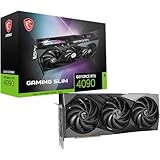


Our Top Picks
 ASUS ROG Strix GeForce RTX 4090 OC EditionROG Strix14.1 x 5.9 x 2.8 inches8.05 poundsCheck on Amazon


Top 3 picks at a glance
Understand what 4K 240Hz asks for
To saturate 240Hz at 4K native in AAA games is beyond any single GPU today, so the realistic goal is to pair a flagship card with high-quality upscaling and frame generation. In esports titles you can approach or exceed 240 fps at 4K directly; in heavy AAA games, upscaling and frame gen bridge the gap to 120–240 fps.
High-end configuration
| Component | Target | Reason |
|---|---|---|
| GPU | Current flagship, 16–24GB VRAM | Only tier that approaches 4K high fps |
| CPU | Fast 8-core current-gen | Avoids CPU limits at 240 fps |
| RAM | 32GB DDR5-6000 CL30 | Feeds high frame rates |
| SSD | 2TB Gen4 (or Gen5) | Large libraries, fast texture streaming |
| PSU | 1000W 80+ Gold, ATX 3.x | Flagship transient spikes |
| Cooling | 360mm AIO or premium air | Sustained flagship heat |
Frame generation is essential here
Reaching triple-digit frame rates at 4K in modern AAA titles leans heavily on upscaling and frame-generation technology. These features can double effective frame rates, turning an 80 fps native scene into 140–160 fps on screen. On a 240Hz panel with VRR, that combination looks exceptionally smooth. Treat these as core features, not optional extras.
Do not create a CPU bottleneck
When frame generation pushes you toward 200+ fps, the CPU suddenly matters again even at 4K. A fast current-gen 8-core with strong single-thread performance keeps 1% lows healthy at these frame rates. Pair it with DDR5-6000 CL30; slow memory undercuts an expensive GPU.
Power and cooling for a flagship
Flagship GPUs have brief power transients that punish undersized units, so a 1000W 80+ Gold ATX 3.x PSU is the safe, quiet choice. Cool the CPU with a 360mm AIO or a top-tier air cooler so it holds boost clocks during long sessions without throttling.
Realistic settings strategy per genre
No single settings preset suits every game on a 4K 240Hz panel, so plan by genre. In competitive shooters, drop to low-medium settings at 4K and let the flagship GPU push toward the refresh ceiling for maximum clarity and responsiveness. In fast multiplayer titles that support it, enable frame generation to comfortably exceed 200 fps. For cinematic single-player games, accept a lower 100–140 fps with visuals maxed and quality-mode upscaling, since story games do not need 240 fps to feel superb on a VRR display. Keep a couple of saved profiles so switching between a ranked session and a story campaign is instant. This flexible approach is why the 4K 240Hz build makes sense: it is powerful enough to chase esports frame rates when clarity matters and to deliver stunning fidelity when immersion matters, all on the same panel without compromise.
FAQ
Can any GPU hit 240 fps at 4K native?
Not in demanding AAA games. Only esports and lighter titles reach 240 fps at 4K natively. For AAA, you rely on upscaling and frame generation to approach the panel’s refresh ceiling.
Is a 4K 240Hz monitor worth it over 4K 144Hz?
For competitive players who also want 4K fidelity, yes—the extra refresh headroom pays off in esports. For mostly single-player gamers, 4K 144Hz is a better value and slightly easier to drive.
Bottom line
A 4K 240Hz panel demands a flagship GPU, a fast 8-core CPU, 32GB of CL30 DDR5, and a 1000W ATX 3.x PSU—plus heavy use of upscaling and frame generation. Built to spec, it delivers the rare combination of 4K sharpness and high-refresh smoothness.

