
Roblox and Fortnite are the two games that convince most families to build their first custom PC, and the good news is that neither one demands a monster rig. Both run beautifully on a mid-range build costing roughly $700–950, and the same machine will happily play dozens of other popular titles. The trick is spending money where these two games actually reward it: fast single-thread CPU performance, a modest but modern GPU, and enough refresh rate on the monitor to feel the difference.
As an Amazon Associate we earn from qualifying purchases at no extra cost to you.



Our Top Picks
Pros & cons
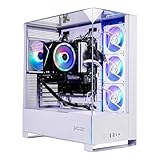
- 10-core i5-14400F pairs with an 8GB RTX 5060 GPU
- 1TB NVMe SSD offers fast load times and storage
- Backed by 1 year of parts and labor warranty
- Only 2 USB-A 3.2 ports limit fast peripheral connections
- RGB lighting customization options aren't detailed in the listing


Top 3 picks at a glance
What Roblox and Fortnite really need
Roblox is famously light on the GPU but leans hard on one or two CPU cores because of how its engine handles physics and scripts. Fortnite is heavier but scales well: on Performance Mode it will run past 200 FPS at 1080p on hardware that costs a fraction of a AAA-ready build. Neither game needs 16GB of VRAM or a 1000W power supply. What matters is consistent frame pacing so a 10-year-old competitive player is not fighting stutter.
A balanced parts plan
Aim for a current 6-core CPU, 16GB of DDR5 (or fast DDR4 on a budget), a 1080p-class GPU, a 650W 80+ Bronze or Gold power supply, and a 1TB NVMe SSD. That leaves headroom to bump the monitor to 1080p 144Hz or 1440p later.
| Component | Budget pick (~$750) | Sweet spot (~$950) |
|---|---|---|
| CPU | 6-core, 6-12 thread | 6-8 core, higher clocks |
| GPU | Entry 1080p card, 8GB | Strong 1080p / entry 1440p, 8-12GB |
| RAM | 16GB DDR4/DDR5 | 16-32GB DDR5-6000 |
| Storage | 1TB NVMe (Gen3/Gen4) | 1-2TB NVMe Gen4 |
| PSU | 550-650W 80+ Bronze | 650W 80+ Gold |
| Expected Fortnite FPS (1080p, Performance) | 140-200 | 200-300 |
Where not to overspend
Do not buy a flagship GPU for these two games; the CPU and monitor will limit you long before the card does. A $250 GPU is plenty. Skip 64GB of RAM entirely. And resist a fancy custom loop: a good $30–40 air cooler keeps a 6-core chip quiet and cool.
Monitor and peripherals matter more than you think
For competitive Fortnite, a 1080p 144Hz panel does more for a young player’s win rate than an extra GPU tier. Budget roughly $120–180 for the monitor and another $60–90 for a decent keyboard and mouse. The whole point of building custom here is spending the savings on the things you actually touch.
Leaving room to grow
The biggest advantage of building custom for a young or casual gamer is that the machine grows with them. A child who starts on Roblox and Fortnite at eight years old may want to play graphically heavy AAA titles at twelve, and a well-planned build absorbs that shift with a single GPU swap rather than a whole new PC. That is why the parts you cannot easily change later, the case, the power supply, and the motherboard, deserve a little extra thought even on a budget build.
Pick a platform with an upgrade path
Choose a motherboard on a socket that still receives new CPUs, so you can drop in a faster chip in a couple of years without replacing the board and RAM together. Buy a 650W 80+ Gold power supply even if a 550W unit would do today; that extra headroom lets a future mid-range GPU slot in without a new PSU. And pick a case with decent airflow and room for a full-length graphics card, because compact bargain cases often block the very upgrade you will want most.
Teach maintenance from the start
Part of the value of a custom family PC is that it is serviceable. Blowing dust out every few months, keeping graphics drivers updated, and leaving a spare SATA and M.2 slot free for a bigger drive later all extend the machine’s useful life well past what a sealed console offers. A build that is easy to clean and expand routinely lasts five years or more for light gaming, which makes the modest upfront effort pay off many times over.
Frequently asked questions
Is a gaming PC overkill just for Roblox?
Not really. Roblox itself is light, but the same $750 build plays Fortnite, Minecraft, and most family titles at high frame rates, so you are buying years of flexibility rather than a single-game machine. A cheap office PC will run Roblox but stutters the moment a heavy experience or a second game loads.
Do these games need a high-end GPU?
No. Both run well on an entry 1080p card with 8GB of VRAM. Money is better spent on a fast CPU and a 144Hz monitor, which is where Roblox and competitive Fortnite actually feel smoother.
Bottom line
A roughly $750–950 custom build is the sweet spot for Roblox and Fortnite: a modern 6-core CPU, a mid-range 1080p GPU, 16GB of RAM, and a 144Hz monitor. That balance delivers high, stable frame rates today and leaves an obvious upgrade path to 1440p when the family is ready.

